How to Check RAM Speed

AlexRD

New member
Pro User
Local time
11:54 PM
Messages
505
Location
Ponta Porã, MS
Hi,
My friend bought 8 GBs of 1333 RAM.
I recently installed CPU-z on his PC to check if everything was ok.
I saw that the RAM was running from 500-600.

How can i be sure, the speed its running?
Is there any program built specifically for that?


Thanks,
Alex
 

My Computer

Computer Manufacturer/Model Number
Custom Built
OS
Windows 7 Professional x64
CPU
Intel Core i7 2600k - 3.4 GHz
Motherboard
Asus Maximus IV Z68 - Extreme
Memory
4x4 Ripjaws X79 Series 2133 MHz (9-11-10-28)
Graphics Card(s)
1x eVGA GTX 580 - 3GB Classified
Sound Card
Realtek ALC 889 HD Audio
Monitor(s) Displays
Full HD Philips TV 32"
Screen Resolution
1920x1080
Hard Drives
1x Crucial m4 SSD 512 GB
PSU
800W Coolermaster Silentpro Gold
Case
Sentey - Renegade GS-6200
Cooling
Stock
Keyboard
Logitech K800 Wireless
Mouse
Logitech Performance MX Laser
Internet Speed
10MB Internet Connection
CPU-z will tell you which speed it's running at. The BIOS will tell you which speed it's set to run at on most motherboards.

What processor and motherboard is the box using? This will shed quite a bit of light on what is possible. For example, does the CPU has a FSB like Core2Duo or Core2Quad, or is it a new Corei7 with the built in memory controller?
 

My Computer

Computer Manufacturer/Model Number
Self-Built in July 2009
OS
Windows 7 Ultimate x64
CPU
Intel Q9550 2.83Ghz OC'd to 3.40Ghz
Motherboard
Gigabyte GA-EP45-UD3R rev. 1.1, F12 BIOS
Memory
8GB G.Skill PI DDR2-800, 4-4-4-12 timings
Graphics Card(s)
EVGA 1280MB Nvidia GeForce GTX570
Sound Card
Realtek ALC899A 8 channel onboard audio
Monitor(s) Displays
23" Acer x233H
Screen Resolution
1920x1080
Hard Drives
Intel X25-M 80GB Gen 2 SSD
Western Digital 1TB Caviar Black, 32MB cache. WD1001FALS
PSU
Corsair 620HX modular
Case
Antec P182
Cooling
stock
Keyboard
ABS M1 Mechanical
Mouse
Logitech G9 Laser Mouse
Internet Speed
15/2 cable modem
Other Info
Windows and Linux enthusiast. Logitech G35 Headset.
Could be SpeedStep or it's equivelant.

Run Orthos or Prime95 while looking at the CPU-z readout. It may peak higher.
 

My Computer

Computer Manufacturer/Model Number
Keeps changing - (Custom)
OS
Windows 7 Professional x64
CPU
Intel Core i7 860
Motherboard
Gigabyte GA-P55-UD4P
Memory
4GB DDR3 Mushkin 1600Mhz @ 7-8-7-20
Graphics Card(s)
MSI GTS250 1GB DDR3 Twin Frozr
Sound Card
Onboard realtek
Monitor(s) Displays
Samsung SyncMaster 24" P2450 + Samsung 20" 2033
Screen Resolution
1920 X 1080 and 1600 X 900 (#2 system 1440 X 900)
Hard Drives
Patriot Inferno 120GB SSD + 3 WD Blue 640GB drives
PSU
Corsair 750 HX Modular
Case
Lancool PC-K62
Cooling
Cooler Master TX3 CPU cooler and 4-140mm and 1-120mm case
Keyboard
Gigabyte USB keyboard
Mouse
Microsoft wireless laser mouse 5000
Internet Speed
7 Mb down 1.5 up
Other Info
System #2: AMD Phenom II X6 1055T (Freezer 7 Pro cooler) - Gigabyte 880GMA-UD2H - WD 500GB Black - 9500GT (1GB) 500W OCZ modular PSU - Antec 200 case. System #3 (LapTop) Core 2 Duo T6670 - 320GB 7200RPM HD - 4GB DDR3 RAM.

My Computer

Computer Manufacturer/Model Number
Custom Built
OS
Windows 7 Professional x64
CPU
Intel Core i7 2600k - 3.4 GHz
Motherboard
Asus Maximus IV Z68 - Extreme
Memory
4x4 Ripjaws X79 Series 2133 MHz (9-11-10-28)
Graphics Card(s)
1x eVGA GTX 580 - 3GB Classified
Sound Card
Realtek ALC 889 HD Audio
Monitor(s) Displays
Full HD Philips TV 32"
Screen Resolution
1920x1080
Hard Drives
1x Crucial m4 SSD 512 GB
PSU
800W Coolermaster Silentpro Gold
Case
Sentey - Renegade GS-6200
Cooling
Stock
Keyboard
Logitech K800 Wireless
Mouse
Logitech Performance MX Laser
Internet Speed
10MB Internet Connection
CPUZ will cut the "real speed" in half too since you're running dual channel DDR2.

I would just look in the BIOS like Pparks1 said...

You can also run this:

http://www.sevenforums.com/performance-maintenance/5400-whats-your-memory-assessment-speed.html

Noo, forget the Specs. I sold that computer. Its my friendscomputer with DdR3

Okay, depending if you're running dual channel or triple channel, CPUZ will cut it in half or thirds respectively. It should tell you what you need to know.
 

My Computer

Computer Manufacturer/Model Number
Keeps changing - (Custom)
OS
Windows 7 Professional x64
CPU
Intel Core i7 860
Motherboard
Gigabyte GA-P55-UD4P
Memory
4GB DDR3 Mushkin 1600Mhz @ 7-8-7-20
Graphics Card(s)
MSI GTS250 1GB DDR3 Twin Frozr
Sound Card
Onboard realtek
Monitor(s) Displays
Samsung SyncMaster 24" P2450 + Samsung 20" 2033
Screen Resolution
1920 X 1080 and 1600 X 900 (#2 system 1440 X 900)
Hard Drives
Patriot Inferno 120GB SSD + 3 WD Blue 640GB drives
PSU
Corsair 750 HX Modular
Case
Lancool PC-K62
Cooling
Cooler Master TX3 CPU cooler and 4-140mm and 1-120mm case
Keyboard
Gigabyte USB keyboard
Mouse
Microsoft wireless laser mouse 5000
Internet Speed
7 Mb down 1.5 up
Other Info
System #2: AMD Phenom II X6 1055T (Freezer 7 Pro cooler) - Gigabyte 880GMA-UD2H - WD 500GB Black - 9500GT (1GB) 500W OCZ modular PSU - Antec 200 case. System #3 (LapTop) Core 2 Duo T6670 - 320GB 7200RPM HD - 4GB DDR3 RAM.
Here is the app that I use to test memory. it probably will give you more info than you want, but it will give you accurate info.
 

My Computer

OS
windows 7
Hey guys, i have recently bought 8Gb (4 x 2Gb sticks) of G Skill trident 1600 Mhz RAM, i opened CPU-Z to check if all was running well, and it appears my Ram frequency is 833Mhz Solid, is this ok or should it be running at 1600 ? Please help :S
 

My Computer

OS
64 bit Win7 Ultimate
CPU
AMD X6 Phenom 1055T Overclocked to 3.5Ghz
Motherboard
Gigabyte GA-880GM-UD2H
Memory
8GB (4 x 2Gb sticks) 1600Mhz G Skill Trident
Graphics Card(s)
Radeon 6850 HD Windforce Overclocked version.
As "nate42nd" already said "depending if you're running dual channel or triple channel, CPUZ will cut it in half or thirds respectively. It should tell you what you need to know."
Therefore, just to clarify for everybody... To know a what speed your memory is running at you need to download CPU-Z, go to the "Memory tab" and look at the memory speed. THEN, you will have to multiply by 2 or 3 if your RAM is either dual or triple channel. DDR2 doesn't mean dual channel and DDR3 doesn't mean triple channel.
 

My Computer

OS
Windows 7 Home Premium x64
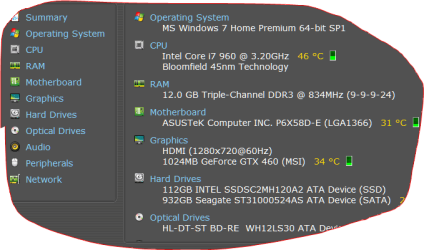
I know of no ram that is cut in thirds. Triple channel ram or double channel ram that is set a 1600 will be reported at 800 using CPU-Z. Capture.PN.PNG
My ram in bios is set at 1668. You will notice that in the picture it indicates DDR3 834. 834+834=1668.
If you want to know what is in the computer install this little program.
http://www.piriform.com/speccy
 

My Computer

Computer type
PC/Desktop
Computer Manufacturer/Model Number
Home made Desktop
OS
Windows 10 Pro. 64/ version 1709 Windows 7 Pro/64
CPU
Intel i7-6800K @ 4.3
Motherboard
ASUS X-99 Deluxe II
Memory
Corsair Platinum 16 gig @2400
Graphics Card(s)
EVGA GTX 1070 OC
Monitor(s) Displays
Asus 27" LED LCD/VE278Q
Screen Resolution
1920-1080 or 1280-720 HDMI
Hard Drives
INTEL SSD 730-240 Gb Sata 3.0/
PSU
EVGA Platium 1200W
Case
Phanteks Luxe Tempered Glass 8 fans/ one radiator
Cooling
XSPC/ Water Cooled CPU
Keyboard
Das 4 Professional
Mouse
Logitech M705/MX Anywhere 2-S
Internet Speed
100 mbits
Antivirus
Microsoft Security Essentials/ Malwarebytes Premium 3.0/ SAS
Browser
I.E. 11 default/Firefox/ ISP Time Warner Cable/Spectrum
Other Info
LG BluRay Burner/
Sound system-KLipsch-THX/
Icy Dock ssd Hot Swap bays.
Actually the reason for the memory speed discrepancy is not due to dual channel or triple channel configuration. DDR stands for Double Data Rate. DDR memory clocks off of both the rising and falling clock edges so for each cycle of the clock, the memory gets clocked twice because there are 2 clock edges (rising and falling). All DDR memory should report clock speeds equal to 1/2 the "memory" speed (or slightly greater). So, 1600mhz ram needs a clock greater than or equal to 800mhz, 1333mhz needs 667, etc. etc...

:p
 

My Computer

OS
Windows 7 Professional x64
Back
Top