Solved how to check which USB port is v2 resp v1?

andis59

New member
Member
Local time
5:52 PM
Messages
77
Location
Mora, Dalicarlia, Sweden
I have a number of external USB Disks connected to my laptop. "Suddenly" one of the disks has slowed down radically!

I have tested the disk and it looks like it's ok, except for the speed.
The disk is: WD Ext HDD 1021 (2 TB)

My laptop is a Dell Vostra 1720 and have 5 USB ports. I was thinking that some of the port may only be USB 1.x, which would explain the lack of speed.

But how do I check this?

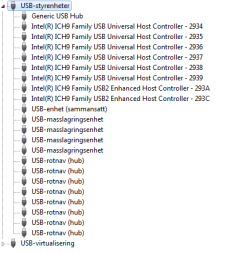
I attach a screen dump of Device Manager (NB! it's in Swedish)

//Anders
 

Attachments
  • usbdevice.PNG
    usbdevice.PNG
    4.8 KB · Views: 6

My Computer My Computer

At a glance

Microsoft Windows 7 Ultimate 32-bit 7601 Mult...Intel(R) Core(TM)2 Duo CPU P8700 @ 2.53GHz, 2...4GBNVIDIA GeForce 9600M GS, 512 Mb
Computer type
PC/Desktop
Computer Manufacturer/Model Number
Dell Vostro 1720, HP 7300 elite mt
OS
Microsoft Windows 7 Ultimate 32-bit 7601 Multiprocessor Free Service Pack 1
CPU
Intel(R) Core(TM)2 Duo CPU P8700 @ 2.53GHz, 2 cores
Motherboard
Dell Inc. 0J056T
Memory
4GB
Graphics Card(s)
NVIDIA GeForce 9600M GS, 512 Mb
Sound Card
High Definition Audio Device
Screen Resolution
1440 x 900 x 59 hertz
Hard Drives
ST750LX003-1AC154 ATA Device 698,64 GB
Keyboard
Standard Keyboard - PS/2
Mouse
Microsoft Wireless Notebook Presenter Mouse 8000 (IntelliPoi
Internet Speed
14 - 20 Mb/s
Antivirus
AVG Free
Browser
Chrome
Other Info
Bios: Dell Inc. A08, 2010-03-05
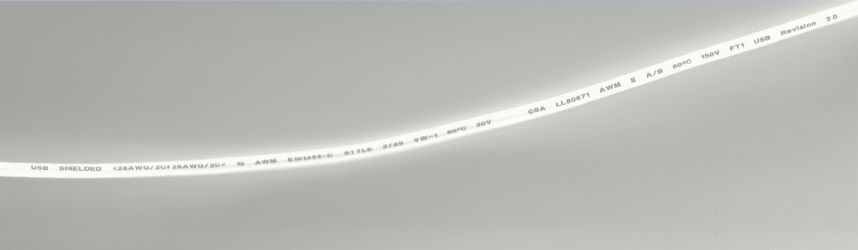
Make sure you are using a High-Speed USB 2.0 cable.
 

My Computer My Computer

At a glance

ME/XP/Vista/Win7
OS
ME/XP/Vista/Win7
How do I see that the cable is for High-Speed 2.0?

// Anders
 

My Computer My Computer

At a glance

Microsoft Windows 7 Ultimate 32-bit 7601 Mult...Intel(R) Core(TM)2 Duo CPU P8700 @ 2.53GHz, 2...4GBNVIDIA GeForce 9600M GS, 512 Mb
Computer type
PC/Desktop
Computer Manufacturer/Model Number
Dell Vostro 1720, HP 7300 elite mt
OS
Microsoft Windows 7 Ultimate 32-bit 7601 Multiprocessor Free Service Pack 1
CPU
Intel(R) Core(TM)2 Duo CPU P8700 @ 2.53GHz, 2 cores
Motherboard
Dell Inc. 0J056T
Memory
4GB
Graphics Card(s)
NVIDIA GeForce 9600M GS, 512 Mb
Sound Card
High Definition Audio Device
Screen Resolution
1440 x 900 x 59 hertz
Hard Drives
ST750LX003-1AC154 ATA Device 698,64 GB
Keyboard
Standard Keyboard - PS/2
Mouse
Microsoft Wireless Notebook Presenter Mouse 8000 (IntelliPoi
Internet Speed
14 - 20 Mb/s
Antivirus
AVG Free
Browser
Chrome
Other Info
Bios: Dell Inc. A08, 2010-03-05
USB 2.png
Check the printing on the cable.
 

My Computer My Computer

At a glance

ME/XP/Vista/Win7
OS
ME/XP/Vista/Win7
Ok, then I haven't got one of those cables...

I found a setting in BIOS that shows startup values, e.g. connected USB disks and which USB version.

I have 5 USB ports and for 4 of them it reports that they are USB 1.1 and only 1 USB 2.0

I have tried to move the disks around and no matter which disk that is connected it's always the same USB version for the same port.

I will get a (number of) high speed cables if that can have anything to do with it.

// Anders
 

My Computer My Computer

At a glance

Microsoft Windows 7 Ultimate 32-bit 7601 Mult...Intel(R) Core(TM)2 Duo CPU P8700 @ 2.53GHz, 2...4GBNVIDIA GeForce 9600M GS, 512 Mb
Computer type
PC/Desktop
Computer Manufacturer/Model Number
Dell Vostro 1720, HP 7300 elite mt
OS
Microsoft Windows 7 Ultimate 32-bit 7601 Multiprocessor Free Service Pack 1
CPU
Intel(R) Core(TM)2 Duo CPU P8700 @ 2.53GHz, 2 cores
Motherboard
Dell Inc. 0J056T
Memory
4GB
Graphics Card(s)
NVIDIA GeForce 9600M GS, 512 Mb
Sound Card
High Definition Audio Device
Screen Resolution
1440 x 900 x 59 hertz
Hard Drives
ST750LX003-1AC154 ATA Device 698,64 GB
Keyboard
Standard Keyboard - PS/2
Mouse
Microsoft Wireless Notebook Presenter Mouse 8000 (IntelliPoi
Internet Speed
14 - 20 Mb/s
Antivirus
AVG Free
Browser
Chrome
Other Info
Bios: Dell Inc. A08, 2010-03-05
Back
Top