How to clean the registry?

inspiron7

New member
Member
VIP
Local time
1:29 AM
Messages
106
Hello,

I manually deleted one game on my PC , I didn't run the uninstaller.

Please tell me how do I clean the registry and everything left behind from that game?

Also , is it good to use registry cleaners,and if it is good then which is the best registry cleaner for Win 7?

Please help me.
Thanks.
 
Last edited:

My Computer My Computer

At a glance

Windows 7 Ultimate x64 bit
Computer type
Laptop
Computer Manufacturer/Model Number
Dell
OS
Windows 7 Ultimate x64 bit
If you know what you are doing you can manually delete registry entries. If you don't know what you are doing you can break windows. There are registry cleaners/optimizers but they have proven to be more problematic than helpful. There is very little performance improvement by using such software.
 

My Computers My Computers

  • At a glance

    Windows 7 pro/Windows 10 ProIntel i7 860 Quad core 2.8 ghz8 gbATI Radeon HD 5770 1 gb ram
    Computer type
    PC/Desktop
    Computer Manufacturer/Model Number
    HP Pavillion Elite HPE-250f
    OS
    Windows 7 pro/Windows 10 Pro
    CPU
    Intel i7 860 Quad core 2.8 ghz
    Memory
    8 gb
    Graphics Card(s)
    ATI Radeon HD 5770 1 gb ram
    Monitor(s) Displays
    Alienware 25 AW2521HF & Viewsonic
    Screen Resolution
    1920 x1080 & 1680x1050
    Hard Drives
    WD blue 1 tb & 500 gb.
    Browser
    FF of course.
    Other Info
    https://www.bestbuy.com/site/hp-pavilion-elite-desktop-intel-core-i7-processor-8gb-memory-1tb-hard-drive/9921493.p?skuId=9921493
  • At a glance

    Windows 2012 R2 Data center/Linux Minti3 9100 3.6GHz, 8M cache, 4C/4T8GB 2666MT/s DDR4 ECC UDIMM
    Computer type
    PC/Desktop
    System Manufacturer/Model Number
    Dell Poweredge T140
    OS
    Windows 2012 R2 Data center/Linux Mint
    CPU
    i3 9100 3.6GHz, 8M cache, 4C/4T
    Memory
    8GB 2666MT/s DDR4 ECC UDIMM
    Monitor(s) Displays
    Viewsonic
    Screen Resolution
    1680x1050
    Hard Drives
    1 TB & 750 GB
    Other Info
    https://www.dell.com/en-us/work/shop/productdetailstxn/poweredge-t140?~ck=bt
Re-install the game and use the un-installer to remove it..
 

My Computer My Computer

At a glance

Windows 7 64 bit
OS
Windows 7 64 bit

My Computer My Computer

At a glance

Win 10 x64, Linux Lite, Win 7 x64, BlackArch,...
Computer type
PC/Desktop
Computer Manufacturer/Model Number
HP Desktop & Compaq Laptop
OS
Win 10 x64, Linux Lite, Win 7 x64, BlackArch, & Kali
Hard Drives
Samsung 850 Pro 256Gb,
Hitachi HDD 1Tb,
Crucial MX SSD 250Gb
Segate 3Tb USB 3.0 Ext. Backup HDD
Internet Speed
150Mbps dn, 20Mbps up
Antivirus
Avast Free, Malwarebytes Anti-Exploit & Anti-Ransomware
Browser
Firefox, Chrome, Opera, & VPN
Reinstalling the game may not be possible if the software key under uninstall is still there.

If you have no intention on playing this game again, no need to monkey with the registry.

As was already mentioned about registry cleaners, I'll further add that they are in large part snakeoil. I wouldn't even mess with a registry optimizer. Even though products like Ccleaner, etc offer a registry cleaner, stay far, far away from using it. It can have the ability of messing your system up or software installations. For certain keys that need to be removed it's better to use a scalpel rather then a sword to get rid of problematic keys. It may be due to malware or in your case not using the uninstaller for a game or program.

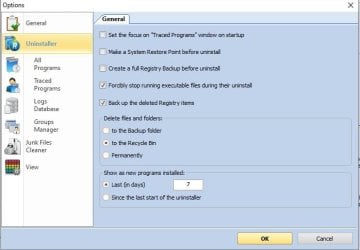
Also note that using RevoUninstaller isn't full prof either. If you use it, make sure RevoUninstaller creates a system restore point first. Then when it comes to the deletion of registry keys look at each one very carefully and make sure it is IN FACT related to the software you are uninstalling. Don't say I didn't warn you.
 

My Computer My Computer

At a glance

Windows 7 Ultimate x64
Computer type
PC/Desktop
OS
Windows 7 Ultimate x64
Default settings Revo creates a restore point!
Also set registry backup as well!
I prefer a full disk image!

Capture.JPG
 

My Computer My Computer

At a glance

Win 10 x64, Linux Lite, Win 7 x64, BlackArch,...
Computer type
PC/Desktop
Computer Manufacturer/Model Number
HP Desktop & Compaq Laptop
OS
Win 10 x64, Linux Lite, Win 7 x64, BlackArch, & Kali
Hard Drives
Samsung 850 Pro 256Gb,
Hitachi HDD 1Tb,
Crucial MX SSD 250Gb
Segate 3Tb USB 3.0 Ext. Backup HDD
Internet Speed
150Mbps dn, 20Mbps up
Antivirus
Avast Free, Malwarebytes Anti-Exploit & Anti-Ransomware
Browser
Firefox, Chrome, Opera, & VPN
You can use a registry cleaner to remove the data from your pc, but make sure to backup your data in case something goes wrong. Cleaning the registry can be risky, so read all the steps and procedures carefully if you want to do it. Otherwise you could leave the data on your PC like a user above suggested, if it is not affecting your PC. There are registry cleaners such as ccleaner and Auslogics that you can check if you are still interested in cleaning your registry.
 

My Computer My Computer

At a glance

Windows 7 Ultimate x64
Computer type
PC/Desktop
OS
Windows 7 Ultimate x64
You can use a registry cleaner to remove the data from your pc, but make sure to backup your data in case something goes wrong. Cleaning the registry can be risky, so read all the steps and procedures carefully if you want to do it. Otherwise you could leave the data on your PC like a user above suggested, if it is not affecting your PC. There are registry cleaners such as ccleaner and Auslogics that you can check if you are still interested in cleaning your registry.


While your post may be well intentioned, I already stated that using a registry cleaner is in large part snakeoil with good reason.

I said the following:

It can have the ability of messing your system up or software installations. For certain keys that need to be removed it's better to use a scalpel rather then a sword to get rid of problematic keys. It may be due to malware or in your case not using the uninstaller for a game or program.
Believe me, a full blown registry cleaner can cause problems. Might not be right away, but can and it's not needed at all.

Just posting this because I don't want to see bad information tossed around. Again, you wanna use a scalpel, not a sword.

Yes, you mentioned backing up the system, but why would one want to go through the hassle of returning their system back to square one when you can just not use the registry cleaner from the get go and use a scalpel approach.

Besides, the OP hasn't responded back here in some time. He or she may have fixed it or went on ahead and ran a registry cleaner avoiding the warning I gave.
 

My Computer My Computer

At a glance

Windows 7 Ultimate x64
Computer type
PC/Desktop
OS
Windows 7 Ultimate x64
Back
Top