
How to clean up numbered devices name?

Berbe

New member
Local time
4:21 AM
Messages
38
In some circumstances, device names appear prefixed wit ha number, like the following screenshot demonstrates:
attachment.php


How do you deal with it in order to remove the number and come back to clean names?

The present situation affects audio devices, but that might happen for any type.

Where to seek for device names?
How do you modify them?

Thanks,
 

Attachments
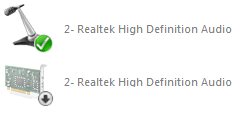
  • strange_names.png
    strange_names.png
    3.5 KB · Views: 47

My Computer My Computer

Computer type
PC/Desktop
Computer Manufacturer/Model Number
Asus G750JM-T4114H
OS
Seven Professional x64
CPU
Intel Core i7 4700HQ
Motherboard
Double chipsets: Haswell MB IMC & Lynx Point HM87
Memory
2 * 8 Gio DDR3-1600 SDRAM
Graphics Card(s)
NVidia GeForce GTX 860M 2 Gio
Sound Card
Realtek ALC282 (chipset integrated)
Monitor(s) Displays
17"3
Screen Resolution
1920*1080 px (16:9)
Hard Drives
2 * Seagate ST950042 0AS (500Gio 7200rpm)
No RAID
Mouse
Razer Copperhead (Asus OEM)
Usually deleting or Uninstalling all instances of such duplicated entries then rebooting will reinstall only one instance unless two are actually needed.
 

My Computer My Computer

Computer type
PC/Desktop
Computer Manufacturer/Model Number
Customs, Dell, Gateway, HP, Toshiba, Acer, ASUS
OS
Windows 7 Ultimate 64-bit, Windows 8.1 64-bit, Mac OS X 10.10, Linux Mint 17, Windows 10 Pro TP
Keyboard
Microsoft
Mouse
Microsoft
Well, intuitively I got the same idea.

I uninstalled all drivers so there was no sound devices at all (the lists were emptied) and reinstalled the new ones.
Fail: the numbered devices reappeared.

I must point out that I took that Windows hard drive from an old machine and put it inside a new one with totally different hardware.
The question there is: how to remove registered hardware which does not exist anymore?
 

My Computer My Computer

Computer type
PC/Desktop
Computer Manufacturer/Model Number
Asus G750JM-T4114H
OS
Seven Professional x64
CPU
Intel Core i7 4700HQ
Motherboard
Double chipsets: Haswell MB IMC & Lynx Point HM87
Memory
2 * 8 Gio DDR3-1600 SDRAM
Graphics Card(s)
NVidia GeForce GTX 860M 2 Gio
Sound Card
Realtek ALC282 (chipset integrated)
Monitor(s) Displays
17"3
Screen Resolution
1920*1080 px (16:9)
Hard Drives
2 * Seagate ST950042 0AS (500Gio 7200rpm)
No RAID
Mouse
Razer Copperhead (Asus OEM)
Any idea?
 

My Computer My Computer

Computer type
PC/Desktop
Computer Manufacturer/Model Number
Asus G750JM-T4114H
OS
Seven Professional x64
CPU
Intel Core i7 4700HQ
Motherboard
Double chipsets: Haswell MB IMC & Lynx Point HM87
Memory
2 * 8 Gio DDR3-1600 SDRAM
Graphics Card(s)
NVidia GeForce GTX 860M 2 Gio
Sound Card
Realtek ALC282 (chipset integrated)
Monitor(s) Displays
17"3
Screen Resolution
1920*1080 px (16:9)
Hard Drives
2 * Seagate ST950042 0AS (500Gio 7200rpm)
No RAID
Mouse
Razer Copperhead (Asus OEM)
You might not be able to remove the 'extras' if both computers had/have Realtek audio devices on their motherboards unless doing a clean re-install of Windows. Such things happen when moving HDDs between machines. Does your audio work at all?
 

My Computer My Computer

Computer type
PC/Desktop
Computer Manufacturer/Model Number
Customs, Dell, Gateway, HP, Toshiba, Acer, ASUS
OS
Windows 7 Ultimate 64-bit, Windows 8.1 64-bit, Mac OS X 10.10, Linux Mint 17, Windows 10 Pro TP
Keyboard
Microsoft
Mouse
Microsoft
Yeah, everything is working fine.

I removed as much driver as possible (for the ones available for uninstall...) and installed all the suitable drivers for the new hardware. That is where Realtek drivers must collide with each other, with the old hardware still being registered somewhere and thus making my new devices being '2-' numbered.

I had trouble with the graphics (strange stuff such as the Win7 booting screen only covering one half of the screen), but running dxdiag (and probably updating DirectX) put Windows video handling back on track.

I expect trouble when switching HDD from a machine to another (and I am even surprised it works at all that well...), but I also thought it could be possible to clean up eddies with a little manual work.
I am seeking for the recipe here.

Everything is registered in the registry somewhere, is not it. I hust need to know where to tap into it...
 

My Computer My Computer

Computer type
PC/Desktop
Computer Manufacturer/Model Number
Asus G750JM-T4114H
OS
Seven Professional x64
CPU
Intel Core i7 4700HQ
Motherboard
Double chipsets: Haswell MB IMC & Lynx Point HM87
Memory
2 * 8 Gio DDR3-1600 SDRAM
Graphics Card(s)
NVidia GeForce GTX 860M 2 Gio
Sound Card
Realtek ALC282 (chipset integrated)
Monitor(s) Displays
17"3
Screen Resolution
1920*1080 px (16:9)
Hard Drives
2 * Seagate ST950042 0AS (500Gio 7200rpm)
No RAID
Mouse
Razer Copperhead (Asus OEM)
Back
Top