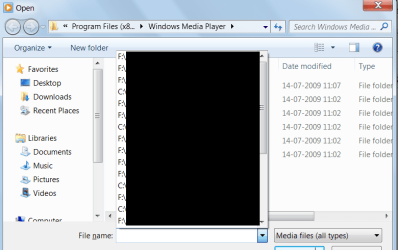
Hi.. I'm new here and based on a little bit of poking around and searching, i really couldnt find an answer to what i was looking for.. so thought i'd register and post the query.. apologies if this is a repeat..
since the past few days i've been trying, in vain, to clear the recently opened media files details.. now i am not talking about the ones that show up in the "files>recent media" tabs in vlc or wmp.. i'm talking about when one clicks on "file>open" in wmp, a box opens up with a drop down of "file name:" and the drop down kinda lists the recently accessed media files.. (attaching screenshot for reference).. i've tried the usual clear history, clear cache, etc.. but it doesnt work.. can someone please help out..
Maguscreed - thank you very much.. it worked.. after trying a variety of history cleaning freewares like BCWipe and SEraser, i'd almost given up on the other ones.. but CCleaner worked nicely.. you're a lifesaver..
TMam69 - thank you.. i actually tried that before, it didnt work.. but CCleaner did..
For anyone who might come across this thread in their search.. here's a list of things i tried before the CCleaner actually worked (just so that you dont waste your time doing the same things)
- clear File MRU (using windows registry, and some other patches)
- usual "file>options" options of clearing preferences, unchecking the 'remember history' boxes, etc
- BCWipe
- SEraser
- manual re-coding of index.dat file using PSPad
yeah piriform makes some good stuff, they also have an app called recuva that can restore deleted files for you. (provided the location on the disk hasn't been overwritten since you deleted the file)
It's also free and easy to use. I've personally used it to recover over 300 gigs of data off a drive.
Hello! I realize I'm way late in this conversation, but I did download CCleaner but cannot figure out what functions to check to clear the file search dropdown list. Thank you.