Solved How to combine seperate volumes on same SSD after uninstall of Ubuntu?

blueshift314

New member
Local time
8:38 PM
Messages
16
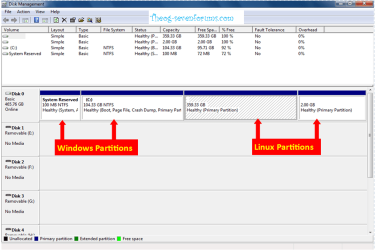
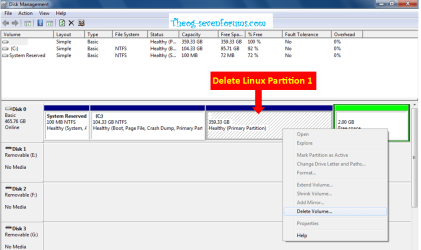
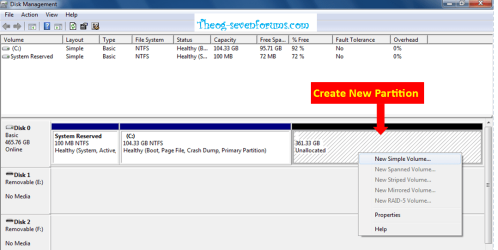
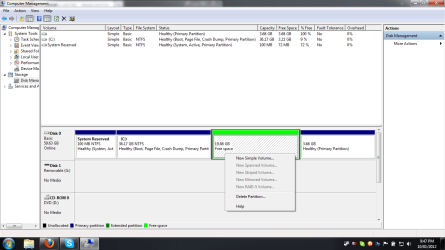
So I just uninstalled Ubuntu, and had a whole big problem with starting up my computer(don't even get me started), and now I'm here, my final problem. So as you can see by the image, my ssd is split up into multiple volumes. I want to know how to combine my main, Windows 7 volume, with my previously Ubuntu volume. At this point it is free space and I have no idea, nor could I find out how to do what I need. I am hoping someone here has a clue about this. Any suggestions?
 

Attachments
  • ssd partitions.png
    ssd partitions.png
    41.6 KB · Views: 46

My Computer My Computer

At a glance

MS Windows 7 Ultimate 64-bit SP1Intel® Core™ i3-380M Processor (3M Cache, 2.5...4GB DDR3Intel HD Graphics
OS
MS Windows 7 Ultimate 64-bit SP1
CPU
Intel® Core™ i3-380M Processor (3M Cache, 2.53 GHz)
Motherboard
Acer Aspire 5733 (CPU)
Memory
4GB DDR3
Graphics Card(s)
Intel HD Graphics
Screen Resolution
1366x768
Hard Drives
63GB Kingston KINGSTON SV100S264G ATA Device (SATA)
Mouse
Corsair's Vengeance M90
Internet Speed
92.1 Mb/s d/l, 65.42 Mb/s u/l, 13ms Ping
When I try to delete partition it says there is not enough space to do so. Makes no sense to me. Any more suggestions?
 

My Computer My Computer

At a glance

MS Windows 7 Ultimate 64-bit SP1Intel® Core™ i3-380M Processor (3M Cache, 2.5...4GB DDR3Intel HD Graphics
OS
MS Windows 7 Ultimate 64-bit SP1
CPU
Intel® Core™ i3-380M Processor (3M Cache, 2.53 GHz)
Motherboard
Acer Aspire 5733 (CPU)
Memory
4GB DDR3
Graphics Card(s)
Intel HD Graphics
Screen Resolution
1366x768
Hard Drives
63GB Kingston KINGSTON SV100S264G ATA Device (SATA)
Mouse
Corsair's Vengeance M90
Internet Speed
92.1 Mb/s d/l, 65.42 Mb/s u/l, 13ms Ping
Could be. You have less than 10% free space on C. It may even need 15%. Temporarily backup/remove some stuff from C and try again.
 

My Computer My Computer

At a glance

Vista, Windows7, Mint Mate, Zorin, Windows 8from 1.6GHz Duo to i7
Computer Manufacturer/Model Number
HP, Dell, Gateway, Toshiba - 4 laptops and 2 desktops
OS
Vista, Windows7, Mint Mate, Zorin, Windows 8
CPU
from 1.6GHz Duo to i7
Monitor(s) Displays
2x HP w2207
Hard Drives
5x HDD, 7x SSD, 12x Externals
Keyboard
with trackball - no mices
Mouse
Trackball mice
Internet Speed
DSL 6000
Okay, sounds like a good idea. I deleted some stuff, freed up more space. I now have 17% available, and it still won't work. Any ideas?
 

My Computer My Computer

At a glance

MS Windows 7 Ultimate 64-bit SP1Intel® Core™ i3-380M Processor (3M Cache, 2.5...4GB DDR3Intel HD Graphics
OS
MS Windows 7 Ultimate 64-bit SP1
CPU
Intel® Core™ i3-380M Processor (3M Cache, 2.53 GHz)
Motherboard
Acer Aspire 5733 (CPU)
Memory
4GB DDR3
Graphics Card(s)
Intel HD Graphics
Screen Resolution
1366x768
Hard Drives
63GB Kingston KINGSTON SV100S264G ATA Device (SATA)
Mouse
Corsair's Vengeance M90
Internet Speed
92.1 Mb/s d/l, 65.42 Mb/s u/l, 13ms Ping
Hmm, now you got me. This is indeed mysterious. Is there an error code with the message ??
 

My Computer My Computer

At a glance

Vista, Windows7, Mint Mate, Zorin, Windows 8from 1.6GHz Duo to i7
Computer Manufacturer/Model Number
HP, Dell, Gateway, Toshiba - 4 laptops and 2 desktops
OS
Vista, Windows7, Mint Mate, Zorin, Windows 8
CPU
from 1.6GHz Duo to i7
Monitor(s) Displays
2x HP w2207
Hard Drives
5x HDD, 7x SSD, 12x Externals
Keyboard
with trackball - no mices
Mouse
Trackball mice
Internet Speed
DSL 6000

My Computer My Computer

At a glance

Vista, Windows7, Mint Mate, Zorin, Windows 8from 1.6GHz Duo to i7
Computer Manufacturer/Model Number
HP, Dell, Gateway, Toshiba - 4 laptops and 2 desktops
OS
Vista, Windows7, Mint Mate, Zorin, Windows 8
CPU
from 1.6GHz Duo to i7
Monitor(s) Displays
2x HP w2207
Hard Drives
5x HDD, 7x SSD, 12x Externals
Keyboard
with trackball - no mices
Mouse
Trackball mice
Internet Speed
DSL 6000

My Computer My Computer

At a glance

Windows 10 Pro x64 ; Xubuntu x64Intel i7 860 @ 2.80 GHz O/C'ed to 4.0GHz16GB Corsair Vengance DDR3 @ 661 MHz Dual Cha...EVGA NVidia GTX 560 1024MB
Computer type
PC/Desktop
Computer Manufacturer/Model Number
Golden Mk. I.4
OS
Windows 10 Pro x64 ; Xubuntu x64
CPU
Intel i7 860 @ 2.80 GHz O/C'ed to 4.0GHz
Motherboard
Gigabyte P55A-UD3R Rev.1. Award BIOS F13
Memory
16GB Corsair Vengance DDR3 @ 661 MHz Dual Channel (9-9-9-24)
Graphics Card(s)
EVGA NVidia GTX 560 1024MB
Sound Card
Realtek Integrated
Monitor(s) Displays
Dual Samsung SyncMaster 2494HS
Screen Resolution
1920*1080 and 1920*1080
Hard Drives
1*Samsung 840 EVO 120GB SSD;
1*OCZ Vertex 2 60GB SSD;
2*Samsung F3 SpinPoint 1TB in RAID0;
1*Samsung F1 SpinPoint 1TB;
2*Western Digital 1TB External USB 3.0
1*Western Digital 500GB External USB 3.0
1*Seagate 500GB External USB 2.0
PSU
Thermaltake ToughPower QFan 750W
Case
Thermaltake Element S VK60001W2Z
Cooling
Corsair H60 Water Cooling, 2*230mm and 2*80mm case fans
Keyboard
Logitech G110
Mouse
Logitech MX518
thanks theog. worked perfectly. very easy too. I just wasn't sure if that 4th partition was a linux or windows volume.
 

My Computer My Computer

At a glance

MS Windows 7 Ultimate 64-bit SP1Intel® Core™ i3-380M Processor (3M Cache, 2.5...4GB DDR3Intel HD Graphics
OS
MS Windows 7 Ultimate 64-bit SP1
CPU
Intel® Core™ i3-380M Processor (3M Cache, 2.53 GHz)
Motherboard
Acer Aspire 5733 (CPU)
Memory
4GB DDR3
Graphics Card(s)
Intel HD Graphics
Screen Resolution
1366x768
Hard Drives
63GB Kingston KINGSTON SV100S264G ATA Device (SATA)
Mouse
Corsair's Vengeance M90
Internet Speed
92.1 Mb/s d/l, 65.42 Mb/s u/l, 13ms Ping
Back
Top