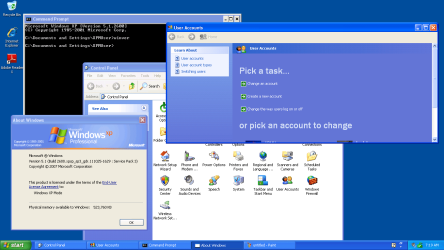
I run XP mode on Windows 7 pro. The XP mode VM reports: Windows XP Professional Version 5.1 (Build 2600.xpsp_sp3_gdr.111025-1629 : Service Pack 3)
Now the problem I have is that managing user accounts from the control panel is missing some standard XP functionality.
The User Accounts management SHOUD begins with two tabs (Users and Advanced). Under Advanced, I need to use the Manage Passwords button to configure stored names and passwords for certain client applications I have access to.
The issue is that in my XP mode VM the users accounts looks more like a home version of Windows with the silly Pick a task.... (change an account, create a new account...) or pick an account to change (with the goofy user icons of car, suitcase, flower, etc.). So, my XP pro doesn't look all that pro.
More to the point is that I cannot configure via the Manage Passwords to configure server locations with usernames and passwords for default access to the enterprise servers.
How do I get the missing Advanced Tab back in user accounts?
Now the problem I have is that managing user accounts from the control panel is missing some standard XP functionality.
The User Accounts management SHOUD begins with two tabs (Users and Advanced). Under Advanced, I need to use the Manage Passwords button to configure stored names and passwords for certain client applications I have access to.
The issue is that in my XP mode VM the users accounts looks more like a home version of Windows with the silly Pick a task.... (change an account, create a new account...) or pick an account to change (with the goofy user icons of car, suitcase, flower, etc.). So, my XP pro doesn't look all that pro.
More to the point is that I cannot configure via the Manage Passwords to configure server locations with usernames and passwords for default access to the enterprise servers.
How do I get the missing Advanced Tab back in user accounts?
Last edited:
My Computer
At a glance
Win 7 Pro 64-bitIntel Core i516 GB Dell, 6 GB ToshibaIntel crap on both but Dell also has nVidia G...
- Computer type
- Laptop
- Computer Manufacturer/Model Number
- Dell Insprion 7559 next to a Toshiba Portege
- OS
- Win 7 Pro 64-bit
- CPU
- Intel Core i5
- Motherboard
- Intel
- Memory
- 16 GB Dell, 6 GB Toshiba
- Graphics Card(s)
- Intel crap on both but Dell also has nVidia GeForce GTX960M
- Sound Card
- RealTek
- Monitor(s) Displays
- internal and external ACER KA270H 27"
- Screen Resolution
- 1920x1080
- Hard Drives
- SSD 256 GB plus numerous WD Red or Purple on USB3 docks. Used to buy a lot of Seagate but tossed them the second time I got unrecoverable disc corruption in the midst of use.
- Keyboard
- Garage Mouse SW and some cheap Amazon China made USB device
- Mouse
- Garage Mouse and some cheap Amazon China made USB device
- Internet Speed
- 50 Mbps (allegedly, depends on server)
- Antivirus
- Defender, Malwarebytes Premium and Kaspersky
- Browser
- IE 11, and Chrome something