How to connect other drives

satimis

New member
Local time
4:25 AM
Messages
27
Hi all,

Windows 7

I have 3 hard drives on the PC. All of them can be detected by BIOS.

Windows 7 is now running on C-drive. Other 2 drives were formatted on Linux system for storage only but without OS running. Please advise how can I connect them to retrieve files from and to save files as well?

Thanks

Regards
satimis
 

My Computer My Computer

At a glance

Windows Vista
OS
Windows Vista
Satimis mate try this

BOOTABLEUBUNTU

Makea bootable Ubuntu disk http://www.ubuntu.com/download

Setthe BIOS to boot from the optical when the machine boots it will show you ascreen with TRY or INSTALL > select TRY. You can of course remove the hard drive and any otherdrives when doing this as if the optical alone is the only drive left in themachine then the BIOS will only find it to boot from.

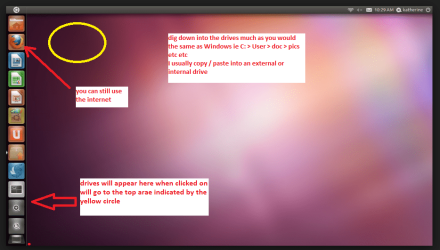
Whenit is finished - it takes very little time you will get a screen like in thepic .

Openthe drive you want > User and dig down until you get to the data / settingsyou may be able to copy / paste the material you want to an external source orother installed drive doing this.

Iam not sure if it will but I have recovered tons of data etc using this methodboth on "dead" or just plain drives that you cannot get data fromusing Windows.
 

Attachments

  • UBUTUX.PNG
    UBUTUX.PNG
    128.9 KB · Views: 0

My Computer My Computer

At a glance

Desk1 7 Home Prem / Desk2 10 Pro / Main lap A...Desk1 i5 3750K / Laptop i7 GTX 860M / Desk2 i...Desk1 8GB (1866) / Desk2 16GB (1333) / Laptop...Desk 1& 2NVidia GTX 650 & Laptops on board Intel
Computer type
PC/Desktop
Computer Manufacturer/Model Number
Own build (new) Desk1 / Asus ROG Win 7 / Desk2 1st build
OS
Desk1 7 Home Prem / Desk2 10 Pro / Main lap Asus ROG 10 Pro 2 laptop Toshiba 7 Pro Asus P2520 7 & 10
CPU
Desk1 i5 3750K / Laptop i7 GTX 860M / Desk2 i5 2500
Motherboard
Desk1 Asus P877-V / Desk2 Gigabyte H67 UD3H / Laptop ?
Memory
Desk1 8GB (1866) / Desk2 16GB (1333) / Laptop 8Gb DDR3
Graphics Card(s)
Desk 1& 2NVidia GTX 650 & Laptops on board Intel
Sound Card
Desk 1 & 2 -XONAR DG Realtek High Def audio Laptop
Monitor(s) Displays
Desk 1 Benq HD 2450 / Desk2 Philips 24" / Laptop 17.5"
Screen Resolution
1920x1080 D1 & D2 & Laptop 1
Hard Drives
Desk1 Samsung 120GB 830 SSD
Asus ROG 256GB 850 Pro SSD
Desk2 Samsung 840 256 SSD
Toshiba 120GB EVO
PSU
Desk 1 Corsair HX 1050/ Laptop ? / Desk 2 Corsair HX 650
Case
Desk 1 Cooler HAF XM ? Toshiba laptop / Desk2 Coolermaster
Cooling
Fans on all Desk1 -2 Desk2 - all Coolermasters 5 Laptop ?
Keyboard
Desk 1 MS Sidewinder X6 Desk 2 MS Sidewinder X 4
Mouse
Desk 1&2 - Gigabyte MS 900 gamer - laptop - Logitec wireless
Internet Speed
ADSL2+
Other Info
One other Desktop (tester) and spare Toshba laptop both with SSD's
Running Kaspersky 2016 ISS on all machines config'd identically
Logitec audio stereo systems on each machine (x3)
Canon MG5250MFC
Router/modem TP-Link running WPA2SK
Hi,

Thanks for your advice.

What I expect to do is making those 2 hard drives sharing data between Windows and Linux system. I have another drive on this PC running Debian 7. It can read data on those 2 hard drives but Windows 7 can read them.

Edit:
===
Debian 7 can read Windows 7 to retrieve data. But Windows 7 can't read Debian 7


Regards
satimis
 

My Computer My Computer

At a glance

Windows Vista
OS
Windows Vista

My Computer My Computer

At a glance

W10 Pro desktop, W11 laptop, W11 Pro tablet (...3.7Ghz 8700K i7, i7-11800H, i7-1065G716G desktop, 16G laptop, 4G tabletAMD Radeon RX580, RTX 3060, Intel Iris Plus
Computer type
PC/Desktop
Computer Manufacturer/Model Number
Home Built desktop, Dell G15 5511 Gaming laptop,MS Surface Pro 7 tablet
OS
W10 Pro desktop, W11 laptop, W11 Pro tablet (all 64-bit)
CPU
3.7Ghz 8700K i7, i7-11800H, i7-1065G7
Motherboard
ASUS TUF Z370-Pro Gaming in desktop
Memory
16G desktop, 16G laptop, 4G tablet
Graphics Card(s)
AMD Radeon RX580, RTX 3060, Intel Iris Plus
Sound Card
High Definition Audio (Built-in to mobo)
Monitor(s) Displays
Samsung U32J59 32" (2x), 15.6", 12"
Screen Resolution
3840x2160, 3840x2160, 1920x1080, 2160x1440
Hard Drives
500G SSD for OS; 2T, 10T & 15T HDDs for Data on Desktop, 1TB SSD laptop, 128G SSD tablet.
PSU
Corsair CX 750M
Case
Antec 100
Cooling
CM 212+
Keyboard
IBM Model M - used continuously since 1986
Mouse
Microsoft Pro IntelliMouse
Internet Speed
400M down 8M up
Antivirus
Windows Defender
Browser
FireFox
Other Info
Built my first computer (8Mhz 8088cpu, 640K RAM, 20MB HDD, 2 360K floppy drives) in 1985 and have been building them for myself, relatives and friends ever since.
Satimis - Try this software: ext2explore Free Download
Hi,

Thanks for your link.

I have been googling a while before posting. There are tons of data on those 2 hard drives for sharing data amongst Linux OS on this PC as well as on other PCs on Intranet. It is impossible for me changing the file system on those 2 hard drives.

satimis
 

My Computer My Computer

At a glance

Windows Vista
OS
Windows Vista
Sorry mistook what you were trying to do:o
 

My Computer My Computer

At a glance

Desk1 7 Home Prem / Desk2 10 Pro / Main lap A...Desk1 i5 3750K / Laptop i7 GTX 860M / Desk2 i...Desk1 8GB (1866) / Desk2 16GB (1333) / Laptop...Desk 1& 2NVidia GTX 650 & Laptops on board Intel
Computer type
PC/Desktop
Computer Manufacturer/Model Number
Own build (new) Desk1 / Asus ROG Win 7 / Desk2 1st build
OS
Desk1 7 Home Prem / Desk2 10 Pro / Main lap Asus ROG 10 Pro 2 laptop Toshiba 7 Pro Asus P2520 7 & 10
CPU
Desk1 i5 3750K / Laptop i7 GTX 860M / Desk2 i5 2500
Motherboard
Desk1 Asus P877-V / Desk2 Gigabyte H67 UD3H / Laptop ?
Memory
Desk1 8GB (1866) / Desk2 16GB (1333) / Laptop 8Gb DDR3
Graphics Card(s)
Desk 1& 2NVidia GTX 650 & Laptops on board Intel
Sound Card
Desk 1 & 2 -XONAR DG Realtek High Def audio Laptop
Monitor(s) Displays
Desk 1 Benq HD 2450 / Desk2 Philips 24" / Laptop 17.5"
Screen Resolution
1920x1080 D1 & D2 & Laptop 1
Hard Drives
Desk1 Samsung 120GB 830 SSD
Asus ROG 256GB 850 Pro SSD
Desk2 Samsung 840 256 SSD
Toshiba 120GB EVO
PSU
Desk 1 Corsair HX 1050/ Laptop ? / Desk 2 Corsair HX 650
Case
Desk 1 Cooler HAF XM ? Toshiba laptop / Desk2 Coolermaster
Cooling
Fans on all Desk1 -2 Desk2 - all Coolermasters 5 Laptop ?
Keyboard
Desk 1 MS Sidewinder X6 Desk 2 MS Sidewinder X 4
Mouse
Desk 1&2 - Gigabyte MS 900 gamer - laptop - Logitec wireless
Internet Speed
ADSL2+
Other Info
One other Desktop (tester) and spare Toshba laptop both with SSD's
Running Kaspersky 2016 ISS on all machines config'd identically
Logitec audio stereo systems on each machine (x3)
Canon MG5250MFC
Router/modem TP-Link running WPA2SK
For use with WinVista, Win7, Win8.1, Macintosh OS X and Linux Mint, I have added a NAS/Network Attached Storage HDD to my Router and can access it for both read and right from all computers. It's a 1TB formatted as NTFS. Most versions of Linux I've looked at can directly work with NTFS [LiveCD or LiveDVD]. Since I installed it I've scaled back my quest for a decent inexpensive NTFS app for my MacBook Pro, what I found didn't work good enough with USB NTFS HDDs but the Mac does natively support FAT32 HDDs.
 

My Computer My Computer

At a glance

Windows 7 Ultimate 64-bit, Windows 8.1 64-bit...
Computer type
PC/Desktop
Computer Manufacturer/Model Number
Customs, Dell, Gateway, HP, Toshiba, Acer, ASUS
OS
Windows 7 Ultimate 64-bit, Windows 8.1 64-bit, Mac OS X 10.10, Linux Mint 17, Windows 10 Pro TP
Keyboard
Microsoft
Mouse
Microsoft
Hi all,

I have 2 PCs, both running Oracle VirtualBox with about 40 VMs installed on PC1 and about 20 VMs on PC2, running Ubuntu/Fedora/SUSE Linux/CentOS/LinuxMint/Win7/WinServer etc,. The PCs are connected via a router. There are 2 additonal hard drives installed on each PC, solely for storage. Data are shared amongst them without problem.

Because I can't manage scanning negatives on VM, I just installed Windows 7 on an additional hard drive on PC2, bare-metal installation. Now the problem of scanning negatives has been solved. But another problem, sharing data, began.

satimis
 

My Computer My Computer

At a glance

Windows Vista
OS
Windows Vista
Hi all,

Lot of thanks for your advice.

Now I find a simple and straightforward solution without making any change on Windows 7. This Windows 7, a bare-metal installation copy, is solely for scanning, in particular the negatives. After scanning I'll leave all image files on Windows 7. Then start up Ubuntu, the host of this Virtual Box PC, and move all files to the storage HD.

Thanks again for your time and effort.

satimis
 

My Computer My Computer

At a glance

Windows Vista
OS
Windows Vista
Back
Top