How to connect vitual Windows XP to network

boyvivu

New member
Local time
9:35 AM
Messages
4
Location
vietnam
I using Windows 7 and setup new vitual Windows XP by Virtual PC 2007 SP1. I can't understand how to connect vitual Windows Xp SP3- 32 bit to network - that is Dial-up connecttion and using follow Windows 7 Profestional SP1 - 32bit. Windows Xp not detect my Dcom E173Eu-1.
Some tutorial by change COM gate or IP address to reset Win XP fo detect. But not work for me! I think when USB gate of Dcom not detect in Vitual PC, COM not work.

Some problem with share Disk or File, Folder of Real Windows7 to Vitual Windows XP. How I can set Windows XP and Windows 7 in a LAN.
------------------
Thank 4 reading!
 

My Computer My Computer

At a glance

Windows 7 Ultimate x86Intel Celeron
OS
Windows 7 Ultimate x86
CPU
Intel Celeron
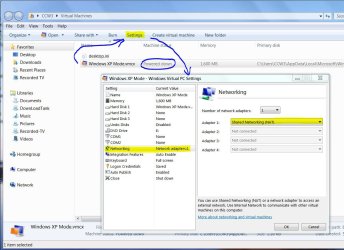
I can't help you specifically since I use Windows Virtual PC running Windows XP but there should be a Settings menu somewhere and a way to turn on Integration options for the virtual machine. Integration options would be what hardware on your PC you want to include in the virtual machine. The Settings menu would allow you to specify details of the hardware.

This picture is of Windows VPC-XP Settings. It might help some. For a trouble free and seamless XP VM, I suggest using the Windows Virtual PC with XP. It's free so you can't beat the price.
 

Attachments

  • XP VM - Settings.JPG
    XP VM - Settings.JPG
    124.3 KB · Views: 18

My Computer My Computer

At a glance

Windows 7 Pro-x64i7-2600 3.4GHz - 3.8GHz Turbo8Gb - 2x4GB, Muskin 991770 PC3-1333Integrated Intel HD 2000
Computer type
PC/Desktop
Computer Manufacturer/Model Number
Built 2/11/2011
OS
Windows 7 Pro-x64
CPU
i7-2600 3.4GHz - 3.8GHz Turbo
Motherboard
Intel DH67BL-B3
Memory
8Gb - 2x4GB, Muskin 991770 PC3-1333
Graphics Card(s)
Integrated Intel HD 2000
Sound Card
Integrated Intel 10.1 HD, RealTek ALC892
Monitor(s) Displays
Asus LCD VH222H, Haier HL24XSL2a
Screen Resolution
1920x1080, 1920x1080
Hard Drives
Crucial SSD C300-128Gb,
Western Digital WD5002AALX - 500Gb,
Western Digital WD7501AALS - 750Gb
PSU
Seasonic 650W 80+ Gold Modular
Case
Rosewill Defender
Cooling
Stock CPU, Four 120mm case fans, PCH fan added
Keyboard
Logitech EX100 Y-RBH94 Wireless
Mouse
Logitech EX100 M-RCE95 Wireless
Internet Speed
3.0/1.5 Mbs
Antivirus
Microsoft Security Essentials
Browser
Microsoft Internet Explorer 11
Other Info
Antec Veris Premier-Multimedia IR Station,
Cyber Accoustics-3602 Speakers,
AFT XM-5U Card Reader,
Hauppauge TV-HVR-2250,
Sony LX300 USB Turntable
Thank !
I not look Setting Button :(
8571679832_6fbacdce99_b.jpg

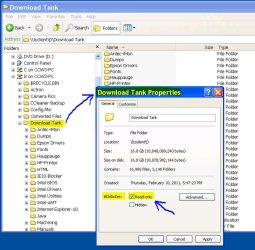
/ more question: how to set a folder never write inside? I tried set a folder to Read Only ( folder store in slave disk - FAT 32 )
but not work.
 

My Computer My Computer

At a glance

Windows 7 Ultimate x86Intel Celeron
OS
Windows 7 Ultimate x86
CPU
Intel Celeron
Is this for the VM? When you start the virtual PC, right click on the folder in question, click on properties and mark it read only.
 

Attachments

  • Files - Read Only.JPG
    Files - Read Only.JPG
    87.6 KB · Views: 3

My Computer My Computer

At a glance

Windows 7 Pro-x64i7-2600 3.4GHz - 3.8GHz Turbo8Gb - 2x4GB, Muskin 991770 PC3-1333Integrated Intel HD 2000
Computer type
PC/Desktop
Computer Manufacturer/Model Number
Built 2/11/2011
OS
Windows 7 Pro-x64
CPU
i7-2600 3.4GHz - 3.8GHz Turbo
Motherboard
Intel DH67BL-B3
Memory
8Gb - 2x4GB, Muskin 991770 PC3-1333
Graphics Card(s)
Integrated Intel HD 2000
Sound Card
Integrated Intel 10.1 HD, RealTek ALC892
Monitor(s) Displays
Asus LCD VH222H, Haier HL24XSL2a
Screen Resolution
1920x1080, 1920x1080
Hard Drives
Crucial SSD C300-128Gb,
Western Digital WD5002AALX - 500Gb,
Western Digital WD7501AALS - 750Gb
PSU
Seasonic 650W 80+ Gold Modular
Case
Rosewill Defender
Cooling
Stock CPU, Four 120mm case fans, PCH fan added
Keyboard
Logitech EX100 Y-RBH94 Wireless
Mouse
Logitech EX100 M-RCE95 Wireless
Internet Speed
3.0/1.5 Mbs
Antivirus
Microsoft Security Essentials
Browser
Microsoft Internet Explorer 11
Other Info
Antec Veris Premier-Multimedia IR Station,
Cyber Accoustics-3602 Speakers,
AFT XM-5U Card Reader,
Hauppauge TV-HVR-2250,
Sony LX300 USB Turntable
From past experience using Microsoft Virtual XP, When i downloaded it and installed it, It connected direct to my local network, on boot up, and didn't have any issues with it.

I guess you could check the device drivers for the virtual NIC, and see if you could ping the VM,
or try using another program like Virtual box and see if you can get it to connect to your network
 

My Computer My Computer

At a glance

Microsoft Windows 7 Ultimate SP1 64xIntel Core i5-2500K OC. 4.232GB 1600MHz Corsair VengeanceATI Radeon 5770 Single Slot
Computer type
PC/Desktop
Computer Manufacturer/Model Number
NZXT Hush2 Gaming RIG 2012
OS
Microsoft Windows 7 Ultimate SP1 64x
CPU
Intel Core i5-2500K OC. 4.2
Motherboard
Asus P8Z68-V LX | Socket 1156
Memory
32GB 1600MHz Corsair Vengeance
Graphics Card(s)
ATI Radeon 5770 Single Slot
Sound Card
Creative Sound Blaster X-Fi
Monitor(s) Displays
Acer S220HQLBrbd 21.5" X3
Screen Resolution
5760 x 1080
Hard Drives
120GB Corsair Force GT
3TB Seagate Barracuda
2TB Seagate Barracuda
PSU
OCZ 1000w
Case
NZXT Hush2
Cooling
Air
Keyboard
Microsoft Wireless Keyboard 3000
Mouse
Microsoft Wireless Mouse 5000
Internet Speed
Virgin Media | 60mb/s Download | 3mb/s Upload
Antivirus
Microsoft Security Essentials
Browser
Mozilla Firefox
Back
Top