Solved How to connect Windows programs through a authenticated proxy network.

Imrankhan

Enthusiast
Power User
VIP
Local time
3:32 PM
Messages
206
Location
Chennai, India
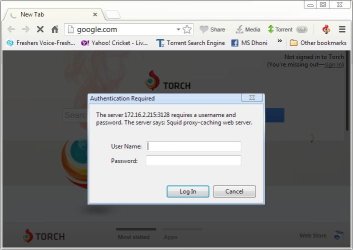
When I open browser, a message box asks for username and password, to connect to internet. Even Windows update asks proxy login through message box. But I couldn't get my pc programs to connect to internet. I have entered authentication information in utorrent and dap. so they work like charm.
But programs like bluestacks, antivirus cant connect to internet.
please help me. Is there any helper application or any settings need to be changed?
 

My Computer

Computer type
Laptop
Computer Manufacturer/Model Number
Dell XPS L502x
OS
Windows 7 Home Premium 64bit
CPU
Intel Core i7 2670QM
Motherboard
Intel HM67 Mobile Express Chipset
Memory
Samsung 8GB 1333Mhz
Graphics Card(s)
nVidia Geforce 540M GT 2GB
Sound Card
Realtek High Definition Audio
Monitor(s) Displays
15.6" Dell Standard RGB-LED Backlit Display
Screen Resolution
1366x768
Hard Drives
Seagate Momentus 2.5" 750GB HDD 5400rpm
Internet Speed
3.1 Mbits/s
Antivirus
AVG Free, Kaspersky
Browser
Google chrome
What happens when you launch the browser? Are you connecting using a domain credential? If so you need to enter the domain then your usename. For example with the name home.local and the user j.kingsbury you would enter:

HOME\j.kingsbury

Is there any 802.1X port authentication set up as this could be a factor?

Josh
 

My Computer

Computer type
PC/Desktop
Computer Manufacturer/Model Number
Custom Built
OS
Windows 7 Professional x64 SP1 ; Windows Server 2012 R2 Standard
CPU
Intel Core i5 2400 @ 3.10GHz
Motherboard
Foxconn H67MP-S/-V/H67MP
Memory
8.0GB DDR3 @ 665MHz (2GBx4)
Graphics Card(s)
AMD Radeon HD 6870
Sound Card
Realtek High Definition Audio
Monitor(s) Displays
AOC 2243W & SMB1930NW
Screen Resolution
1440x900 & 1920x1080
Hard Drives
977GB Seagate ST31000524AS ATA Drive (SATA)
250GB WD iSCSI attached Drive
PSU
750W Gaming PSU
Case
Novatech Night
Cooling
Fan
Keyboard
Dell Standard PS/2 Keyboard
Mouse
R.A.T 07 Gaming Mouse
Internet Speed
Download: 10 Mbps Ping: 30ms Upload: 0.81 Mbps
Browser
Google Chrome
Other Info
Optiarc DVD RW AD-5260S ATA Device
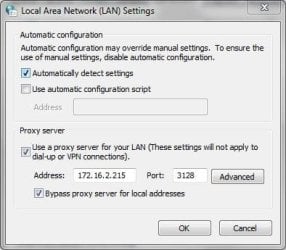
The Attached Image consists of details as far i know... This is how i connect to internet.Capture.JPG

Capture1.JPG
 

My Computer

Computer type
Laptop
Computer Manufacturer/Model Number
Dell XPS L502x
OS
Windows 7 Home Premium 64bit
CPU
Intel Core i7 2670QM
Motherboard
Intel HM67 Mobile Express Chipset
Memory
Samsung 8GB 1333Mhz
Graphics Card(s)
nVidia Geforce 540M GT 2GB
Sound Card
Realtek High Definition Audio
Monitor(s) Displays
15.6" Dell Standard RGB-LED Backlit Display
Screen Resolution
1366x768
Hard Drives
Seagate Momentus 2.5" 750GB HDD 5400rpm
Internet Speed
3.1 Mbits/s
Antivirus
AVG Free, Kaspersky
Browser
Google chrome
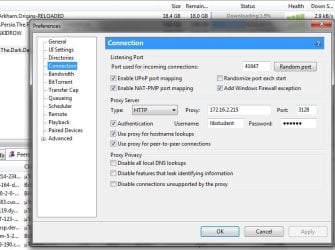
This is My Bittorent connection settings...
Capture2.JPG

How to connect Bluestacks, Antivirus Update, Sidebar Gadgets to internet through this type of connection.
 

My Computer

Computer type
Laptop
Computer Manufacturer/Model Number
Dell XPS L502x
OS
Windows 7 Home Premium 64bit
CPU
Intel Core i7 2670QM
Motherboard
Intel HM67 Mobile Express Chipset
Memory
Samsung 8GB 1333Mhz
Graphics Card(s)
nVidia Geforce 540M GT 2GB
Sound Card
Realtek High Definition Audio
Monitor(s) Displays
15.6" Dell Standard RGB-LED Backlit Display
Screen Resolution
1366x768
Hard Drives
Seagate Momentus 2.5" 750GB HDD 5400rpm
Internet Speed
3.1 Mbits/s
Antivirus
AVG Free, Kaspersky
Browser
Google chrome
After authentication using the web browser you should gain internet access and your other applications should receive internet access as well.

If you are struggling to authenticate at the browser then try to enter the IP address in the username field for example:

USERNAME:172.16.2.215\libstudent

PASSWORD: {Password for the username libstudent}

Hopefully this helps,
Josh :)
 

My Computer

Computer type
PC/Desktop
Computer Manufacturer/Model Number
Custom Built
OS
Windows 7 Professional x64 SP1 ; Windows Server 2012 R2 Standard
CPU
Intel Core i5 2400 @ 3.10GHz
Motherboard
Foxconn H67MP-S/-V/H67MP
Memory
8.0GB DDR3 @ 665MHz (2GBx4)
Graphics Card(s)
AMD Radeon HD 6870
Sound Card
Realtek High Definition Audio
Monitor(s) Displays
AOC 2243W & SMB1930NW
Screen Resolution
1440x900 & 1920x1080
Hard Drives
977GB Seagate ST31000524AS ATA Drive (SATA)
250GB WD iSCSI attached Drive
PSU
750W Gaming PSU
Case
Novatech Night
Cooling
Fan
Keyboard
Dell Standard PS/2 Keyboard
Mouse
R.A.T 07 Gaming Mouse
Internet Speed
Download: 10 Mbps Ping: 30ms Upload: 0.81 Mbps
Browser
Google Chrome
Other Info
Optiarc DVD RW AD-5260S ATA Device
I am not struggling to connect to my browser. If I open Chrome and type a website, it asks for username and password. Then I open Torch and type a website it asks for username and password. In windows update it asks for username and password. In Bittorent , i doesnt work even after i enter login details in browser. It needs username and password always entered in connection settings.(see image).
So this means every individual program has to login itself seperately to access internet. I can easily login through , if we are using browser or download manager, by entering login details in each when started. But programs like bluestacks , games, antivirus doesnt provide login message box, so that i could connect them to internet by entering login details.
So I am asking, if there is any way to connect the programs(which doesnt have provision to enter login details) to use internet.
 

My Computer

Computer type
Laptop
Computer Manufacturer/Model Number
Dell XPS L502x
OS
Windows 7 Home Premium 64bit
CPU
Intel Core i7 2670QM
Motherboard
Intel HM67 Mobile Express Chipset
Memory
Samsung 8GB 1333Mhz
Graphics Card(s)
nVidia Geforce 540M GT 2GB
Sound Card
Realtek High Definition Audio
Monitor(s) Displays
15.6" Dell Standard RGB-LED Backlit Display
Screen Resolution
1366x768
Hard Drives
Seagate Momentus 2.5" 750GB HDD 5400rpm
Internet Speed
3.1 Mbits/s
Antivirus
AVG Free, Kaspersky
Browser
Google chrome
...If I open Chrome and type a website, it asks for username and password....
What happens if you open Internet Explorer and type a website? IE should be able to pass the credentials to the OS which in turn passes them to apps that request them. Some apps/games won't request them and won't work via a proxy.
 

My Computer

Computer type
Laptop
Computer Manufacturer/Model Number
Employer provided Dell Latitude
OS
W7 Pro SP1 64bit
CPU
i7
Memory
8GB
Graphics Card(s)
Intel HD Graphics
Hard Drives
crappy SSD
Antivirus
Employer mandated Symantec Endpoint Protection
Browser
Pale Moon 64bit, IE11 64bit & Chrome 64bit
Nothing happens. I entered logon details Internet Explorer 10. For testing I went to Adobe Reader and chose check for updates. It said connection error.
 

My Computer

Computer type
Laptop
Computer Manufacturer/Model Number
Dell XPS L502x
OS
Windows 7 Home Premium 64bit
CPU
Intel Core i7 2670QM
Motherboard
Intel HM67 Mobile Express Chipset
Memory
Samsung 8GB 1333Mhz
Graphics Card(s)
nVidia Geforce 540M GT 2GB
Sound Card
Realtek High Definition Audio
Monitor(s) Displays
15.6" Dell Standard RGB-LED Backlit Display
Screen Resolution
1366x768
Hard Drives
Seagate Momentus 2.5" 750GB HDD 5400rpm
Internet Speed
3.1 Mbits/s
Antivirus
AVG Free, Kaspersky
Browser
Google chrome
For linuxmint, I use dconf editor app. I enter all proxy details in it. then i could connect to internet easily.
 

My Computer

Computer type
Laptop
Computer Manufacturer/Model Number
Dell XPS L502x
OS
Windows 7 Home Premium 64bit
CPU
Intel Core i7 2670QM
Motherboard
Intel HM67 Mobile Express Chipset
Memory
Samsung 8GB 1333Mhz
Graphics Card(s)
nVidia Geforce 540M GT 2GB
Sound Card
Realtek High Definition Audio
Monitor(s) Displays
15.6" Dell Standard RGB-LED Backlit Display
Screen Resolution
1366x768
Hard Drives
Seagate Momentus 2.5" 750GB HDD 5400rpm
Internet Speed
3.1 Mbits/s
Antivirus
AVG Free, Kaspersky
Browser
Google chrome
In post #3, under LAN settings, uncheck "Automatically detect settings".
 

My Computer

Computer type
Laptop
Computer Manufacturer/Model Number
Employer provided Dell Latitude
OS
W7 Pro SP1 64bit
CPU
i7
Memory
8GB
Graphics Card(s)
Intel HD Graphics
Hard Drives
crappy SSD
Antivirus
Employer mandated Symantec Endpoint Protection
Browser
Pale Moon 64bit, IE11 64bit & Chrome 64bit
Yes that worked.:D:D
Thank you UsernameIssues.
 

My Computer

Computer type
Laptop
Computer Manufacturer/Model Number
Dell XPS L502x
OS
Windows 7 Home Premium 64bit
CPU
Intel Core i7 2670QM
Motherboard
Intel HM67 Mobile Express Chipset
Memory
Samsung 8GB 1333Mhz
Graphics Card(s)
nVidia Geforce 540M GT 2GB
Sound Card
Realtek High Definition Audio
Monitor(s) Displays
15.6" Dell Standard RGB-LED Backlit Display
Screen Resolution
1366x768
Hard Drives
Seagate Momentus 2.5" 750GB HDD 5400rpm
Internet Speed
3.1 Mbits/s
Antivirus
AVG Free, Kaspersky
Browser
Google chrome
Back
Top