how to cool my GPU help

tz frantic

New member
Local time
12:31 AM
Messages
233

My Computer

Computer Manufacturer/Model Number
PACKARD bell
OS
windows 7
CPU
4 CPU by Intel Core 2 Quad Q6600
Motherboard
Vegas 2 Motherboard Full ATX motherboard
Memory
3 gb ram
Graphics Card(s)
NVIDIA GeForce 8800
Hard Drives
500GB C D =500GB
Seagate Barracuda 7200.10 500 GB Hard Disk by 2
Other Info
8 in 1 Gigabyte GO-C81LA CardReader/Writer

My Computer

Computer type
PC/Desktop
Computer Manufacturer/Model Number
Custom Build
OS
Windows 10 Pro - 64 bit
CPU
Intel i7 2600K
Motherboard
Asus P8P67
Memory
8 Gig ddr3 1600 mhz - viper extreme (Patriot)
Graphics Card(s)
EVGA 980 TI
Monitor(s) Displays
2 - Lg 21" LED , sony 48 " bravia LED
Hard Drives
one - samsung 840 series 465.76 GB SSD
two - wd 2 tB black
one - wd 1.5 tb black
one - wb 1 tb black
PSU
1000 Watt Coolmaster : Silent Pro Gold
Case
antec 1200
Cooling
watercooled
Mouse
logitech wireless
Antivirus
Norton Security 2015
Other Info
powerware 3.1 KVA FERRUPS with 4 - 1000 Amp Deep cycle batteries ...
It's probably buried on the bottom and does not get enough airflow. An additional fan in the right place may help (short of dry ice - LOL). Sometimes there are also a lot of cables that obstruct the airflow. Check that too. For a test, open the sidepanels and blow air in (with a fan or whatever).
 

My Computer

Computer Manufacturer/Model Number
HP, Dell, Gateway, Toshiba - 4 laptops and 2 desktops
OS
Vista, Windows7, Mint Mate, Zorin, Windows 8
CPU
from 1.6GHz Duo to i7
Monitor(s) Displays
2x HP w2207
Hard Drives
5x HDD, 7x SSD, 12x Externals
Keyboard
with trackball - no mices
Mouse
Trackball mice
Internet Speed
DSL 6000
no it is not buried and there is next to no dust so that's not the problem anything esle
 

My Computer

Computer Manufacturer/Model Number
PACKARD bell
OS
windows 7
CPU
4 CPU by Intel Core 2 Quad Q6600
Motherboard
Vegas 2 Motherboard Full ATX motherboard
Memory
3 gb ram
Graphics Card(s)
NVIDIA GeForce 8800
Hard Drives
500GB C D =500GB
Seagate Barracuda 7200.10 500 GB Hard Disk by 2
Other Info
8 in 1 Gigabyte GO-C81LA CardReader/Writer
no it is not buried and there is next to no dust so that's not the problem anything esle

Hmm, so that rules that one out. Did you check that the GPU blower is seated correctly and runs as expected. There are not that many possibilities short of a basic malfunction.
 

My Computer

Computer Manufacturer/Model Number
HP, Dell, Gateway, Toshiba - 4 laptops and 2 desktops
OS
Vista, Windows7, Mint Mate, Zorin, Windows 8
CPU
from 1.6GHz Duo to i7
Monitor(s) Displays
2x HP w2207
Hard Drives
5x HDD, 7x SSD, 12x Externals
Keyboard
with trackball - no mices
Mouse
Trackball mice
Internet Speed
DSL 6000
it is
 

My Computer

Computer Manufacturer/Model Number
PACKARD bell
OS
windows 7
CPU
4 CPU by Intel Core 2 Quad Q6600
Motherboard
Vegas 2 Motherboard Full ATX motherboard
Memory
3 gb ram
Graphics Card(s)
NVIDIA GeForce 8800
Hard Drives
500GB C D =500GB
Seagate Barracuda 7200.10 500 GB Hard Disk by 2
Other Info
8 in 1 Gigabyte GO-C81LA CardReader/Writer
it is seated correct i am sure the blower is working
 

My Computer

Computer Manufacturer/Model Number
PACKARD bell
OS
windows 7
CPU
4 CPU by Intel Core 2 Quad Q6600
Motherboard
Vegas 2 Motherboard Full ATX motherboard
Memory
3 gb ram
Graphics Card(s)
NVIDIA GeForce 8800
Hard Drives
500GB C D =500GB
Seagate Barracuda 7200.10 500 GB Hard Disk by 2
Other Info
8 in 1 Gigabyte GO-C81LA CardReader/Writer
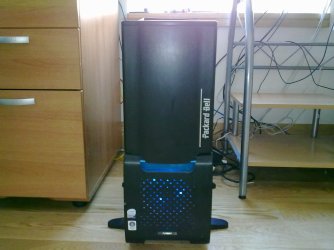
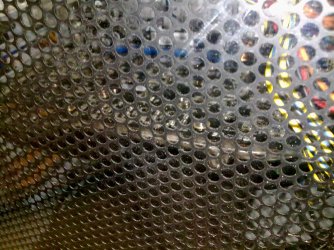
can you take a pic of your case configuration by any chance & stick it up here for us..??

i have seen 8800s lose thermal integrity over time on a few sites, the TIM would need reapplying if this is the case (& the card is dust & cable free)

for a dual slot card 60c idle's are a little high, what are your max load temps..??

:)
 

My Computer

Computer Manufacturer/Model Number
myself
OS
SEVEN x64
CPU
Q9450 @ 3.6GHZ 1.34v
Motherboard
ASUS P5K PREMIUM P35
Memory
8GB 1066 buffalo firestix @ 1152mhz CL5
Graphics Card(s)
Sapphire HD 5970 + GTX260 (physX)
Sound Card
Creative X-FI Xtreme Gamer
Monitor(s) Displays
SAMSUNG 20'' & SAMSUNG 23'' (dual screens)
Screen Resolution
2048x1152 & 1680x1050
Hard Drives
1x seagate 160gb IDE & 1x seagate 160gb SATA
PSU
XCILIO 850w (78A)
Case
CM590 1x 120x38mm & 2x92x38mm / 4x 120x25mm
Cooling
AC7 PRO @ 92x38mm blower, Lamptron military bus bay controll
Keyboard
LOGITECH E110
Mouse
logitech NX5
Internet Speed
2MB
Other Info
its a continual ''work in progress''....
maxium load is 70
 

My Computer

Computer Manufacturer/Model Number
PACKARD bell
OS
windows 7
CPU
4 CPU by Intel Core 2 Quad Q6600
Motherboard
Vegas 2 Motherboard Full ATX motherboard
Memory
3 gb ram
Graphics Card(s)
NVIDIA GeForce 8800
Hard Drives
500GB C D =500GB
Seagate Barracuda 7200.10 500 GB Hard Disk by 2
Other Info
8 in 1 Gigabyte GO-C81LA CardReader/Writer
I have a Geforce 9800GT and right now it is sitting at 63 Degrees C.
 

My Computer

Computer type
PC/Desktop
Computer Manufacturer/Model Number
Custom Build
OS
Win 10 Pro 64
CPU
Intel Core i7 960 @3.20 GHz
Motherboard
MSI MS7522
Memory
24.0 GB DDR3
Graphics Card(s)
EVGA GTX 750Ti
Monitor(s) Displays
LG E2341 23 Inch
Screen Resolution
1920x1080
Hard Drives
1TB Western Dgital 1002FAEX-00Y9A0
1TB Hitachi HDS721010CLA322
PSU
700 Watt
Case
Haf 912
Cooling
Fans
Keyboard
Logitech MK710
Mouse
Logitech M705
Internet Speed
Cable
Antivirus
AIS 2015 .10.0.2225
Browser
Firefox 49
Other Info
MalwareBytes Anti-Rootkit utility
here
 

Attachments

  • 07032010066.jpg
    07032010066.jpg
    293.5 KB · Views: 20
  • 07032010065.jpg
    07032010065.jpg
    254.9 KB · Views: 12
  • 07032010069.jpg
    07032010069.jpg
    213.2 KB · Views: 12
  • 07032010068.jpg
    07032010068.jpg
    475.7 KB · Views: 14

My Computer

Computer Manufacturer/Model Number
PACKARD bell
OS
windows 7
CPU
4 CPU by Intel Core 2 Quad Q6600
Motherboard
Vegas 2 Motherboard Full ATX motherboard
Memory
3 gb ram
Graphics Card(s)
NVIDIA GeForce 8800
Hard Drives
500GB C D =500GB
Seagate Barracuda 7200.10 500 GB Hard Disk by 2
Other Info
8 in 1 Gigabyte GO-C81LA CardReader/Writer
It could be as Skunk suggested, Thermal paste degradation or the fan itself is running to slow etc.

What driverset are you using?

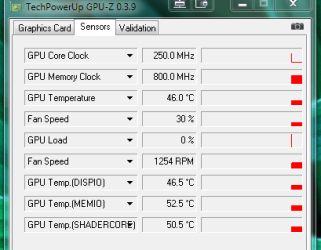
What does GPU-Z > sensors show the fan speed at?

techPowerUp! :: Downloads
 

My Computer

Computer type
PC/Desktop
Computer Manufacturer/Model Number
Systems by SmartEyeball
OS
8 Pro x64
CPU
i7 3770K 4.6GHz
Motherboard
ASUS P8Z77 WS
Memory
16GB G.Skill Trident X 2666mhz
Graphics Card(s)
x2 EVGA 780 Ti Superclocked SLI
Sound Card
SB X-FI Surround 5.1 PRO USB / ATH-AD900 Headphones
Monitor(s) Displays
x3 Dell U2410 / 58" Samsung
Screen Resolution
5760*1200/ 1920*1200
Hard Drives
2x Intel 520 240GB (RAID 0) * 2x WD Caviar Blacks 2TB (RAID 0) * 2TB WD Caviar Black * Sony Optirac DVD
PSU
Silverstone Strider Evolution 1200W
Case
Thermaltake Level 10 GT Snow Edition
Cooling
Noctua NH-D14
Keyboard
Topre Realforce // Ducky Shine MX Black // Filco Ninja TKL
Mouse
Thermaltake Theron (Highly Recommended) + Razer Imperator
Antivirus
MSE
Browser
IE, FF, WaterFox
Other Info
GT Extreme V2 Sim Racing Cockpit + 40" LCD and K/B Mouse stand ▼
Fanatec CSR Elite Wheel + Clubsport V1 Pedals + CSR shifter/7G-H ▼Saitek X52 Pro ▼ TrackIR 5 Pro
Buttkicker v2 Seat Rumbler with Dedicated 5.1 and Sub Woofer attached to frame ▼
=
Bloody Big Grin
is shows two gpu one is at 58 and the other is 52 and the pcb is 48 fan speed is 100 and 3195RPM
 

My Computer

Computer Manufacturer/Model Number
PACKARD bell
OS
windows 7
CPU
4 CPU by Intel Core 2 Quad Q6600
Motherboard
Vegas 2 Motherboard Full ATX motherboard
Memory
3 gb ram
Graphics Card(s)
NVIDIA GeForce 8800
Hard Drives
500GB C D =500GB
Seagate Barracuda 7200.10 500 GB Hard Disk by 2
Other Info
8 in 1 Gigabyte GO-C81LA CardReader/Writer
My Computer

Computer Manufacturer/Model Number
Home built
OS
Windows 7 Home Premium x64
CPU
AMD Phenom II X4 945
Motherboard
ASUS M4N98TD EVO AM3 NVIDIA nForce 980a SLI
Memory
8 GB G-Skill 1.5v DDR 3 1333Mhz
Graphics Card(s)
(2) MSI 512MB GTS 250 SLI
Sound Card
Soundblaster Audigy 2 platinum
Monitor(s) Displays
Samsung 2255BW 22"
Screen Resolution
1650 x 1050
Hard Drives
2 WD 250GB 7500RPM
PSU
Antec TP-750. The ultimate bang for the buck PSU
Case
Raidmax
Cooling
Sycthe Slipstream cooling fans(4)
Keyboard
Zboard Merc
Mouse
Logitech MX-518
Internet Speed
3MB
Other Info
LG Blu-Ray/DVD combo drive/LG DVD-RW w/ lightscribe
but i only had the card for a year and a half what is thermal paste.
 

My Computer

Computer Manufacturer/Model Number
PACKARD bell
OS
windows 7
CPU
4 CPU by Intel Core 2 Quad Q6600
Motherboard
Vegas 2 Motherboard Full ATX motherboard
Memory
3 gb ram
Graphics Card(s)
NVIDIA GeForce 8800
Hard Drives
500GB C D =500GB
Seagate Barracuda 7200.10 500 GB Hard Disk by 2
Other Info
8 in 1 Gigabyte GO-C81LA CardReader/Writer
It's a metallic(silver) based paste compound that helps to transfer heat from in your case a GPU and RAM surfaces to a cooler by elimating air gaps for an irregular surface. It comes in a little tube for around 5 bucks and you just apply a thin even layer to the surface of a cleaned surface. Usually a pea sized amount works. You can use an old credit card to spread it on the surface of your GPU. Even if you've had it for a year and a half it may have been on a shelf for a while. 8800 GTX's have been out since late 2006. 8800's are notorius for running hot and over time thermal paste degradation happens. I had the same thing happen with my 8800 GTS after a couple of years. If you do this make sure that you are neat with it and that you don't overapply it. This stuff is conductive and can short out components and make your day go south.

http://www.newegg.com/Product/Produ...A=0&Order=BESTMATCH&Description=thermal+paste
 

My Computer

Computer Manufacturer/Model Number
Home built
OS
Windows 7 Home Premium x64
CPU
AMD Phenom II X4 945
Motherboard
ASUS M4N98TD EVO AM3 NVIDIA nForce 980a SLI
Memory
8 GB G-Skill 1.5v DDR 3 1333Mhz
Graphics Card(s)
(2) MSI 512MB GTS 250 SLI
Sound Card
Soundblaster Audigy 2 platinum
Monitor(s) Displays
Samsung 2255BW 22"
Screen Resolution
1650 x 1050
Hard Drives
2 WD 250GB 7500RPM
PSU
Antec TP-750. The ultimate bang for the buck PSU
Case
Raidmax
Cooling
Sycthe Slipstream cooling fans(4)
Keyboard
Zboard Merc
Mouse
Logitech MX-518
Internet Speed
3MB
Other Info
LG Blu-Ray/DVD combo drive/LG DVD-RW w/ lightscribe
  • Like
Reactions: Dom
if my gpu is at 60 what will that cause
 

My Computer

Computer Manufacturer/Model Number
PACKARD bell
OS
windows 7
CPU
4 CPU by Intel Core 2 Quad Q6600
Motherboard
Vegas 2 Motherboard Full ATX motherboard
Memory
3 gb ram
Graphics Card(s)
NVIDIA GeForce 8800
Hard Drives
500GB C D =500GB
Seagate Barracuda 7200.10 500 GB Hard Disk by 2
Other Info
8 in 1 Gigabyte GO-C81LA CardReader/Writer
if my gpu is at 60 what will that cause

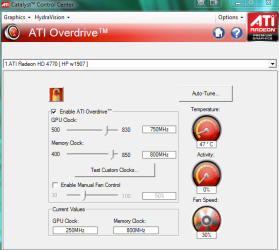
Do you have any temperature readings from when you first installed the card or that you can remember. I had a BFG 8400 GS 512mb that ran hot as well. When I did a custom build I went with the XFX Radeon 4770. Going from a low end card to a high end card made all the difference in the hardware as well as software and 3rd party software to control fans. You might want to start thinking about a new card. From all the replies so far, it sounds like the fan might be going out. It's worth a shot to try and fix the card w/thermal paste and see if that works and if not time for a new card.
gpu.PNG
ATI.PNG
 

My Computer

Computer Manufacturer/Model Number
Custom built
OS
Windows 7 Ultimate 64 bit
CPU
AMD Phenom II X4 965 Black Edition
Motherboard
Gigabyte GA-MA790X-DS4
Memory
GSkill 4 X 2 GB PC 8500
Graphics Card(s)
XFX Radeon HD 6790 D
Sound Card
On board RealTek HD
Monitor(s) Displays
Dual monitors:Samsung SyncMaster S20B300
Screen Resolution
1600 X 900
Hard Drives
Seagate Barracuda 1TB (primary)
Seagate Barracuda 2 X 320 GB
PSU
Ultra X4 750 watt fully modular
Case
Thermaltake Overseer RX 1 full tower
Cooling
Core-Contact 92 mm CPU Cooler
Keyboard
Logitech G510
Mouse
Razor DeathAdder
Internet Speed
50/5 Mbps UL/DL
Other Info
Optical: Super Muliti DVD burner w/lightscribe, Hauppauge WinTV HVR-1800
If you are not into switching your card you can also try after-market cooler if you are comfortable with taking apart the fan of the 8800GTX

Arctic Cooling

It works for the 8800 but just make sure and research more of it. There are others but this one was 21 USD. I just have good experience with Arctic cooling but there are other companies. I know switching cards isn't always an option for some so this might help. Along with what everyones already mentioned.
 

My Computer

Computer Manufacturer/Model Number
ZezasuBuilt
OS
Windows Seven x64
CPU
Intel Core 2 Quad Q6700 3.2Ghz
Motherboard
GA-UD3P Intel and Crossfire ready
Memory
6GB Samsung
Graphics Card(s)
5850 Sapphire Toxic Edition
Sound Card
On Board relTek
Monitor(s) Displays
23inch LG W2343T Dual Montiors
Screen Resolution
1920-1680 Dualmonitors
Hard Drives
Western Digital 7200. X 2 (500gb)
Sega 7.2 X 2 (500gb)
PSU
Corsair HX650W
Case
Lian Li Lan Cool PC-k7
Cooling
Artic Freezer 7 Artic Case fans
Keyboard
Logitech illuminated keyboard
Mouse
Logitech Trackball
Internet Speed
1MB down 500k UP (10mb D /1mb U )
Other Info
Windows 7, have yet to reinstall :)
if your load temps are 70c then i'd leave it as it is, we can see the card itself is clear for airflow...

60c is well within thermal spec for the card (though a pretty high idle temp), if you reapply the thermal grease you might only gain yourself a few degrees & you run the risk of bricking the card completely by removing the cooler.

if your load temps begin to rise, reapplying paste or aftermarket cooling will be your only option before the card burns itself out.

:)
 

My Computer

Computer Manufacturer/Model Number
myself
OS
SEVEN x64
CPU
Q9450 @ 3.6GHZ 1.34v
Motherboard
ASUS P5K PREMIUM P35
Memory
8GB 1066 buffalo firestix @ 1152mhz CL5
Graphics Card(s)
Sapphire HD 5970 + GTX260 (physX)
Sound Card
Creative X-FI Xtreme Gamer
Monitor(s) Displays
SAMSUNG 20'' & SAMSUNG 23'' (dual screens)
Screen Resolution
2048x1152 & 1680x1050
Hard Drives
1x seagate 160gb IDE & 1x seagate 160gb SATA
PSU
XCILIO 850w (78A)
Case
CM590 1x 120x38mm & 2x92x38mm / 4x 120x25mm
Cooling
AC7 PRO @ 92x38mm blower, Lamptron military bus bay controll
Keyboard
LOGITECH E110
Mouse
logitech NX5
Internet Speed
2MB
Other Info
its a continual ''work in progress''....
  • Like
Reactions: Dom
Back
Top