How to copy and paste Full Internet Path to Public Folders & Files

detrychn

New member
Local time
12:08 PM
Messages
3
Hello,

I would like to know how I can copy the full internet path to public folders and files in Windows 7.

In Windows XP, I was able to right click a folder or file, select copy path --> copy full internet path, and then paste the result into emails / documents / etc in order to direct work colleagues to files without having to send them as an attachment (using up my limited space in my outlook client).

I'm new to the forums, but would really appreciate any help you can provide!

Nick
 

My Computer My Computer

At a glance

Windows 7 64 bit8mb
Computer Manufacturer/Model Number
HP Elitebook 8540w
OS
Windows 7 64 bit
Memory
8mb
Does the context menu option "Copy shortcut" not do this?
 

My Computer My Computer

At a glance

Linux Mint 17 Cinnamon | Win 7 Ult x64Intel I7-3770K @ 4.2ghz32GB G-Skill C10QEVGA GTX 670 2GB SC
Computer type
PC/Desktop
Computer Manufacturer/Model Number
Home Made
OS
Linux Mint 17 Cinnamon | Win 7 Ult x64
CPU
Intel I7-3770K @ 4.2ghz
Motherboard
ASRock Extreme 4
Memory
32GB G-Skill C10Q
Graphics Card(s)
EVGA GTX 670 2GB SC
Sound Card
Creative Fatality ExtremeGamer
Monitor(s) Displays
LG E2742V x 2
Screen Resolution
1920x1080
Hard Drives
256GB Vertex 4 SSD
2TB Seagate ST2000DM001
1TB Seagate ST1000DM003
PSU
Corsair HX 650
Case
HAF 932 advanced
Cooling
Corsair H100i liquid cooler
Keyboard
Logitech Wireless
Mouse
Logitech Wireless
Internet Speed
OptusNet NBN 100/40
Antivirus
Malwarebytes
Browser
Firefox 30
Other Info
Router: Sagemcom F@st 3846 Crippled by Optus.
Copy

Copy the path from your browser. (right click > copy) Navigate to where you want to put the link (say a directory) right click > new > shortcut.
 

My Computer My Computer

At a glance

win 7 X64 Ultimate SP1I3770KG Skill F3-14900CL9-4GBXL x 4NVIDIA GeForce GTX670 + Intel 4000
Computer Manufacturer/Model Number
BGC (Bob's Garage Crew)
OS
win 7 X64 Ultimate SP1
CPU
I3770K
Motherboard
Asus P8Z77-V Deluxe
Memory
G Skill F3-14900CL9-4GBXL x 4
Graphics Card(s)
NVIDIA GeForce GTX670 + Intel 4000
Sound Card
Realtek HD 5.1 (MOB)
Monitor(s) Displays
Asus VW224T (1)
Screen Resolution
1920 x 1080
Hard Drives
SATA Corsair Force GT 2.5" 180GB (System) Sata 3
OCZ Vertex3 120GB
OCZ Vertex 2 120GB 2.5" SATA II
ST31000524AS 1000.2GB
WD15EARS (External)
PSU
CoolerMaster 1000 Watt
Case
CoolerMaster HAF X
Cooling
CPU -- CoolerMaster 520N
Keyboard
MS Wireless 3000 V2
Mouse
MS Wireless 3000 V2
Internet Speed
Cable
Antivirus
Norton Internet Security
Browser
IE9
Other Info
AMI Bios 1805
OC'd 3%
FILE PATH - FROM START MENU
Start Menu, All Programs, highlight program + right-click on it, select Properties, Shortcut, Target (shows actual file path NOT the shortcut path!)

FILE PATH - FROM WINDOWS EXPLORER
Open Windows Explorer, highlight the file, and press Shift + right-click mouse.
Select: Copy as path.
Open a document (i.e. Word page or email) and select: Paste.
The path of the file will be pasted in the doc, email, etc.

FILE PATH - FROM THE TASKBAR – (FOR A FILE PINNED TO TASKBAR OR IN QUICK LAUNCH)
Be sure the program is not running at the time.
Hold the Shift key while right-clicking the pinned shortcut.
This will bring up the full Context Menu.
Select: Copy as path.
Open a document (i.e. Word page or email) and select: Paste.
The path of the file will be pasted in the doc, email, etc.
 

My Computer My Computer

At a glance

Vista 64 bit and 32 bit (SP2)Intel(R) Core(TM)2 Duo Processor T9400 (2.53 GHz4GB DDR2 System Memory (2 Dimm)512 MB NVIDIA GeForce 9600M GT
Computer Manufacturer/Model Number
HP Pavillion dv5t (generation 1)
OS
Vista 64 bit and 32 bit (SP2)
CPU
Intel(R) Core(TM)2 Duo Processor T9400 (2.53 GHz
Memory
4GB DDR2 System Memory (2 Dimm)
Graphics Card(s)
512 MB NVIDIA GeForce 9600M GT
Monitor(s) Displays
15.4" diagonal WSXGA+ High-Definition HP BrightView Widescre
Screen Resolution
1680 x 1050
Hard Drives
320GB 5400RPM SATA Hard Drive with HP ProtectSmart Hard Drive Protection
Keyboard
Built-in HP
Mouse
Built in - Synaptics TouchPad V6.5 on PS/2 Port
Internet Speed
Max
Other Info
~ Intel Next-Gen Wireless-N Mini-card w/Bluetooth ~ Blu-Ray ROM DVD+/-R/RW ~ Integ. HDTV Hybrid Tuner ~ 12 Cell Battery ~ MS Office (Home Premium) 2007 ~
I appreciate the feedback, but none of it provides a solution to my original problem:

I need to be able to paste the path as a link (hyperlink, internet link, etc.) so that when someone clicks that link, they open the file / folder.

This used to be possible and extremely easy / useful in Windows XP.

Anyone have a solution?

Thanks
 

My Computer My Computer

At a glance

Windows 7 64 bit8mb
Computer Manufacturer/Model Number
HP Elitebook 8540w
OS
Windows 7 64 bit
Memory
8mb
It is not possible, nor has it ever been possible, to paste a path to files on your computer to an email so that receiver can open that file just by clicking the link. In network environment when the file is shared it is possible to share the link, but not over an email when receiver is not on the same network. Absolutely not possible, has never been possible. Not with XP, not with any other Windows version or operating system.

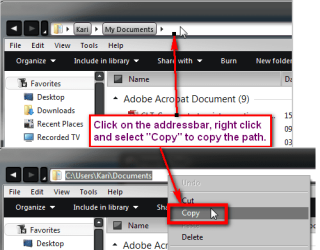
If you want to copy the path you need to click on Explorer address bar to change default Windows way to show address to traditional path, right click and select Copy. This copies the path to the folder but not the complete path (including file name).

Copy_path.png

Kari
 

My Computer My Computer

At a glance

Windows 10 Pro x64 EN-GB1.6 GHz Intel Core i7-720QM Processor6 GBATI Mobility Radeon HD 5850 Graphics
Computer type
Laptop
Computer Manufacturer/Model Number
HP ENVY 17-1150eg
OS
Windows 10 Pro x64 EN-GB
CPU
1.6 GHz Intel Core i7-720QM Processor
Memory
6 GB
Graphics Card(s)
ATI Mobility Radeon HD 5850 Graphics
Sound Card
Beats sound system with integrated subwoofer
Monitor(s) Displays
17" laptop display, 22" LED and 32" Full HD TV through HDMI
Screen Resolution
1600*900 (1), 1920*1080 (2&3)
Hard Drives
Internal: 2 x 500 GB SATA Hard Disk Drive 7200 rpm
External: 2TB for backups, 3TB USB3 network drive for media
Cooling
As Envy runs a bit warm, I have it on a Cooler Master pad
Keyboard
Logitech diNovo Media Desktop Laser (bluetooth)
Mouse
Logitech Performance Mouse MX
Internet Speed
50/10 Mbps VDSL
Antivirus
Windows Defender 4.3.9431.0
Browser
Maxthon 3.5.2., IE11

My Computer My Computer

At a glance

Microsoft Windows 7 Home Premium 64-bit 7600IIx4 amd athelon 635 processor2x2gbati radeon HD 5450
Computer Manufacturer/Model Number
Hewlett packard/p6512uk
OS
Microsoft Windows 7 Home Premium 64-bit 7600
CPU
IIx4 amd athelon 635 processor
Motherboard
FOXCONN 2AA9
Memory
2x2gb
Graphics Card(s)
ati radeon HD 5450
Sound Card
(1) Realtek High Definition Audio (2) AMD High Definition
Monitor(s) Displays
samsung lcd tv 32"
Screen Resolution
1360x 768
Hard Drives
(1) WDC WD10 01FAES-60Z2A0 SATA Disk Device (2) Maxtor OneTouch USB Device (3) ST310003 33AS USB Device (4) WD My Book 1111 USB Device
PSU
?
Cooling
air!
Keyboard
wireless hp
Mouse
wireless Hp,optical
Internet Speed
1.10mb/s
Antivirus
MSE
Browser
Firefox
Yeah, copying the path of an object sitting on your system will not be accessible by anybody. The object has to be on a server somewhere (Skydrive, Dropbox, etc.).

But if it is a URL, that is easy. Just highlight and Copy/Paste.
 

My Computer My Computer

At a glance

Vista, Windows7, Mint Mate, Zorin, Windows 8from 1.6GHz Duo to i7
Computer Manufacturer/Model Number
HP, Dell, Gateway, Toshiba - 4 laptops and 2 desktops
OS
Vista, Windows7, Mint Mate, Zorin, Windows 8
CPU
from 1.6GHz Duo to i7
Monitor(s) Displays
2x HP w2207
Hard Drives
5x HDD, 7x SSD, 12x Externals
Keyboard
with trackball - no mices
Mouse
Trackball mice
Internet Speed
DSL 6000
I should have clarified that i'm looking to do this in a network environment. The files and folders to which i'm trying to share links are all shared files and folders.

@boobah - that seems like it would be the best idea; however, my company's firewalls would prevent the install of that program, so much so, that i'm not even allowed to view the website...

any ideas?
 

My Computer My Computer

At a glance

Windows 7 64 bit8mb
Computer Manufacturer/Model Number
HP Elitebook 8540w
OS
Windows 7 64 bit
Memory
8mb
Just put the files you want to share into a folder, then get the people you want to share with to add that to a library on their system, then they only have to do it once and you only have to give them the path once and any files they need from you will just be there.
 

My Computer My Computer

At a glance

Windows 7 Ultimate x64Intel Core2 Quad Q8300 2.5GhzKingston HyperX 4x1GB DDR2 1066MhzAsus/Nvidia 9500GT 1GB
Computer type
PC/Desktop
Computer Manufacturer/Model Number
Self Build
OS
Windows 7 Ultimate x64
CPU
Intel Core2 Quad Q8300 2.5Ghz
Motherboard
Asus P5QD Turbo
Memory
Kingston HyperX 4x1GB DDR2 1066Mhz
Graphics Card(s)
Asus/Nvidia 9500GT 1GB
Sound Card
On-Board HD
Monitor(s) Displays
22" Widescreen TFT
Screen Resolution
1920x1080
Hard Drives
2x 320Gb Seagate SATAII RAID 0
2x 80Gb Seagate SATAII RAID 0
1x 1tb hybrid (8gb ssd)
PSU
650w
Case
ATX
Cooling
140mm front, 120mm Rear, 80mm Chipset + stock CPU and GPU
Keyboard
Plastic one
Mouse
Plastic one
Internet Speed
4Mbps
Other Info
Laptop: HP Elitebook 2560p
i5 @2.7Ghz 4GB DDR3
Did you ever find out?

Hey Nick - Did you ever find out how to do this?

Hello,

I would like to know how I can copy the full internet path to public folders and files in Windows 7.

In Windows XP, I was able to right click a folder or file, select copy path --> copy full internet path, and then paste the result into emails / documents / etc in order to direct work colleagues to files without having to send them as an attachment (using up my limited space in my outlook client).

I'm new to the forums, but would really appreciate any help you can provide!

Nick
 

My Computer My Computer

At a glance

x64
OS
x64
Shared Folder?

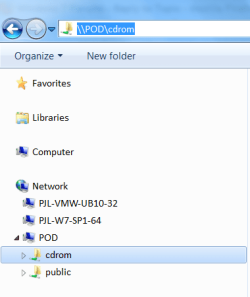
If the folder appears in the "Network" section in "Windows Explorer" (i.e. it has been shared) you can copy the path name from the "Address Bar".
UNC Path.png
 

My Computer My Computer

At a glance

W7 Ultimate SP1, LM19.2 MATE, W10 Home 1703, ...AMD Phenom II x6 1100T, 3.3 GHz12GB DDR3 1333 G-Skill (4GB x 2), G-Skill (2G...NVIDIA GeForce GTX 660
Computer type
PC/Desktop
Computer Manufacturer/Model Number
n/a
OS
W7 Ultimate SP1, LM19.2 MATE, W10 Home 1703, W10 Pro 1703 VM, #All 64 bit
CPU
AMD Phenom II x6 1100T, 3.3 GHz
Motherboard
ASUS M4A88T-M/USB3 (AM3)
Memory
12GB DDR3 1333 G-Skill (4GB x 2), G-Skill (2GB x 2)
Graphics Card(s)
NVIDIA GeForce GTX 660
Sound Card
Realtek?
Monitor(s) Displays
Samsung S23B350
Screen Resolution
1920x1080
Hard Drives
WD Green 2TB (SATA), WD Green 3TB (SATA), WD Blue 4TB (SATA), WD Blue 6TB (SATA)
PSU
Cooler Master
Case
Antec GX300 Tower
Cooling
3x Antec TRICOOL 120mm Fans
Mouse
Wired Optical
Internet Speed
DSL
Antivirus
Avast
Browser
Pale Moon (64 bit)
Other Info
2018-12-27 Upgraded HDDs
2015-12-10 Upgraded case, graphics card, storage
2015-08-15 Upgraded motherboard & RAM
2015-07-15 Upgraded LM17.1 to LM17.2
Pursuant to lehnerus2000, you can also get the UNC path of a file in one of these folders in the "Network" section, such as public, for example, by opening the folder, Shift+Right-Click the file, Click "Copy as path", then paste to see the full UNC pathname of the file.

Unfortunately, I have not found an easier way to do this, certainly not in a Windows Explorer launched from a network drive letter, as was easily done using "Copy Full Path" from the XP pop-up menu.
 

My Computer My Computer

At a glance

Windows 7 Professional 64 bitIntel Core i7 M620 @2.67 GHz x 4 (I guess)8.00 GBNVIDIA NVS 3100M
Computer type
Laptop
Computer Manufacturer/Model Number
Dell
OS
Windows 7 Professional 64 bit
CPU
Intel Core i7 M620 @2.67 GHz x 4 (I guess)
Motherboard
?
Memory
8.00 GB
Graphics Card(s)
NVIDIA NVS 3100M
Hard Drives
ST9320423AS
WD My Passport 0740 USB
Antivirus
Symantec Endpoint Protection
Browser
Mozilla Firefox, IE8
Back
Top