How to create a network profile shortcut in Win7 Pro??

PepeDepp

New member
Local time
3:59 PM
Messages
2
Location
Cairns, Queensland, Australia
I am trying to setup something for the company I work for that makes it easy for staff to change the network settings when our ADSL goes down and we want to use wireless broadband as a backup. BUT we still need to have access to the LAN which would mean different gateway settings for the different adapters.

I was wondering if it is possible in Windows 7 Pro to create a shortcut to a pre configured network profile in windows 7?

Thanks in advance.
 

My Computer My Computer

At a glance

Queenslandi3's & i5's4gb
Computer type
PC/Desktop
Computer Manufacturer/Model Number
Dell
OS
Queensland
CPU
i3's & i5's
Memory
4gb
Browser
Chrome
Welcome to seven forums.

I am trying to setup something for the company I work for that makes it easy for staff to change the network settings when our ADSL goes down and we want to use wireless broadband as a backup. BUT we still need to have access to the LAN which would mean different gateway settings for the different adapters.

I was wondering if it is possible in Windows 7 Pro to create a shortcut to a pre configured network profile in windows 7?

Sure it. Create your two network connections in network and sharing (wired and wireless, or whatever). Then create two shortcuts on your desktop, with the following code.. Simple batch files..

If both profiles have LAN access, why would you need to change the gateway? It's disable one profile/enable the other. We use DHCP so for us, with a home lan of 20 or so devices it works seamlessly. LAN access is always available, and the Internet profile is all that gets changed..

Wouldn't you only need to change gateways if the individual connections used different routers?

Code:
@echo off
netsh interface set interface name="Local Area Connection" admin=disabled
netsh interface set interface name="Local Area Connection 2" admin=enabled
Code:
@echo off
netsh interface set interface name="Local Area Connection 2" admin=disabled
netsh interface set interface name="Local Area Connection" admin=enabled

Save those as .bat or .cmd files and place on the desktop or startmenu..
 

My Computer My Computer

At a glance

Linux Mint 17 Cinnamon | Win 7 Ult x64Intel I7-3770K @ 4.2ghz32GB G-Skill C10QEVGA GTX 670 2GB SC
Computer type
PC/Desktop
Computer Manufacturer/Model Number
Home Made
OS
Linux Mint 17 Cinnamon | Win 7 Ult x64
CPU
Intel I7-3770K @ 4.2ghz
Motherboard
ASRock Extreme 4
Memory
32GB G-Skill C10Q
Graphics Card(s)
EVGA GTX 670 2GB SC
Sound Card
Creative Fatality ExtremeGamer
Monitor(s) Displays
LG E2742V x 2
Screen Resolution
1920x1080
Hard Drives
256GB Vertex 4 SSD
2TB Seagate ST2000DM001
1TB Seagate ST1000DM003
PSU
Corsair HX 650
Case
HAF 932 advanced
Cooling
Corsair H100i liquid cooler
Keyboard
Logitech Wireless
Mouse
Logitech Wireless
Internet Speed
OptusNet NBN 100/40
Antivirus
Malwarebytes
Browser
Firefox 30
Other Info
Router: Sagemcom F@st 3846 Crippled by Optus.
I am trying to setup something for the company I work for that makes it easy for staff to change the network settings when our ADSL goes down and we want to use wireless broadband as a backup. BUT we still need to have access to the LAN which would mean different gateway settings for the different adapters.

I was wondering if it is possible in Windows 7 Pro to create a shortcut to a pre configured network profile in windows 7?

Thanks in advance.

You can easily set up a single NIC to use both gateways by using the advanced settings for IPv4. You could also keep both routers on the same subnet by turning off DHCP on the secondary router.

I'm not sure exactly the details of the required set up but the Admin may be able to use these two settings to get this set up.

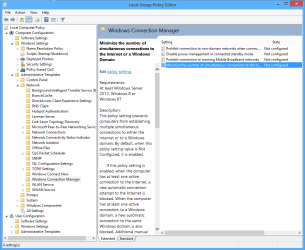
You can also set up Windows using the local group policy to connect to both of those connections at start up. By default Windows should choose the wired connection but if the wired connection cuts out then Windows would automatically use the wireless connection. You can also adjust the metric if required. This would enable automatic connection to the other network so there would be no need to set up a short cut.

The Local Group Policy setting in the picture needs to be disabled for dual connections to start automatically at start up, only one connection is actually used by Windows.
 

Attachments

  • Set up Windows for dual connections.PNG
    Set up Windows for dual connections.PNG
    36.6 KB · Views: 1

My Computer My Computer

At a glance

Windows 7 Ult, Windows 8.1 Pro,Q9650-4.275GHz, E8600 4.5GHz, E6750-3.8GHzG.Skill PC2 9600 1200Mhz 5 5 5 15 2TGTX480
Computer type
PC/Desktop
Computer Manufacturer/Model Number
Home built
OS
Windows 7 Ult, Windows 8.1 Pro,
CPU
Q9650-4.275GHz, E8600 4.5GHz, E6750-3.8GHz
Motherboard
Evga 780i FTW
Memory
G.Skill PC2 9600 1200Mhz 5 5 5 15 2T
Graphics Card(s)
GTX480
Sound Card
Asus Xonar D2
Monitor(s) Displays
HannsG
Screen Resolution
1680X1050
Hard Drives
GSkill Phoenix Pro 120GB SSD
PSU
ThermalTake Toughpower 1000Watt modular
Case
ThermalTake XaserV
Cooling
Xigmatek S1283
Keyboard
Logitech G15
Mouse
Logitech G9
Internet Speed
T1
Thanks heaps. I'll give that a go.

Cheers
 

My Computer My Computer

At a glance

Queenslandi3's & i5's4gb
Computer type
PC/Desktop
Computer Manufacturer/Model Number
Dell
OS
Queensland
CPU
i3's & i5's
Memory
4gb
Browser
Chrome
Back
Top