How to create a second primary partition to dual OS on a computer.

BrentR678

New member
Local time
11:46 AM
Messages
8
Hello,

I am trying to install Windows 8 on my computer dual booting with the Windows 7 that is already installed. My troubles are when trying to format the existing hard drive with Win 7 installed to make room for the new OS. I shrank the existing partition and now have 20GB of unallocated space. I then put in the Win 8 disk and tried to put it on that unallocated space. It gave me a message saying it cant install it on this partition and that the dynamic volume was not supported. I then tried taking that unallocated space and made it a simple volume with the same results. I remember reading somewhere i need to make a second system partition but dont remember how to do that. I guess what im looking for is help on how to create a dual booting computer with Windows 7 and Windows 8. I really appreciate all responses and thank you very much in advance!
 

My Computer My Computer

At a glance

Windows 7 Pro x64
OS
Windows 7 Pro x64
You cannot install an operating system on unallocated space, you have to create a primary partition first.

You also need to be using a basic volume and not a dynamic one and 20GB is the bare minimum for installing Windows 7, let alone Windows 8.

Although this tutorial shows how to dual-boot Windows 7 and Vista, the same principles will apply to a dual-boot with Windows 7 and Windows 8.

http://www.sevenforums.com/tutorials/5166-dual-boot-installation-windows-7-vista.html

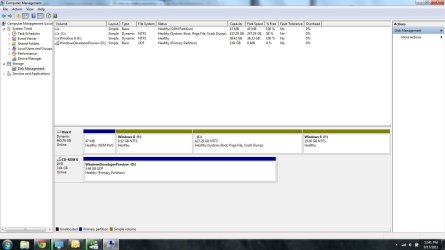
Please post your disk management layout so that we can advise you further.
 
Last edited:

My Computer My Computer

At a glance

Windows 7 Ultimate SP1 64-BitIntel Core i7 870 @ 2.93GHz8Gb Dual-Channel DDR3 @ 664MHznVidia GeForce GTX 460 1024MB dedicated RAM
Computer Manufacturer/Model Number
HP Pavilion Elite 495UK
OS
Windows 7 Ultimate SP1 64-Bit
CPU
Intel Core i7 870 @ 2.93GHz
Motherboard
MSI 2A9C (CPU1)
Memory
8Gb Dual-Channel DDR3 @ 664MHz
Graphics Card(s)
nVidia GeForce GTX 460 1024MB dedicated RAM
Sound Card
Realtek HD Audio
Monitor(s) Displays
HP2310i
Screen Resolution
1920 x 1080
Hard Drives
1x1954GB Hitachi HDS22020ALA 330 (RAID), 1x1954GB Hitachi External for backup and storage
PSU
460W
Case
HP Elite
Cooling
Air cooled
Keyboard
Logitech K750 solar-powered keyboard
Mouse
Logitech Wireless M180 mouse
Internet Speed
2Mb
Other Info
Pure Avanti Flow Internet Radio with iPod Dock, 64Gb iPod, HP USB Speakers, Sony MDR-V500 Headphones, Sony Vaio F-Series Laptop
Hey guys thanks for the quick reply! Right now it sounds like my biggest problem is that my hard drive is dynamic and I need to get it back to basic. If i remember right i need to completely reformat my computer to do so. Is that right? Or is there a way to still do it with a dynamic disk? Attached is an image of my disk management. Thanks again.
 

Attachments

  • Disk Management.jpg
    Disk Management.jpg
    95.9 KB · Views: 477

My Computer My Computer

At a glance

Windows 7 Pro x64
OS
Windows 7 Pro x64

My Computer My Computer

At a glance

Windows 7 Ultimate SP1 64-BitIntel Core i7 870 @ 2.93GHz8Gb Dual-Channel DDR3 @ 664MHznVidia GeForce GTX 460 1024MB dedicated RAM
Computer Manufacturer/Model Number
HP Pavilion Elite 495UK
OS
Windows 7 Ultimate SP1 64-Bit
CPU
Intel Core i7 870 @ 2.93GHz
Motherboard
MSI 2A9C (CPU1)
Memory
8Gb Dual-Channel DDR3 @ 664MHz
Graphics Card(s)
nVidia GeForce GTX 460 1024MB dedicated RAM
Sound Card
Realtek HD Audio
Monitor(s) Displays
HP2310i
Screen Resolution
1920 x 1080
Hard Drives
1x1954GB Hitachi HDS22020ALA 330 (RAID), 1x1954GB Hitachi External for backup and storage
PSU
460W
Case
HP Elite
Cooling
Air cooled
Keyboard
Logitech K750 solar-powered keyboard
Mouse
Logitech Wireless M180 mouse
Internet Speed
2Mb
Other Info
Pure Avanti Flow Internet Radio with iPod Dock, 64Gb iPod, HP USB Speakers, Sony MDR-V500 Headphones, Sony Vaio F-Series Laptop
Dynamic partitions are for spanning partitions across multiple HD's. You apparently ignored a warning it was about to convert when trying to create a fourth partiiton.

You'll need to burn to CD the previous, free version of Partiiton Wizard bootable CD to boot it, then Convert Dynamic to Basic Disk: pw422.zip ISO - Windows Live

You can also use PW CD to resize the partitions in any direction since I would get rid of the tiny second partition, resize C into its space, then make Win7 partition the size you truly want. Partition Wizard Use the Bootable CD

If you want more than four partitions in the future, you'll have to convert one which is not System partition to Logical using PW CD, which will then allow you to add as many Logical subpartitions as you want.
 
i use Paragon hard disk Manager for all my partions issues, it even has a wizard to make duel OS simple.
 

My Computer My Computer

At a glance

Windows 7 Ultimate 32 Bit SP 1Pentium 4, 3.00 GHz socket 7751GB DDR2Onboard
Computer Manufacturer/Model Number
Custom Built
OS
Windows 7 Ultimate 32 Bit SP 1
CPU
Pentium 4, 3.00 GHz socket 775
Motherboard
Foxconn
Memory
1GB DDR2
Graphics Card(s)
Onboard
Sound Card
Creative Labs (Soundblaster Live)
Monitor(s) Displays
UMC LCD
Screen Resolution
1024x768
Hard Drives
4 SATA
2 IDE
PSU
HEC-300AR-PTE
Case
Mesh
Cooling
Intel CPU fan, 3 generic case fans
Keyboard
Dell RT7D00
Mouse
Tiny
Internet Speed
Yawwwn
Other Info
my computer is rubbish, the only good thing about it is that it has cost me nothing to build as i have salvaged the components from freinds, everything including the monitor was free gratis!
And I use DiskPart to convert dynamic to basic.
 

My Computer My Computer

At a glance

MS Windows 7 Ultimate SP1 64-bitAMD A10-4600M6.00 GB Dual-Channel DDR3 @ 798MHz (11-11-12-28)AMD Radeon HD 7660G
Computer Manufacturer/Model Number
Toshiba Satellite S875D-S7239 laptop
OS
MS Windows 7 Ultimate SP1 64-bit
CPU
AMD A10-4600M
Motherboard
AMD Pumori (Socket FT1)
Memory
6.00 GB Dual-Channel DDR3 @ 798MHz (11-11-12-28)
Graphics Card(s)
AMD Radeon HD 7660G
Sound Card
High Definition Audio Device
Monitor(s) Displays
Generic PnP Monitor (1600x900@60Hz)
Screen Resolution
1600x900@60Hz
Hard Drives
SSD 119GB Corsair CSSD-V128GB2 ATA Device
Keyboard
Standard PS/2 Keyboard
Mouse
HP Wireless Optical Mobile Mouse Model FHA-3410
Internet Speed
What the local pub, local coffee shop offers.
Other Info
Optical Drive:MATSHITA BD-CMB UJ160B ATA Device


Also have an Asus ha1002xp netbook with Win 7 Ultimate installed.
Diskpart conversion is a destructive method, which is why the PW free older version was offered.
 
Before i have to convert to basic on my primary hard drive, i have a external hard drive thats still basic. Am i able to somehow install the OS on that? When i plugged it in, created a second primary partition on the drive and attempted to install Windows 8, its said installing to a usb hard drive isnt supported. Think thats just a limitation of the developers preview or am i doing something wrong.
 

My Computer My Computer

At a glance

Windows 7 Pro x64
OS
Windows 7 Pro x64
You can only install to an external disk with an eSata connection.
 

My Computer My Computer

At a glance

Vista, Windows7, Mint Mate, Zorin, Windows 8from 1.6GHz Duo to i7
Computer Manufacturer/Model Number
HP, Dell, Gateway, Toshiba - 4 laptops and 2 desktops
OS
Vista, Windows7, Mint Mate, Zorin, Windows 8
CPU
from 1.6GHz Duo to i7
Monitor(s) Displays
2x HP w2207
Hard Drives
5x HDD, 7x SSD, 12x Externals
Keyboard
with trackball - no mices
Mouse
Trackball mice
Internet Speed
DSL 6000
Okay ill probably buy an esata drive and run windows 8 off of that rather then off my main hard drive. Im not sure if its worth all the hassle of converting my disk back to basic. For that same point i could just as easily run off a virtual computer instead. Thank you all very much for your fast and helpful responses!
 

My Computer My Computer

At a glance

Windows 7 Pro x64
OS
Windows 7 Pro x64
You want your disk to be Basic unless spanning partitions across multiple HD´s. It is as simple as booting PW CD provided and clicking to convert.
 
Back
Top