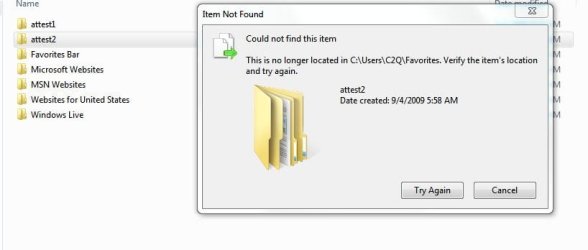
How to delete a file W7 says no longer there?

ben07

New member
Power User
Local time
12:26 AM
Messages
111
Windows says those two files attest1 and attest2 no longer there, but as you can see from the pix there are there:confused:, how to delete them? Thanks.
 

Attachments

  • Del.JPG
    Del.JPG
    29.4 KB · Views: 169

My Computer My Computer

At a glance

Windows 7 Pro x64 RTMIntel
OS
Windows 7 Pro x64 RTM
CPU
Intel
Did you delete them before??
Right click somewhere on the screen and select Refresh. See if the files still there after and try delete them.
 

My Computer My Computer

At a glance

Windows 7 Professional x64QuadCore AMD Phenom II X4 Black Edition 955 3...8 GB Crucial DDR3SAPPHIRE Radeon HD 4890 1GB HDMI New Edition
Computer Manufacturer/Model Number
MasterB/Custom
OS
Windows 7 Professional x64
CPU
QuadCore AMD Phenom II X4 Black Edition 955 3.2 GHz
Motherboard
Asus M4A785TD-V Evo
Memory
8 GB Crucial DDR3
Graphics Card(s)
SAPPHIRE Radeon HD 4890 1GB HDMI New Edition
Sound Card
VIA VT1708S HD Audio 7.1 onboard/ ATI HDMI video card
Monitor(s) Displays
Acer H233H 23'' LCD HDMI
Screen Resolution
1920x1080
Hard Drives
1x 500GB and 1x 1TB 7200RPM 32MB Cache WD Caviar Black
PSU
CORSAIR CMPSU-620HX 620W
Case
COOLER MASTER Storm Scout SGC-2000
Cooling
2x 140mm and 1x 120mm case fans, Stock CPU fan
Keyboard
Logitech MX 3200
Mouse
Logitech MX 3200
Internet Speed
15 Mbps
Other Info
My first build!
Hey masterB:D, yes I previously deleted those two folders from IE's Favorites, I guess I was hitting the "Yes" confirmation too fast (was deleting a bunch of bookmarks folders).

I tried "rename" them and delete, no go, refreshed both inside the folder as well on the desktop, no go:o, what else can I try?
 

My Computer My Computer

At a glance

Windows 7 Pro x64 RTMIntel
OS
Windows 7 Pro x64 RTM
CPU
Intel
try placing those folders in your favorites again and delete them from there. I don't know but worth a shot.

When I say that I mean making new folders with the same names, just so it's clear.
 

My Computer My Computer

At a glance

Windows 7 Ultimate 32 bitIntel Core 2 Duo CPU E4500 2.20 GHz1.99 GBIntel G33/G31 Express Chipset Family (256 MB)
Computer Manufacturer/Model Number
Seanix Desktop PC
OS
Windows 7 Ultimate 32 bit
CPU
Intel Core 2 Duo CPU E4500 2.20 GHz
Memory
1.99 GB
Graphics Card(s)
Intel G33/G31 Express Chipset Family (256 MB)
Sound Card
Realtek ALC888/1200
Monitor(s) Displays
DELL
Screen Resolution
1280 X 1024
Hard Drives
320GB Internal
200GB External
Case
Seanix
Keyboard
Seanix USB Keyboard
Mouse
Seanix USB Keyboard
Internet Speed
Broadband
Other Info
Getting close to 3 years old.
Try an unlocking software - Lock Hunter or Unlocker. And then use the Unlocking sw to delete the file. Or try to delete it in safe mode.
 

My Computer My Computer

At a glance

Windows 7 x64Intel Core 2 Duo E4500 @2200 Mhz4GB (2x2) DDR 2 800Geforce 8800 GTS 320 GDDR3
Computer Manufacturer/Model Number
Intel / Custom
OS
Windows 7 x64
CPU
Intel Core 2 Duo E4500 @2200 Mhz
Motherboard
Intel DG965WH
Memory
4GB (2x2) DDR 2 800
Graphics Card(s)
Geforce 8800 GTS 320 GDDR3
Sound Card
On Board IDT 7.1 Dolby
Monitor(s) Displays
Acer AL1717 / Philips 32PFL3403 (HDTV)
Screen Resolution
1280 * 1024 / 1280 * 768
Hard Drives
ST3250310AS Seagate Barracuda : 250 GB
SAMSUNG HD502HI Samsung SpinPoint F2EG : 500 GB
SAMSUNG HD502IJ SpinPoint F1 : 500 GB
WDC WD5000AAKS-22A7B0 : 500GB
PSU
500W
Case
Zebronics Peace Custom
Cooling
6 x Cooling Fans
Keyboard
Generic
Mouse
Generic - Profile Mouse
Internet Speed
Crap
Hello Ben,

In addition to the above, sometimes a simple restart of the computer will get rid of these ghost files.

Hope this helps,
Shawn
 

My Computer My Computer

At a glance

64-bit Windows 11 Pro for WorkstationsIntel i7-8700K OC'd to 5 GHz64 GB (4x16GB) G.SKILL TridentZ RGB DDR4 3600...ASUS ROG-STRIX-GTX1080TI-O11G-GAMING
Computer type
PC/Desktop
Computer Manufacturer/Model Number
Self built custom
OS
64-bit Windows 11 Pro for Workstations
CPU
Intel i7-8700K OC'd to 5 GHz
Motherboard
ASUS ROG Maximus XI Formula Z390
Memory
64 GB (4x16GB) G.SKILL TridentZ RGB DDR4 3600 MHz
Graphics Card(s)
ASUS ROG-STRIX-GTX1080TI-O11G-GAMING
Sound Card
Integrated
Monitor(s) Displays
2 x Samsung Odyssey G7 27"
Screen Resolution
2560x1440
Hard Drives
1TB Samsung 990 PRO M.2,
4TB Samsung 990 PRO PRO M.2,
TerraMaster F8 SSD Plus NAS
PSU
Seasonic Prime Titanium 850W
Case
Thermaltake Core P3
Cooling
Corsair Hydro H115i
Keyboard
Logitech wireless K800
Mouse
Logitech MX Master 4
Internet Speed
2 Gb/s Download and 100 Mb/s Upload
Antivirus
Malwarebyte Anti-Malware Premium
Browser
Google Chrome
Other Info
Logitech Z625 speaker system,
Logitech BRIO 4K Pro webcam,
HP Color LaserJet Pro MFP M477fdn,
APC SMART-UPS RT 1000 XL - SURT1000XLI,
Galaxy S23 Plus phone
Hello Ben,

In addition to the above, sometimes a simple restart of the computer will get rid of these ghost files.

Hope this helps,
Shawn

+1 this has happened to me in Vista a lot of times
 

My Computer My Computer

At a glance

Vista
OS
Vista
Thanks for all the suggestion/help.

Still couldn't delete those two folders:(, restarted at least 5 times, went into regedit and found those items under Favorites and deleted them, but now still showing in Favorites folder:confused:.

Re-import the bookmarks (was hoping the EXACT same names of those two folders would be over written), no go! I tried creating two folders with EXACT names to replace them, but Windows would only allow me to "Merge" and NOT "Replace"!

I also did a System Restore to a restore point prior to this, but those two folders are still there! Went into CMD and navigated to those two folders and using del *.* and deleted those under DOS, but still there!

This is really challenging:rolleyes:
 

My Computer My Computer

At a glance

Windows 7 Pro x64 RTMIntel
OS
Windows 7 Pro x64 RTM
CPU
Intel
I also did a System Restore to a restore point prior to this, but those two folders are still there!
Without sence system restore restore whole system and installed programs don't change your private data

Went into CMD and navigated to those two folders and using del *.* and deleted those under DOS, but still there!
This is really challenging:rolleyes:
You mean those folders are constantly re-created...Disable all startup programs in msconfig and delete them again + restart

And one more important warning...attest1 and attest2 are folders not files and "del *.*" remove only all files in folder,don't remove subfolders (surly these folders never been removed) you have to use following commands to remove these folders

rd /s C:\users\C2Q\Favorites\attest1
 

My Computer My Computer

At a glance

Windows 7 Professional x64 PLAMD Athlon 4450eGoodRam DDR2 2x2048MB (FSB 800MHz)nVidia GeForce 9600GT (G94-300) 1024 MB
Computer Manufacturer/Model Number
Custom made
OS
Windows 7 Professional x64 PL
CPU
AMD Athlon 4450e
Motherboard
Giga-Byte GA-MA69G-S3H
Memory
GoodRam DDR2 2x2048MB (FSB 800MHz)
Graphics Card(s)
nVidia GeForce 9600GT (G94-300) 1024 MB
Monitor(s) Displays
SAMSUNG SyncMaster HS2P301688
Hard Drives
Seagate ST3750330AS 750GB
PSU
Corsair 550W
Cooling
AeroCool ExtremeEngine 3T
Bingo Flavius:D, thank you!

rd /s did it:geek:
 

My Computer My Computer

At a glance

Windows 7 Pro x64 RTMIntel
OS
Windows 7 Pro x64 RTM
CPU
Intel
Back
Top
