Hello,
Can you advise me how I could get rid of admin folder in C:\Users ? I didn't have this folder in there before. I've recently turned on the default administrator with the command "net user administrator /active:yes" but also turned it off after some time with using word "no" instead of "yes". I mind that I see the same media device twice in my network, e.g. U50VG:Administrator: and U50VGeter:. I think this causes my problem. I look forward to your ides.
Here's how to delete it's user folder after you have disabled the built-in Adminstrator account,
Log on to another administrator account.
Open the C:\Users\Administratror folder, and click on Continue and Yes (UAC) to approve opening it.
Close the C:\Users\Administratror folder.
You should now be able to right click on the C:\Users\Administratror folder and click on Delete to do so.
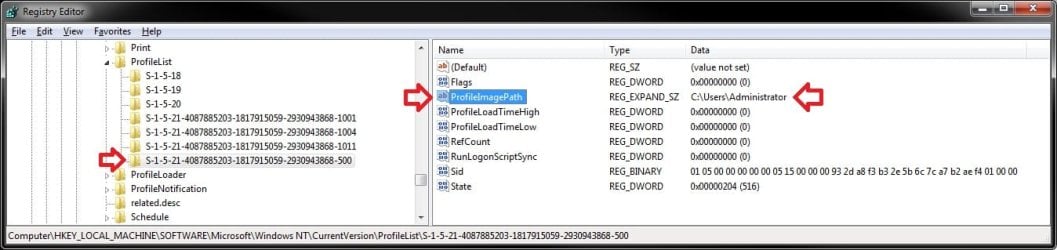
If that doesn't remove the extra media device for "Administrator", then go to the registry location below, look for and delete the long S-1-5-21...... key number that has C:\Users\Administratror as the Data value for it's ProfileImagePath. Restart the computer afterwards.
Hello Shawn,
I think I followed your advice correctly, but I didn't succeed. That OS has the only account(which is admin), so I logged on and when I tried to access/enter administrator directory in c:\Users it was no problem, it didn't show any pop-up caution window, it showed me the folder's content. So I moved back to c:\Users and tried to delete administrator folder, but I got some pop-up window saying "The action can't be completed because the file is open in Windows Media Player Network Sharing Service" ... here's what it says exactly:
Then I deleted the register you have told to delete and restarted the computer, but still no results. The administrator folder is still there and "U50VG:Admnistrator:" device in my network as well. Any other ideas? Sorry for my english, hope you can understand.
Stop the Windows Media Player Network Sharing Service temporarily, then see if you may be able to delete the C:\Users\Administratror folder. Afterwards, start the service again (Start - Automatic (Delated start)).
If not, then boot into Safe Mode, and see if you may be able to delete the C:\Users\Administratror folder. Afterwards, boot back into normal mode.
My Computer
Computer type
PC/Desktop
Computer Manufacturer/Model Number
Self built custom
OS
64-bit Windows 11 Pro for Workstations
CPU
Intel i7-8700K OC'd to 5 GHz
Motherboard
ASUS ROG Maximus XI Formula Z390
Memory
64 GB (4x16GB) G.SKILL TridentZ RGB DDR4 3600 MHz
Graphics Card(s)
ASUS ROG-STRIX-GTX1080TI-O11G-GAMING
Sound Card
Integrated
Monitor(s) Displays
2 x Samsung Odyssey G7 27"
Screen Resolution
2560x1440
Hard Drives
1TB Samsung 990 PRO M.2,
4TB Samsung 990 PRO PRO M.2,
TerraMaster F8 SSD Plus NAS
PSU
Seasonic Prime Titanium 850W
Case
Thermaltake Core P3
Cooling
Corsair Hydro H115i
Keyboard
Logitech wireless K800
Mouse
Logitech MX Master 4
Internet Speed
2 Gb/s Download and 100 Mb/s Upload
Antivirus
Malwarebyte Anti-Malware Premium
Browser
Google Chrome
Other Info
Logitech Z625 speaker system,
Logitech BRIO 4K Pro webcam,
HP Color LaserJet Pro MFP M477fdn,
APC SMART-UPS RT 1000 XL - SURT1000XLI,
Galaxy S23 Plus phone
Stopping the service and deleting the folder afterwards worked great. Now, I encountered another problem. I just clicked "switch user" accidentally and noticed screen like this:
Why is there "other user" option? When I click it, it requires name and pass.
The tutorial below should be able to help with this. My guess is that you may have another long S-1-5-21...... key number for the Administrator to delete, or you may have another one listed for another deleted user account.

 eter:. I think this causes my problem. I look forward to your ides.