How to delete please the restore points .......

ohsocute69

New member
Member
Local time
7:01 AM
Messages
69
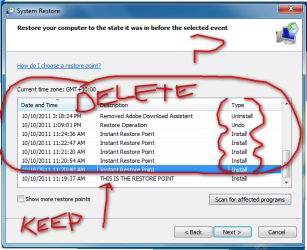
I have made a picture i am wanting to ONLY delete restore points that are in the red circle.
i have seen you can delete , but from what i gather only keep the latest restore point and the rest get deleted ...

any help thanks .....
 

Attachments

  • 2011-10-12_133732.png
    2011-10-12_133732.png
    42.4 KB · Views: 15

My Computer My Computer

OS
32
Start Menu>All Programs>Accessories>System Tools> Disk Cleanup> More Options Tab(top of window)>System Restore and Shadow Copies(Push Clean Up Button)

This Will Delete ALL but Last Restore Point!!!
 

My Computer My Computer

Computer type
PC/Desktop
Computer Manufacturer/Model Number
Jeepmann/Custom Built
OS
Windows 7 Ultimate 64bit
CPU
Intel Core i7-2600K Sandy Bridge 3.4GHz (@[email protected])
Motherboard
Asus Maximus IV Extreme LGA 1155 Intel P67
Memory
G.SKILL Ripjaws X Series 16GB 1600Mhz (4 x 4GB) (Stock)
Graphics Card(s)
x2 EVGA GeForce GTX 760's w/ACXCoolers in SLI Surround
Sound Card
On-Board
Monitor(s) Displays
3x Acer 24" HDMI Widescreen LCD Monitor
Screen Resolution
3@ 1920x1080 (5760x1080 In Surround)
Hard Drives
Samsung 830 128gb ssd
Western Digital Caviar Black 640GB 7200 RPM
Western Digital Caviar Black 500GB 7200 RPM
Seagate 2tb 7200 RPM
PSU
COOLER MASTER Silent Pro 1000W
Case
COOLER MASTER HAF X Black
Cooling
CORSAIR Hydro H70
Keyboard
Logitech G510
Mouse
Zalman M300
Internet Speed
100mbps-ish Down & 5mbps-ish Up
Other Info
I installed the stock 140mm case fan outside of case then installed the H70+ 1 of its 120mm fans inside case. Used the 2nd 120mm from the H70 to go in the Gpu tunnel.
230mm Front,200mm side,200mm top,120mm Gpu tunnel,120mm&140mm on H70.
CCleaner has the ability to do that. It is in the tools menu. Link in my sig.
 

My Computer My Computer

Computer type
Laptop
Computer Manufacturer/Model Number
Hewlett-Packard/G62-107SA Notebook
OS
Microsoft Windows 7 Home Premium 64-bit Service Pack 1
CPU
Intel(R) Core(TM) i3 CPU M 330 @ 2.13GHz
Motherboard
Hewlett-Packard 1425
Memory
8 GB DDR3
Graphics Card(s)
Intel(R) HD Graphics
Sound Card
Realtek High Definition Audio
Monitor(s) Displays
Builtin
Screen Resolution
1366 x 768 x 32 bits (4294967296 colors) @ 60 Hz
Hard Drives
250 GB SATA Hard Disk Drive 7200 rpm
2TB Seagate GoFlex USB 2 Drive
1TB Iomega Prestige USB 2 Drive
1.5TB Iomega Prestige USB 2 Drive (Samsung)
2TB WD MyBook Live NAS.
Mouse
Logitech Anywhere MX
Internet Speed
152 Mbs download 10 Mbs upload
Antivirus
Norton 360
Browser
Chrome
  • Like
Reactions: Arc
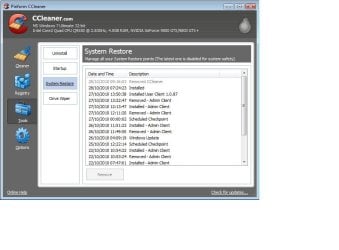
Just my 2 cents worth but I find it a lot easier to control my restore points using a free product called CCleaner.

CCleaner - Optimization and Cleaning - Free Download

When you run CCleaner you have a Tools option on the left side of the dashboard. Click on Tools and you'll see a System Restore option. From there you can remove whatever restore points you want except for the most current.

ccleaner.JPG
 

My Computer My Computer

Computer type
Laptop
Computer Manufacturer/Model Number
Sony Vaio VPCEB47GM Laptop
OS
Win 7 Pro 64-bit
CPU
Intel i5 2.4 Ghz
Memory
8GB DDR3
Graphics Card(s)
Intel HD 3000
Sound Card
IDT High Definition
Monitor(s) Displays
15.6 WGXA Anti-Glare LED
Screen Resolution
1280x800
Hard Drives
640Gb 7200rpm
Antivirus
MSE
Browser
Opera (primary) with IE9 backup
  • Like
Reactions: Arc
Start Menu>All Programs>Accessories>System Tools> Disk Cleanup> More Options Tab(top of window)>System Restore and Shadow Copies(Push Clean Up Button)

This Will Delete ALL but Last Restore Point!!!
this is were im not understanding, it has not got that tab , even after i ran that cleaner (options tab is there) but then im unable to (shadow) or anything that resembles this

AND now that restore point i want has gone rrrr
 

Attachments

  • 2011-10-12_191846.png
    2011-10-12_191846.png
    42.4 KB · Views: 16

My Computer My Computer

OS
32
Start Menu>All Programs>Accessories>System Tools> Disk Cleanup> More Options Tab(top of window)>System Restore and Shadow Copies(Push Clean Up Button)

This Will Delete ALL but Last Restore Point!!!
this is were im not understanding, it has not got that tab , even after i ran that cleaner (options tab is there) but then im unable to (shadow) or anything that resembles this

You might need to "Right Click" on "Disk Cleanup" and Run as Administrator. See if that gives you the option tab, mine is just there but I am the Admin. for my system.

Also check this Thread out.....
Disk Cleanup - Open and Use
or www.sevenforums.com/tutorials/818-disk-cleanup-open-use.html

You may also want to run that "Clean up System Files" (button in you pic) But read though the above link first it has a great step by step.
 
Last edited:

My Computer My Computer

Computer type
PC/Desktop
Computer Manufacturer/Model Number
Jeepmann/Custom Built
OS
Windows 7 Ultimate 64bit
CPU
Intel Core i7-2600K Sandy Bridge 3.4GHz (@[email protected])
Motherboard
Asus Maximus IV Extreme LGA 1155 Intel P67
Memory
G.SKILL Ripjaws X Series 16GB 1600Mhz (4 x 4GB) (Stock)
Graphics Card(s)
x2 EVGA GeForce GTX 760's w/ACXCoolers in SLI Surround
Sound Card
On-Board
Monitor(s) Displays
3x Acer 24" HDMI Widescreen LCD Monitor
Screen Resolution
3@ 1920x1080 (5760x1080 In Surround)
Hard Drives
Samsung 830 128gb ssd
Western Digital Caviar Black 640GB 7200 RPM
Western Digital Caviar Black 500GB 7200 RPM
Seagate 2tb 7200 RPM
PSU
COOLER MASTER Silent Pro 1000W
Case
COOLER MASTER HAF X Black
Cooling
CORSAIR Hydro H70
Keyboard
Logitech G510
Mouse
Zalman M300
Internet Speed
100mbps-ish Down & 5mbps-ish Up
Other Info
I installed the stock 140mm case fan outside of case then installed the H70+ 1 of its 120mm fans inside case. Used the 2nd 120mm from the H70 to go in the Gpu tunnel.
230mm Front,200mm side,200mm top,120mm Gpu tunnel,120mm&140mm on H70.
  • Like
Reactions: Arc
Please note that CCleaner on XP does NOT purge the entire Restore Points.
It only purges the Registry Hives within each R.P. because they become redundant when access for restoration is hidden.
Each R.P. holds a self contained set of Registry Hives that FULLY holds the entire state of the Registry as at that time.
Each R.P. also holds copies of all deleted and updated files as they were removed during the life of that Restore Point. Those MUST NOT be removed otherwise when Windows restores to an earlier available R.P. it will NOT have a copy of the original deleted/replaced file and your system is then totally corrupted.

I have no experience of Restore Points with Windows 7, but assume something similar.
Macrium Backups are more than adequate for me

CCleaner is good, but if you want to only retain the last R.P. then Disc Cleanup will remove all the previous file backups as well as the registry backups.
 

My Computer My Computer

Computer Manufacturer/Model Number
ASUSTeK Computer INC. M3A32-MVP DELUXE (CPU 1)
OS
Windows 7 Ultimate 64 bit SP1 x64
CPU
AMD Phenom X4 9500
Motherboard
ASUSTeK M3A32-MVP Deluxe (CPU 1)
Memory
8 GB
Graphics Card(s)
ATI Radeon HD 4600 Series
Sound Card
AMD High Definition Audio Device
Monitor(s) Displays
SyncMaster (1680x1050@60Hz)
Hard Drives
59GB OCZ-VERTEX2 ATA Device
+
977GB SAMSUNG HD103SJ ATA Device
+
625GB WDC WD6401AALS-00L3B2 ATA Device

My Computer My Computer

Computer type
PC/Desktop
Computer Manufacturer/Model Number
Self built custom
OS
64-bit Windows 11 Pro for Workstations
CPU
Intel i7-8700K OC'd to 5 GHz
Motherboard
ASUS ROG Maximus XI Formula Z390
Memory
64 GB (4x16GB) G.SKILL TridentZ RGB DDR4 3600 MHz
Graphics Card(s)
ASUS ROG-STRIX-GTX1080TI-O11G-GAMING
Sound Card
Integrated
Monitor(s) Displays
2 x Samsung Odyssey G7 27"
Screen Resolution
2560x1440
Hard Drives
1TB Samsung 990 PRO M.2,
4TB Samsung 990 PRO PRO M.2,
TerraMaster F8 SSD Plus NAS
PSU
Seasonic Prime Titanium 850W
Case
Thermaltake Core P3
Cooling
Corsair Hydro H115i
Keyboard
Logitech wireless K800
Mouse
Logitech MX Master 4
Internet Speed
2 Gb/s Download and 100 Mb/s Upload
Antivirus
Malwarebyte Anti-Malware Premium
Browser
Google Chrome
Other Info
Logitech Z625 speaker system,
Logitech BRIO 4K Pro webcam,
HP Color LaserJet Pro MFP M477fdn,
APC SMART-UPS RT 1000 XL - SURT1000XLI,
Galaxy S23 Plus phone
Back
Top