Solved How to delete subfolder but not it's content

ScottW

New member
Local time
6:53 PM
Messages
13
I have a few movies I've saved on the hard drive but it's a hassle to navigate to them e.g. /burns/fulldvd9/fulldisc. I want to delete the middle subfolder without messing with the contents in the full disc folder. I could save the contents to another location, delete the subfolder and then move it back but with mucho GBs this would take forever.
Thanks for your suggestions.
 

My Computer My Computer

OS
Windows 7 32 bit
Just move everything that is in fulldvd9 to burns until fulldvd9 is empty. Then delete fullsdvd9.
 

My Computer My Computer

Computer Manufacturer/Model Number
HP, Dell, Gateway, Toshiba - 4 laptops and 2 desktops
OS
Vista, Windows7, Mint Mate, Zorin, Windows 8
CPU
from 1.6GHz Duo to i7
Monitor(s) Displays
2x HP w2207
Hard Drives
5x HDD, 7x SSD, 12x Externals
Keyboard
with trackball - no mices
Mouse
Trackball mice
Internet Speed
DSL 6000
I have a few movies I've saved on the hard drive but it's a hassle to navigate to them e.g. /burns/fulldvd9/fulldisc. I want to delete the middle subfolder without messing with the contents in the full disc folder. I could save the contents to another location, delete the subfolder and then move it back but with mucho GBs this would take forever.
Thanks for your suggestions.

Why can't you just move the /fulldisc folder to /burns, then delete filldvd9?
 

My Computer My Computer

OS
Win7U 64 RTM
CPU
Q9550
Motherboard
GA-EP45-UD3R
Memory
8GB Gskill
Graphics Card(s)
ASUS|EAH4850/HTDI/1GD3/A
Sound Card
xfi Plat
Monitor(s) Displays
Dell 2405fpw
Screen Resolution
1920x1200
Hard Drives
Seagate & WD sata Drives
PSU
Antec
Case
Antec
Keyboard
MS Natural Ergonomic 4000
Mouse
Logitech MX610 USB Cordless
You should be able to drag and drop.

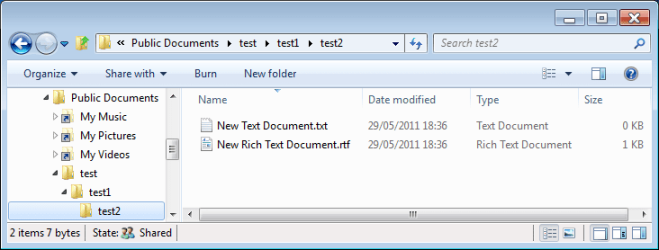
Capture.PNG

This shows a simplified version of what you have got, just to show the procedure. As you can see, I have 2 documents in the test2 folder, which is a sub-folder of test1 which in turn is a sub-folder of test. All I need to do is to highlight (in the right-hand panel) all the files that I wish to move from the test2 folder and then drag them over to test1 or test in the left-hand panel as appropriate.
 

My Computer My Computer

Computer type
PC/Desktop
Computer Manufacturer/Model Number
Dwarf Dwf/11/2012 r09/2013
OS
Windows 8.1 Pro RTM x64
CPU
Intel Core-i5-3570K 4-core @ 3.4GHz (Ivy Bridge) (OC 4.4GHz)
Motherboard
ASRock Z77 Extreme4-M
Memory
4 x 4GB DDR3-1600 Corsair Vengeance CMZ8GX3M2A1600C9B (16GB)
Graphics Card(s)
MSI GeForce GTX770 Gaming OC 2GB
Sound Card
Realtek High Definition on board solution (ALC 898)
Monitor(s) Displays
ViewSonic VA1912w Widescreen (VGA)
Screen Resolution
1440x900
Hard Drives
OCZ Agility 3 SSD 120GB SATA III x2 (RAID 0)
Samsung HD501LJ 500GB SATA II x2
Hitachi HDS721010CLA332 1TB SATA II
Iomega 1.5TB Ext USB 2.0
WD 2.0TB Ext USB 3.0
PSU
XFX Pro Series 850W Semi-Modular
Case
Gigabyte IF233
Cooling
1 x 120mm Front Inlet 1 x 120mm Rear Exhaust
Keyboard
Microsoft Comfort Curve Keyboard 3000 (USB)
Mouse
Microsoft Comfort Mouse 3000 for Business (USB)
Internet Speed
NetGear DG834Gv3 ADSL Modem/Router (Ethernet) ~4.0 Mb/s (O2)
Antivirus
Avast! 8.0.1497
Browser
IE 11
Other Info
Optical Drive: HL-DT-ST BD-RE BH10LS30 SATA Bluray
Lexmark S305 Printer/Scanner/Copier (USB)
WEI Score: 8.1/8.1/8.5/8.5/8.25
Asus Eee PC 1011PX Netbook (Windows 7 x86 Starter)
I have a few movies I've saved on the hard drive but it's a hassle to navigate to them e.g. /burns/fulldvd9/fulldisc. I want to delete the middle subfolder without messing with the contents in the full disc folder. I could save the contents to another location, delete the subfolder and then move it back but with mucho GBs this would take forever.
Thanks for your suggestions.

Why can't you just move the /fulldisc folder to /burns, then delete filldvd9?
I think we are all saying the same thing. I suspect that there are a lot more folders in fulldvd8 than just fulldisk. And a chained "Move to folder" would be the easiest - especially if there are a lot of folders.
 

My Computer My Computer

Computer Manufacturer/Model Number
HP, Dell, Gateway, Toshiba - 4 laptops and 2 desktops
OS
Vista, Windows7, Mint Mate, Zorin, Windows 8
CPU
from 1.6GHz Duo to i7
Monitor(s) Displays
2x HP w2207
Hard Drives
5x HDD, 7x SSD, 12x Externals
Keyboard
with trackball - no mices
Mouse
Trackball mice
Internet Speed
DSL 6000
Thanks for all the feedback. I get in the habit of using copy and paste and forget about dragging and dropping.
 

My Computer My Computer

OS
Windows 7 32 bit
Thanks for all the feedback. I get in the habit of using copy and paste and forget about dragging and dropping.
Remember that moving files is almost instantaneous, as long as they are on the same volume, as they don't actually get moved at all.
 

My Computer My Computer

Computer Manufacturer/Model Number
CreepinJesus Mk. IV
OS
Windows 7 Ultimate x64
CPU
Intel Core i5-2500 3.3GHz
Motherboard
Asus P8H67-M PRO
Memory
8GB DDR3 1333MHz
Graphics Card(s)
On-board
Sound Card
On-board
Monitor(s) Displays
Samsung SyncMaster BX2250 22.5" LED-backlit LCD
Screen Resolution
1920 * 1080
Hard Drives
OCZ Agility 3 120GB, SATA-III
PSU
Thermaltake Toughpower Grand TPG-650M
Case
Lian-Li PC-A04
Cooling
Standard fans. They blow.
Keyboard
Logitech K360
Mouse
Generic Logitech from the bargain-bin by the checkout
Internet Speed
Over 9000! ...Mbps.
Other Info
Chocolate digestives are my favourite biscuit.
Back
Top