
Solved How to detect corrupt media files?

Callender

New member
Guru
Gold Member
VIP
Local time
10:09 PM
Messages
4,776
Location
United Kingdom
Does anyone know of a way to scan for corrupt media files? I'm talking about video and image files that might be corrupt. I have found a way to check the entire hard drive for corrupt .jpg files and delete them when found but I'm looking for a way to fix other possibly corrupted media files without needing to locate them and check them one by one. By media files I mean video and image files. (all formats).
 

My Computer My Computer

Computer type
Laptop
Computer Manufacturer/Model Number
ASUS
OS
Microsoft Windows 7 Home Premium 64-bit 7601 Multiprocessor Free Service Pack 1
CPU
AMD C-60 APU with Radeon(tm) HD Graphics
Motherboard
ASUSTeK COMPUTER INC. X501U
Memory
4.00 GB
Graphics Card(s)
AMD Radeon HD 6290 Graphics
Sound Card
(1) AMD High Definition Audio Device (2) Realtek High Defi
Screen Resolution
1366 x 768 x 32 bits (4294967296 colors) @ 60 Hz
Hard Drives
Hitachi HTS545050A7E380 SATA Disk Device
Antivirus
Comodo CIS & FW, SecureAplus App Whitelisting, Threatfire
Browser
Cyberfox 64bit, Opera 64bit, Airfox
Other Info
Spy-The-Spy, HitmanPro.Alert, Norton Connect Safe, MJRegWatcher, BitDefender TrafficLight, Voodoo Shield, Zemana AntiMalware
How do you know what to fix if you don't know it needs fixing in the first place? Surely you need to be able to locate them in the first place which is what you have managed to do?
 

My Computer My Computer

Computer type
PC/Desktop
Computer Manufacturer/Model Number
Golden Mk. I.4
OS
Windows 10 Pro x64 ; Xubuntu x64
CPU
Intel i7 860 @ 2.80 GHz O/C'ed to 4.0GHz
Motherboard
Gigabyte P55A-UD3R Rev.1. Award BIOS F13
Memory
16GB Corsair Vengance DDR3 @ 661 MHz Dual Channel (9-9-9-24)
Graphics Card(s)
EVGA NVidia GTX 560 1024MB
Sound Card
Realtek Integrated
Monitor(s) Displays
Dual Samsung SyncMaster 2494HS
Screen Resolution
1920*1080 and 1920*1080
Hard Drives
1*Samsung 840 EVO 120GB SSD;
1*OCZ Vertex 2 60GB SSD;
2*Samsung F3 SpinPoint 1TB in RAID0;
1*Samsung F1 SpinPoint 1TB;
2*Western Digital 1TB External USB 3.0
1*Western Digital 500GB External USB 3.0
1*Seagate 500GB External USB 2.0
PSU
Thermaltake ToughPower QFan 750W
Case
Thermaltake Element S VK60001W2Z
Cooling
Corsair H60 Water Cooling, 2*230mm and 2*80mm case fans
Keyboard
Logitech G110
Mouse
Logitech MX518
What to fix.

Thanks. I guess that I didn't explain too well. The reason that I'm looking for corrupt media files is that I read somewhere that such a file can cause iconcache.db corruption. Currently I need to rebuild the icon cache one or more times per day. I've tried the usual fixes such as changing colour depth in display to high color 16 bit then back to true color 16 bit. I've also disabled windows tracking of broken shortcuts and keep broken shortcuts to a minimum. I've applied the hotfixes from microsoft.

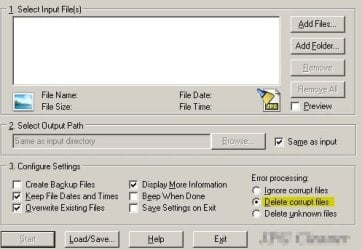
I've scanned for and deleted all corrupt jpeg files.

I'm looking for a way to automate detection and deletion of other possibly corrupt media files. I read that one possible cause of iconcache.db corruption is the presence of at least one corrupt media file and I'd like to investigate this further.

The problem happens at random times and there doesn't appear to be a common cause that I can track down.
 

Attachments

  • Clean JPG.jpg
    Clean JPG.jpg
    25.9 KB · Views: 14

My Computer My Computer

Computer type
Laptop
Computer Manufacturer/Model Number
ASUS
OS
Microsoft Windows 7 Home Premium 64-bit 7601 Multiprocessor Free Service Pack 1
CPU
AMD C-60 APU with Radeon(tm) HD Graphics
Motherboard
ASUSTeK COMPUTER INC. X501U
Memory
4.00 GB
Graphics Card(s)
AMD Radeon HD 6290 Graphics
Sound Card
(1) AMD High Definition Audio Device (2) Realtek High Defi
Screen Resolution
1366 x 768 x 32 bits (4294967296 colors) @ 60 Hz
Hard Drives
Hitachi HTS545050A7E380 SATA Disk Device
Antivirus
Comodo CIS & FW, SecureAplus App Whitelisting, Threatfire
Browser
Cyberfox 64bit, Opera 64bit, Airfox
Other Info
Spy-The-Spy, HitmanPro.Alert, Norton Connect Safe, MJRegWatcher, BitDefender TrafficLight, Voodoo Shield, Zemana AntiMalware
Fixed the problem

I didn't find an easy way to check for corrupt media files that I thought might be causing the problem but I went back over steps that I performed some months ago to fix iconcache.db corruption problems and part of the fix was to create the following registry keys:

[HKEY_LOCAL_MACHINE\Software\Microsoft\Windows\ScheduledDiagnostics]
“IsBrokenShortcutsTSEnabled”=dword:00000000
“IsUnusedDesktopIconsTSEnabled”=dword:00000000

I checked again today and found that these keys were missing - probably down to using an overly aggressive registry cleaner or something! So I re-created them and so far there have been no further problems.
 

My Computer My Computer

Computer type
Laptop
Computer Manufacturer/Model Number
ASUS
OS
Microsoft Windows 7 Home Premium 64-bit 7601 Multiprocessor Free Service Pack 1
CPU
AMD C-60 APU with Radeon(tm) HD Graphics
Motherboard
ASUSTeK COMPUTER INC. X501U
Memory
4.00 GB
Graphics Card(s)
AMD Radeon HD 6290 Graphics
Sound Card
(1) AMD High Definition Audio Device (2) Realtek High Defi
Screen Resolution
1366 x 768 x 32 bits (4294967296 colors) @ 60 Hz
Hard Drives
Hitachi HTS545050A7E380 SATA Disk Device
Antivirus
Comodo CIS & FW, SecureAplus App Whitelisting, Threatfire
Browser
Cyberfox 64bit, Opera 64bit, Airfox
Other Info
Spy-The-Spy, HitmanPro.Alert, Norton Connect Safe, MJRegWatcher, BitDefender TrafficLight, Voodoo Shield, Zemana AntiMalware
Back
Top