
How to disable creation of BootCKCL.etl

7uui8uy7

New member
Member
Local time
10:35 PM
Messages
24
Hi,

I've disabled Circular Kernel Context Logger from Performance Monitor but the file in C:\Windows\System32\wdi\LogFiles is still getting created and the size of it increases over time while using the computer.
I pretty often get errors in Event Logger about it. Like:

The maximum file size for session "Circular Kernel Context Logger" has been reached. As a result, events might be lost (not logged) to file "C:\Windows\system32\WDI\LogFiles\BootCKCL.etl". The maximum files size is currently set to 104857600 bytes.

and

Session "Circular Kernel Context Logger" stopped due to the following error: 0xC0000188

How can I disable creation of that log file or how to get rid of the errors?

Thanks!
 

My Computer My Computer

At a glance

Windows 7 Professional x64
OS
Windows 7 Professional x64
1st, that isn't really going to do anything as the CKCL perfmon log you see there isn't the same one creating the bootckcl.etl file (just look at the properties of it ;)), so disabling that isn't going to get you anywhere. Second, the log should stop when the machine is "idle", which should be about 7-10 seconds of little CPU and disk activity.

The real curious bit is why isn't the machine hitting idle or timing out the log? I've never heard of this before, although I suppose anything is possible. Let me ping some people who are far smarter than me about what they think about this - in the meantime, can you gather / upload a boot trace as per this tutorial?
 
Last edited:

My Computer My Computer

At a glance

Windows 10 Pro x64Intel Core i7 4790K @ 4.5GHz32GB DDR3Nvidia GeForce GTX970
Computer type
PC/Desktop
Computer Manufacturer/Model Number
Custom
OS
Windows 10 Pro x64
CPU
Intel Core i7 4790K @ 4.5GHz
Motherboard
Asus Maximus Hero VII
Memory
32GB DDR3
Graphics Card(s)
Nvidia GeForce GTX970
Sound Card
Realtek HD Audio
Screen Resolution
1920x1200
Hard Drives
1x Samsung 250GB SSD
4x WD RE 2TB (RAIDZ)
PSU
Corsair AX760i
Case
Fractal Design Define R4
Cooling
Noctua NH-D15
1st, that isn't really going to do anything as the CKCL perfmon log you see there isn't the same one creating the bootckcl.etl file (just look at the properties of it ;)), so disabling that isn't going to get you anywhere. Second, the log should stop when the machine is "idle", which should be about 7-10 seconds of little CPU and disk activity.
The real curious bit is why isn't the machine hitting idle or timing out the log? I've never heard of this before, although I suppose anything is possible. Let me ping some people who are far smarter than me about what they think about this - in the meantime, can you gather / upload a boot trace as per this tutorial?
Currently I got rid of the error with expanding the log file size from 20 to 60. I'll do a boot trace later.

https://rapidshare.com/files/57915011/Boottrace.rar

Second boottrace is taken after I modified minimum processor state under power settings from 100% to 5%

https://rapidshare.com/files/1339149699/Boottrace2.rar
 
Last edited:

My Computer My Computer

At a glance

Windows 7 Professional x64
OS
Windows 7 Professional x64
1st, that isn't really going to do anything as the CKCL perfmon log you see there isn't the same one creating the bootckcl.etl file (just look at the properties of it ;)), so disabling that isn't going to get you anywhere. Second, the log should stop when the machine is "idle", which should be about 7-10 seconds of little CPU and disk activity.

The real curious bit is why isn't the machine hitting idle or timing out the log? I've never heard of this before, although I suppose anything is possible. Let me ping some people who are far smarter than me about what they think about this - in the meantime, can you gather / upload a boot trace as per this tutorial?
Currently I got rid of the error with expanding the log file size from 20 to 60. I'll do a boot trace later.

https://rapidshare.com/files/57915011/Boottrace.rar

Second boottrace is taken after I modified minimum processor state under power settings from 100% to 5%

https://rapidshare.com/files/1339149699/Boottrace2.rar

Hi!
I got the same problem. How could you modify log file size?
 

My Computer My Computer

At a glance

Windows 7
OS
Windows 7
BootCKCL.eti

Does anyone have a solution that will stop BootCKCL.eti from growing? The file can be deleted but on reboot, it is regenerated at the last size. It would be nice if it started all over again a zero. No such luck.
 

My Computer My Computer

At a glance

Windows 7 Ultimate 64 bit with SP 1AMD 6000+4 GBNVIDIA GeForce 8200
Computer Manufacturer/Model Number
Generic
OS
Windows 7 Ultimate 64 bit with SP 1
CPU
AMD 6000+
Motherboard
ASROCK 10N78
Memory
4 GB
Graphics Card(s)
NVIDIA GeForce 8200
Monitor(s) Displays
2
Hard Drives
WD 120GB
1st, that isn't really going to do anything as the CKCL perfmon log you see there isn't the same one creating the bootckcl.etl file (just look at the properties of it ;)), so disabling that isn't going to get you anywhere. Second, the log should stop when the machine is "idle", which should be about 7-10 seconds of little CPU and disk activity.

The real curious bit is why isn't the machine hitting idle or timing out the log? I've never heard of this before, although I suppose anything is possible. Let me ping some people who are far smarter than me about what they think about this - in the meantime, can you gather / upload a boot trace as per this tutorial?

but there is not a way to disable it?
thanks
 

My Computer My Computer

At a glance

windows 7 ultimate 64bit
Computer type
PC/Desktop
OS
windows 7 ultimate 64bit
Disable BootCKCL.etl creation

Hi,

Well I managed to disable creation but I should point out that I made a system image backup and a copy of the file first!

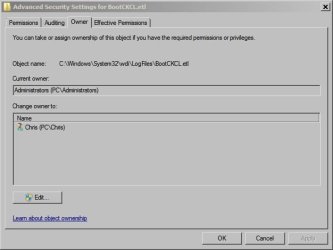
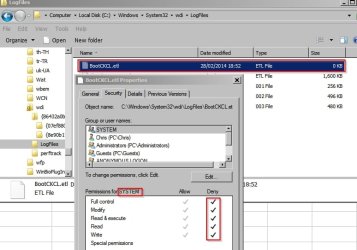
Deleted the file and created a new one using notepad. Then changed owner to PC\ Administrators.

From an elevated command prompt, changed to Windows directory and then typed:

attrib -h -s "C:\Windows\System32\wdi\LogFiles\BootCKCL.etl" /s /d

ENTER

Then made Administrators owner and with full control. Denied SYSTEM any control.

After testing - rebooted several times - the file remains at zero bytes in size.

Note for other users: This is not recommended. It has been done for test purposes.


Advanced Security Settings for BootCKCL.jpg

BootCKCL.jpg
 

My Computer My Computer

At a glance

Microsoft Windows 7 Home Premium 64-bit 7601 ...AMD C-60 APU with Radeon(tm) HD Graphics4.00 GBAMD Radeon HD 6290 Graphics
Computer type
Laptop
Computer Manufacturer/Model Number
ASUS
OS
Microsoft Windows 7 Home Premium 64-bit 7601 Multiprocessor Free Service Pack 1
CPU
AMD C-60 APU with Radeon(tm) HD Graphics
Motherboard
ASUSTeK COMPUTER INC. X501U
Memory
4.00 GB
Graphics Card(s)
AMD Radeon HD 6290 Graphics
Sound Card
(1) AMD High Definition Audio Device (2) Realtek High Defi
Screen Resolution
1366 x 768 x 32 bits (4294967296 colors) @ 60 Hz
Hard Drives
Hitachi HTS545050A7E380 SATA Disk Device
Antivirus
Comodo CIS & FW, SecureAplus App Whitelisting, Threatfire
Browser
Cyberfox 64bit, Opera 64bit, Airfox
Other Info
Spy-The-Spy, HitmanPro.Alert, Norton Connect Safe, MJRegWatcher, BitDefender TrafficLight, Voodoo Shield, Zemana AntiMalware
Back
Top