Solved how to disable dual boot

shadali

New member
Local time
2:06 AM
Messages
7
okay ...now i installed Win 7 ...but there are too boot .... one its ...windows 7 ...and other windows earlier/previous version .....and i have to select windows 7 to get started ....any idea how to disable dual boot and set only windows 7 boot??
 

My Computer My Computer

OS
Windows7 - 64 bit
CPU
Core i5
Motherboard
GIGABYTE Ultra Durable GA-PA65-UD3-B3
Memory
4 GB RAM
Graphics Card(s)
Nvidia GT 240
Sound Card
Realtek
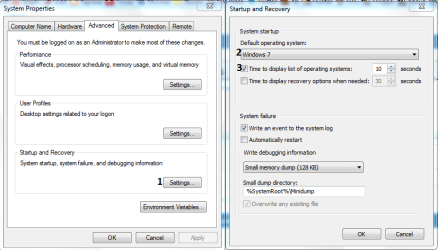
Contol Panel->System->Advanced System Settings. There is StartUp and Recovery click Settings.
In default OS select Windows 7,and uncheck Time to display operating systems.
Capture.PNG

Now you're default os will be Windows 7.You'll don't need to choise XP or 7.
 

My Computer My Computer

Computer type
PC/Desktop
Computer Manufacturer/Model Number
Custom Build
OS
Windows 10 Pro x64
CPU
Intel Core i5 4440 @Stock
Motherboard
Gigabyte Z97 D3H
Memory
4 x 4GB HyperX Fury DDR3
Graphics Card(s)
Gigabyte GTX 1050Ti O4G
Sound Card
Integrated
Monitor(s) Displays
Dell P2417H
Screen Resolution
1920 x 1080
Hard Drives
Samsung EVO 850 120GB / Toshiba DT01ACA050 1TB 7200prm 32MB
PSU
Riotoro Onyx 750W
Case
NZXT H500 Black-Red
Cooling
Stock CPU + NZXT 120mm + 2x120mm red fans
Keyboard
Modecom Volcano Lanparty
Mouse
Asus ROG Gladius / DeepCool E-Pad Plus
Internet Speed
DOCSIS 50/3 Mbit
Browser
Google Chrome
Other Info
Asus K55VJ(i5 3210M, GT635M / 2GB, 8GB DDR3, 500GB HDD)
It sounds like you installed Win7 to another partition with the old OS still on the HD, creating a Dual Boot.

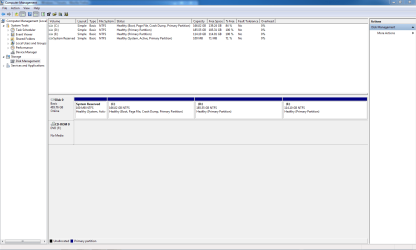
Post back a screenshot of your maximized Disk Management drive map, using Snipping Tool in Start menu, and we'll take a look.
 
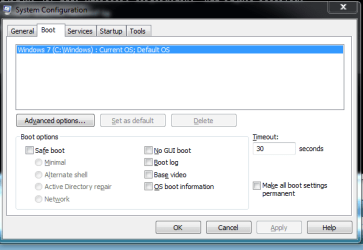
msconfig > Boot tab. Delete the one you don't want.
 

My Computer My Computer

Computer Manufacturer/Model Number
HP, Dell, Gateway, Toshiba - 4 laptops and 2 desktops
OS
Vista, Windows7, Mint Mate, Zorin, Windows 8
CPU
from 1.6GHz Duo to i7
Monitor(s) Displays
2x HP w2207
Hard Drives
5x HDD, 7x SSD, 12x Externals
Keyboard
with trackball - no mices
Mouse
Trackball mice
Internet Speed
DSL 6000
is this what you asked?
when clicked boot tab i could only see windows 7 here in msconfig ..... but its dual boot .... i think if i click windows earlier version during boot, nothing wont happen cus i did not install earlier one properly (it was XP).....but it shows ...
 

Attachments

  • disk management.PNG
    disk management.PNG
    31.3 KB · Views: 716
  • Capture.PNG
    Capture.PNG
    12.1 KB · Views: 574

My Computer My Computer

OS
Windows7 - 64 bit
CPU
Core i5
Motherboard
GIGABYTE Ultra Durable GA-PA65-UD3-B3
Memory
4 GB RAM
Graphics Card(s)
Nvidia GT 240
Sound Card
Realtek
Is XP still installed on D or E, or did you install over it on C?

As it isn't listed on msconfig>Boot tab, install EasyBCD 2.02 (older versions are free now) and delete all but Win7 on the Edit Boot Menu tab.
 
man!! ....you are really helpful ...... is there anything you cant do??? :D
 

My Computer My Computer

OS
Windows7 - 64 bit
CPU
Core i5
Motherboard
GIGABYTE Ultra Durable GA-PA65-UD3-B3
Memory
4 GB RAM
Graphics Card(s)
Nvidia GT 240
Sound Card
Realtek
How to remove harddrive with win XP

Hi, I have quite similar problem as described above.
My old IDE harddrive with windows XP on it is in bad condition... so I decided to replace it with new one. I bought new SATA drive. On this I installed new Windows 7 Ultimate. The instalation of W7 was made from the windows xp interface with choice "new instalation on new drive". Then I shutdown the PC, remove the old harddrive, change the BIOS setting to boot from the new drive then run PC.. but nothing happened, only black screen. Then I put the old hardrive in returned the bios changes and the computer worked. But on windows startup revealed the menu with choices Win XP and Win 7.
With advice written above I installed EasyBCD 2.0.2 and edit the bootloader also made the H: partition with Win7 active&bootable. Now the PC boots straight to Win7 without revealing the menu. But my problem is that always when I try to remove the old noisy harddrive PC won't start. I see only black screen.
Probably on partiton C: on old harddrive there is some files which are needed to boot the WIN7.
Could somebody help me? (and sorry for my english) :)
 

My Computer My Computer

OS
windows 7 ultimate x32
Why would you run an install from another OS? Are you not aware that you are to boot the DVD to install Win7?

You should also unplug any other HD's so they do not derail the Win7 boot files from it's HD.

Please post back a screenshot of your maximized Disk mgmt drive map with listings, using the Snipping Tool in Start Menu. attach using paper clip in reply box.

Where did you get Ultimate? How is it activated?
 
Open EasyBCD and go to (Edit Boot Menu) and Check on (Skip Boot Menu):)
 

My Computer My Computer

Computer type
PC/Desktop
Computer Manufacturer/Model Number
Dell
OS
Windows 7 Ultimate x64
CPU
Intel Dualcore E5700 3.0 ghz 2.99 ghz
Motherboard
Dell
Memory
4 GB Ram
Graphics Card(s)
Nvidia Quadro NVS 290 (256 MB) (Overclocked)
Sound Card
Soundmax Integrated Audio Card
Monitor(s) Displays
MultiSync
Screen Resolution
1280x960
Hard Drives
1- 500 GB
Keyboard
Dell
Mouse
KTC
Internet Speed
512 KB
Antivirus
Nothing
Browser
FireFox
Tick (Skip boot menu) in easybcd
 

My Computer My Computer

Computer type
PC/Desktop
Computer Manufacturer/Model Number
Dell
OS
Windows 7 Ultimate x64
CPU
Intel Dualcore E5700 3.0 ghz 2.99 ghz
Motherboard
Dell
Memory
4 GB Ram
Graphics Card(s)
Nvidia Quadro NVS 290 (256 MB) (Overclocked)
Sound Card
Soundmax Integrated Audio Card
Monitor(s) Displays
MultiSync
Screen Resolution
1280x960
Hard Drives
1- 500 GB
Keyboard
Dell
Mouse
KTC
Internet Speed
512 KB
Antivirus
Nothing
Browser
FireFox
That will not help as he was wanting to remove the XP HD which held the boot files.

What's required is marked Mark Win7 Partition Active then run Startup Repair - Run up to 3 Separate Times until Win7 boots and holds the System flag. He can then remove the other drive.

I asked for his Disk Mgmt because there are sometimes unknowns like Win7 is on Logical partition which can't be marked Active until converted using Partition Wizard CD.

He never replied, probably because I asked him how he was activating Ultimate.
 
Back
Top