
How to disable paste and paste shortcut in desktop CM

Shone89

New member
Local time
3:16 AM
Messages
1
Hello,

I would like to remove paste shrotcut option from the desktop context menu, and if it is possible paste option too. I mean, I would like not to have those options if I am not in process of copying something. I am using W7 Home Premium 32 bit, and when I right click on desktop I have these options, even if I am not copying anything. There is a picture in attachment of my desktop cm, so u can see what I want removed.

Can anyone tell me where to disable this in registry, or wherever it is possible ?

Thanks
 

Attachments
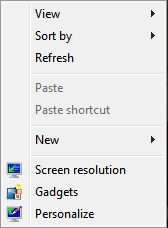
  • cm.png
    cm.png
    2.4 KB · Views: 57

My Computer My Computer

At a glance

Windows 7 Home Premium 32bit
Computer type
PC/Desktop
OS
Windows 7 Home Premium 32bit
What is a Desktop CM?
 

My Computer My Computer

At a glance

Windows 10 Pro. 64/ version 1709 Windows 7 Pr...Intel i7-6800K @ 4.3Corsair Platinum 16 gig @2400EVGA GTX 1070 OC
Computer type
PC/Desktop
Computer Manufacturer/Model Number
Home made Desktop
OS
Windows 10 Pro. 64/ version 1709 Windows 7 Pro/64
CPU
Intel i7-6800K @ 4.3
Motherboard
ASUS X-99 Deluxe II
Memory
Corsair Platinum 16 gig @2400
Graphics Card(s)
EVGA GTX 1070 OC
Monitor(s) Displays
Asus 27" LED LCD/VE278Q
Screen Resolution
1920-1080 or 1280-720 HDMI
Hard Drives
INTEL SSD 730-240 Gb Sata 3.0/
PSU
EVGA Platium 1200W
Case
Phanteks Luxe Tempered Glass 8 fans/ one radiator
Cooling
XSPC/ Water Cooled CPU
Keyboard
Das 4 Professional
Mouse
Logitech M705/MX Anywhere 2-S
Internet Speed
100 mbits
Antivirus
Microsoft Security Essentials/ Malwarebytes Premium 3.0/ SAS
Browser
I.E. 11 default/Firefox/ ISP Time Warner Cable/Spectrum
Other Info
LG BluRay Burner/
Sound system-KLipsch-THX/
Icy Dock ssd Hot Swap bays.
Context Menu
 

My Computer My Computer

At a glance

Win 10 Pro 64Intel Core i7 960 @3.20 GHz24.0 GB DDR3EVGA GTX 750Ti
Computer type
PC/Desktop
Computer Manufacturer/Model Number
Custom Build
OS
Win 10 Pro 64
CPU
Intel Core i7 960 @3.20 GHz
Motherboard
MSI MS7522
Memory
24.0 GB DDR3
Graphics Card(s)
EVGA GTX 750Ti
Monitor(s) Displays
LG E2341 23 Inch
Screen Resolution
1920x1080
Hard Drives
1TB Western Dgital 1002FAEX-00Y9A0
1TB Hitachi HDS721010CLA322
PSU
700 Watt
Case
Haf 912
Cooling
Fans
Keyboard
Logitech MK710
Mouse
Logitech M705
Internet Speed
Cable
Antivirus
AIS 2015 .10.0.2225
Browser
Firefox 49
Other Info
MalwareBytes Anti-Rootkit utility
You may need those one day. Especially the Paste.
 

My Computer My Computer

At a glance

Win 10 Pro 64Intel Core i7 960 @3.20 GHz24.0 GB DDR3EVGA GTX 750Ti
Computer type
PC/Desktop
Computer Manufacturer/Model Number
Custom Build
OS
Win 10 Pro 64
CPU
Intel Core i7 960 @3.20 GHz
Motherboard
MSI MS7522
Memory
24.0 GB DDR3
Graphics Card(s)
EVGA GTX 750Ti
Monitor(s) Displays
LG E2341 23 Inch
Screen Resolution
1920x1080
Hard Drives
1TB Western Dgital 1002FAEX-00Y9A0
1TB Hitachi HDS721010CLA322
PSU
700 Watt
Case
Haf 912
Cooling
Fans
Keyboard
Logitech MK710
Mouse
Logitech M705
Internet Speed
Cable
Antivirus
AIS 2015 .10.0.2225
Browser
Firefox 49
Other Info
MalwareBytes Anti-Rootkit utility

My Computer My Computer

At a glance

Win 10 Pro 64Intel Core i7 960 @3.20 GHz24.0 GB DDR3EVGA GTX 750Ti
Computer type
PC/Desktop
Computer Manufacturer/Model Number
Custom Build
OS
Win 10 Pro 64
CPU
Intel Core i7 960 @3.20 GHz
Motherboard
MSI MS7522
Memory
24.0 GB DDR3
Graphics Card(s)
EVGA GTX 750Ti
Monitor(s) Displays
LG E2341 23 Inch
Screen Resolution
1920x1080
Hard Drives
1TB Western Dgital 1002FAEX-00Y9A0
1TB Hitachi HDS721010CLA322
PSU
700 Watt
Case
Haf 912
Cooling
Fans
Keyboard
Logitech MK710
Mouse
Logitech M705
Internet Speed
Cable
Antivirus
AIS 2015 .10.0.2225
Browser
Firefox 49
Other Info
MalwareBytes Anti-Rootkit utility
Hello Shone89 and Welcome to Seven Forums,

Why do you want or need these options removed?
Can't you just ignore them?

It's not unusual for Windows programs to disable options that are not applicable "at the moment".
I think it's better for stability and reliability to not try and tweak Win 7 and make changes to do things it is not designed to do.
Maybe there is some registry tweak or 3rd party program that will do what you want, but is it worth it?
IMHO, making changes like this may cause problems in the future.
How much is really gained versus the potential risk?

I'm all for playing around and trying different things, but I think that's best done in a Test environment where a Backout plan is in place, if something goes wrong.

Right now I'm on a Win 7 OS that was installed in Oct 2009 and it is working very well.
Yes, it is very "Vanilla", but it works very well and reliably. :geek:
 

My Computer My Computer

At a glance

Multi-Boot W7_Pro_x64 W8.1_Pro_x64 W10_Pro_x6...AMD Athlon II x4 6206GB GSkill DDR2 800AMD 4670 GPU + AMD 4200 IGP
Computer type
PC/Desktop
Computer Manufacturer/Model Number
home built
OS
Multi-Boot W7_Pro_x64 W8.1_Pro_x64 W10_Pro_x64 +Linux_VMs +Chromium_VM
CPU
AMD Athlon II x4 620
Motherboard
Gigabyte GA-MA785G-UD3H
Memory
6GB GSkill DDR2 800
Graphics Card(s)
AMD 4670 GPU + AMD 4200 IGP
Sound Card
on board Realtek ALC889A
Monitor(s) Displays
RCA 40" LCD TV, Insignia 32" LCD TV, HP 15" LCD monitor
Screen Resolution
1680 x 1050
Hard Drives
OCZ Vertex 3 120GB,
Samsung F3 1TB (3),
Several others - WD, Seagate, Hitachi, ...
PSU
Corsair 500 W
Case
Rosewill mid tower
Cooling
CM 90mm rifle
Keyboard
Gyration wireless, Logitech wireless, Dell USB wired
Mouse
Gyration wireless, Logitech wireless, V7 USB wired
Internet Speed
Spectrum - 100Mbps D / 10Mbps U
Antivirus
Avast, MBAM3, EMET, WinPatrol
Browser
Pale Moon, Firefox, IE
Other Info
2 multi-boot PC's
Mainly HTPC/Office/Gen purpose (no gaming).
Trendnet USB KVM.
LG DVD burner/Blue Ray Player.
Tray system for removable SATA backup drives.

Not currently OCd, under-volted.
I use Hybrid sleep, rarely re-boot or shutdown.

Hauppauge HD-PVR, Avermedia PCIe TV Tuner, Hauppauge PCI TV Tuner.

My Computer My Computer

At a glance

Windows 10 Pro. 64/ version 1709 Windows 7 Pr...Intel i7-6800K @ 4.3Corsair Platinum 16 gig @2400EVGA GTX 1070 OC
Computer type
PC/Desktop
Computer Manufacturer/Model Number
Home made Desktop
OS
Windows 10 Pro. 64/ version 1709 Windows 7 Pro/64
CPU
Intel i7-6800K @ 4.3
Motherboard
ASUS X-99 Deluxe II
Memory
Corsair Platinum 16 gig @2400
Graphics Card(s)
EVGA GTX 1070 OC
Monitor(s) Displays
Asus 27" LED LCD/VE278Q
Screen Resolution
1920-1080 or 1280-720 HDMI
Hard Drives
INTEL SSD 730-240 Gb Sata 3.0/
PSU
EVGA Platium 1200W
Case
Phanteks Luxe Tempered Glass 8 fans/ one radiator
Cooling
XSPC/ Water Cooled CPU
Keyboard
Das 4 Professional
Mouse
Logitech M705/MX Anywhere 2-S
Internet Speed
100 mbits
Antivirus
Microsoft Security Essentials/ Malwarebytes Premium 3.0/ SAS
Browser
I.E. 11 default/Firefox/ ISP Time Warner Cable/Spectrum
Other Info
LG BluRay Burner/
Sound system-KLipsch-THX/
Icy Dock ssd Hot Swap bays.
Back
Top