How to disable Systray icon "Safely remove hardware and eject media"?

pstein

New member
Member
VIP
Local time
7:07 PM
Messages
244
How to disable Systray icon "Safely remove hardware and eject media"?

In my Systray there is an icon "Safely remove hardware and eject media"
which did not exist in WinXP.

I guest this is for possible removing USB sticks from USB slots.

However I should be able to remove USB sticks by just plugging them out.
Per definition WinOS and hardware should be able to handle this automatically.

So I do not need this icon in Systray.

How can I hide this icon permanently from Systray?

Peter
 

My Computer My Computer

At a glance

win7pro 64bit
Computer type
PC/Desktop
OS
win7pro 64bit
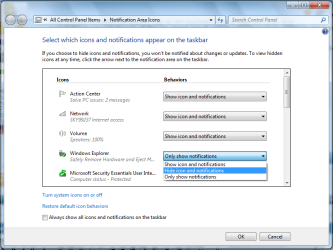
If you right click on the arrow thing in your notification tray, you will see "customize notification icons."

From there, you should be able to set it to "hide icon and notifications"
 

My Computer My Computer

At a glance

W7 Professional x64AMD Athlon II X3 445 Rana 3.10 GHzPNY XLR DDR3 1600 4x2GBNVIDIA GeForce GTS 450 (fermi) 1GB GDDR5
Computer Manufacturer/Model Number
Pugh Technologies
OS
W7 Professional x64
CPU
AMD Athlon II X3 445 Rana 3.10 GHz
Motherboard
MSI 870A-G54
Memory
PNY XLR DDR3 1600 4x2GB
Graphics Card(s)
NVIDIA GeForce GTS 450 (fermi) 1GB GDDR5
Sound Card
Realtek ALC892 onboard
Monitor(s) Displays
ASUS VE205t, Viewsonic VX2035WM
Screen Resolution
1600x900, 1600x1050
Hard Drives
977GB Hitachi Hitachi HDS721010CLA332
244GB Western Digital WDC WD2500AAJS-65B4A0
488GB Western Digital WDC WD5000AAJS-00A8B0
488GB Western Digital WDC WD5000AAKS-00UU3A0
PSU
Antec EarthWatts EA650 650W
Case
ThermalTake Armor A90 Mid Tower
Cooling
3x 120mm in, 1x 120mm & 200mm out, self built hydro-cooler
Keyboard
Logitec 55
Mouse
Razer Deathadder
Internet Speed
20 Mbps D/L, 9 Mbps U/L
That icon exists on every WinXP machine I've ever used. And, I wouldn't recommend just unplugging a USB stick without ejecting it first. You could lose data that way. I've also managed to kill a USB thumb drive by unplugging it without ejecting it first.
 

My Computer My Computer

At a glance

Windows 7 Home Premium x64Intel Pentium dual-core E5400 2.7Ghz, 2MB6Gb DDR3 SDRAM @ 1066MhzIntel G45/G43 Express Chipset
Computer Manufacturer/Model Number
Dell Inspiron 560
OS
Windows 7 Home Premium x64
CPU
Intel Pentium dual-core E5400 2.7Ghz, 2MB
Motherboard
Dell OK83V0
Memory
6Gb DDR3 SDRAM @ 1066Mhz
Graphics Card(s)
Intel G45/G43 Express Chipset
Sound Card
Realtek High Def Audio
Monitor(s) Displays
24" HD widescreen LCD and 21" widescreen LCD
Screen Resolution
1920x1080 @ 59Hz and 1680x1050 @ 59Hz
Hard Drives
640 Gb internal, 500Gb external and 1Tb external plus about 2TB in various sized external drives that are kept in storage as photo archives/backups
PSU
No idea - whatever the thing came with
Case
Mini tower w/ black bezel
Cooling
No idea - whatever the thing came with - fans, I suppose
Keyboard
Logitech MX3200 wireless laser keyboard
Mouse
Logitech MX3200 wireless laser mouse
Internet Speed
Cable (RoadRunner)
Other Info
CyberPower one-hour UPS, DVD-RW, 19-in-1 card reader, 7-port USB hub, 2-port USB hub on the 21" monitor, built-in webcam with stereo microphones on the 21" monitor
That icon has existed in the System Tray on Win machines since at least Win 2000. It is a good idea to use it to be sure all files are closed and all cached writes have been written to disk before pulling your USB stick.

You can disable write-caching on the removable drive which should allow you to remove the drive without the need to use the "Safely Remove" icon. See this tutorial.

As LiquidSnak pointed out you can customize that icon to "hide icon and notifications".
 

My Computer My Computer

At a glance

W10 Pro desktop, W11 laptop, W11 Pro tablet (...3.7Ghz 8700K i7, i7-11800H, i7-1065G716G desktop, 16G laptop, 4G tabletAMD Radeon RX580, RTX 3060, Intel Iris Plus
Computer type
PC/Desktop
Computer Manufacturer/Model Number
Home Built desktop, Dell G15 5511 Gaming laptop,MS Surface Pro 7 tablet
OS
W10 Pro desktop, W11 laptop, W11 Pro tablet (all 64-bit)
CPU
3.7Ghz 8700K i7, i7-11800H, i7-1065G7
Motherboard
ASUS TUF Z370-Pro Gaming in desktop
Memory
16G desktop, 16G laptop, 4G tablet
Graphics Card(s)
AMD Radeon RX580, RTX 3060, Intel Iris Plus
Sound Card
High Definition Audio (Built-in to mobo)
Monitor(s) Displays
Samsung U32J59 32" (2x), 15.6", 12"
Screen Resolution
3840x2160, 3840x2160, 1920x1080, 2160x1440
Hard Drives
500G SSD for OS; 2T, 10T & 15T HDDs for Data on Desktop, 1TB SSD laptop, 128G SSD tablet.
PSU
Corsair CX 750M
Case
Antec 100
Cooling
CM 212+
Keyboard
IBM Model M - used continuously since 1986
Mouse
Microsoft Pro IntelliMouse
Internet Speed
400M down 8M up
Antivirus
Windows Defender
Browser
FireFox
Other Info
Built my first computer (8Mhz 8088cpu, 640K RAM, 20MB HDD, 2 360K floppy drives) in 1985 and have been building them for myself, relatives and friends ever since.
Left clicking the tray arrow and selecting customize

Capture1.PNG

you can select 'Hide icon & notifications'

Capture.PNG

Hope it helps :)


OS
 

My Computer My Computer

At a glance

Windows 7 Ultimate x64AMD Sempron Dual Core3GBNVIDIA GeForce 6150SE nForce 430
Computer Manufacturer/Model Number
Compaq Desktop
OS
Windows 7 Ultimate x64
CPU
AMD Sempron Dual Core
Memory
3GB
Graphics Card(s)
NVIDIA GeForce 6150SE nForce 430
Screen Resolution
1024x768
Hard Drives
150GB Sata
I can't tell you how many times I've set up for a conference and had someone bring me a corrupted flash drive they just "pulled out" instead of ejecting. In Windows 7, it takes two mouse clicks. Click once on the icon, click again on the drive from the pop-up list.
 

My Computer My Computer

At a glance

Windows 7 Ultimate x64 SP1Intel Core i7-260012 GB Patriot Extreme DDR3-1333Nvidia GTX 470
OS
Windows 7 Ultimate x64 SP1
CPU
Intel Core i7-2600
Motherboard
Gigabyte GA-P67A-UD3P-B3
Memory
12 GB Patriot Extreme DDR3-1333
Graphics Card(s)
Nvidia GTX 470
Monitor(s) Displays
Dell UltraSharp 2209WA
Hard Drives
OCZ Agility3 240 GB, WD5001AALS, WD7501AALS
PSU
OCZ ModStream 700W
Case
CoolerMaster HAF 912 Advanced
Cooling
CoolerMaster Hyper 212 Plus
I have discovered a way to remove that icon, which involves the following steps:

1. Download Dud (Dud) and Replacer (Replacer).
2. Rename dud.exe to stobject.dll.
3. Give Ownership of the stobject.dll in \Windows\System32 to Administrators and give Full Permission to it.
4. Run Replacer to replace the original stobject.dll with the renamed dud.exe.
5. Restart the PC.
 

My Computer My Computer

At a glance

Windows 7 Ultimate (Build 7201)Intel Core 2 Duo4 GBnVidia GeForce 8800 GT
Computer Manufacturer/Model Number
HP Pavilion a6244n
OS
Windows 7 Ultimate (Build 7201)
CPU
Intel Core 2 Duo
Memory
4 GB
Graphics Card(s)
nVidia GeForce 8800 GT
Sound Card
Realtek High Definition Audio
Monitor(s) Displays
LG W1942
Screen Resolution
1440x900
Hard Drives
Hitachi HDT725050VLA360 - 500 GB
Keyboard
Adesso SlimTouch Pro
Mouse
Adesso SlimTouch Pro
Internet Speed
3 mbps
Back
Top