

- Local time
- 11:09 AM
- Messages
- 105
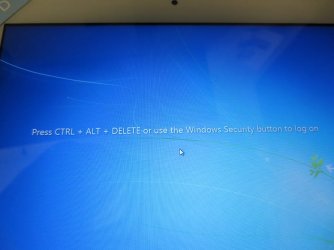
How to disable? "use the windows security button to unlock this comp."
See see shot. Need some experts in the house its been 2 days of Goggle searches.
I'm trying to figure out if this is a Windows thing or different model wireless KB/mouse thing.
Reason I say this its on a corporate domain with a GVision touch screen / Windows 7 Pro./ NOT a tablet. Lots of threads on this message with tablets or mobile PC this is not one of them.
We just deployed same touch screen, same OS/model PC 2 weeks ago but different wireless KB/mouse. (no clue if that makes a difference but listed anyways)
Why is one PC normal logging in i.e ctrl/alt/del and other PC login has this message "Press ctrl alt delete or use the windows security button to unlock this computer"??
I've went in to Turn Windows features on or off unchecked Tablet to no avail. Its a brand new image same as the others but this screen is prompted at login. The PC BTW is an HP Mini we deploy and I don't even know where this security button would be.
Any ideas?Thank you
See see shot. Need some experts in the house its been 2 days of Goggle searches.
I'm trying to figure out if this is a Windows thing or different model wireless KB/mouse thing.
Reason I say this its on a corporate domain with a GVision touch screen / Windows 7 Pro./ NOT a tablet. Lots of threads on this message with tablets or mobile PC this is not one of them.
We just deployed same touch screen, same OS/model PC 2 weeks ago but different wireless KB/mouse. (no clue if that makes a difference but listed anyways)
Why is one PC normal logging in i.e ctrl/alt/del and other PC login has this message "Press ctrl alt delete or use the windows security button to unlock this computer"??
I've went in to Turn Windows features on or off unchecked Tablet to no avail. Its a brand new image same as the others but this screen is prompted at login. The PC BTW is an HP Mini we deploy and I don't even know where this security button would be.
Any ideas?Thank you
Attachments
My Computer
At a glance
Windows 10 64-bitIntel i7K 8700K16GB Dual Channel DDR4 @2666MHzEVGA GeForce RTX 2080 Ti XC Ultra Gaming 11GB...
- Computer type
- PC/Desktop
- Computer Manufacturer/Model Number
- Dell Alienware Aurora R7
- OS
- Windows 10 64-bit
- CPU
- Intel i7K 8700K
- Motherboard
- Alienware 0VDT73
- Memory
- 16GB Dual Channel DDR4 @2666MHz
- Graphics Card(s)
- EVGA GeForce RTX 2080 Ti XC Ultra Gaming 11GB GDDR6
- Sound Card
- Realtek on-board w/Logitech z506 5.1 Surround
- Monitor(s) Displays
- LG - 65" Class - OLED - C9
- Screen Resolution
- 3840 x 2160 4K
- Hard Drives
- 512GB M.2 PCIe SSD
1TB 7200RPM SATA 6Gb/s (Storage)
- PSU
- 850W EPA Bronze PSU Liquid Cooled Chassis
- Case
- Alienware Aurora
- Cooling
- Liquid Cooled
- Keyboard
- Logitech Wireless K800
- Mouse
- Logitech Performance MX
- Internet Speed
- 100MB
- Antivirus
- Emsisoft
- Browser
- Firefox 64-bit
- Other Info
- Steelseries Artics Pro Wireless gaming headset.
https://steelseries.com/gaming-headsets/arctis-pro-wireless


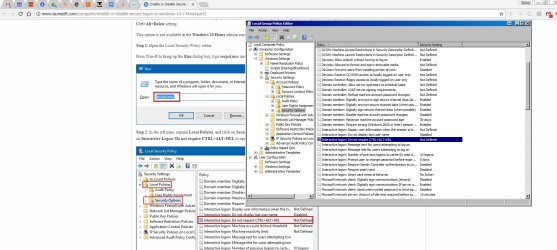
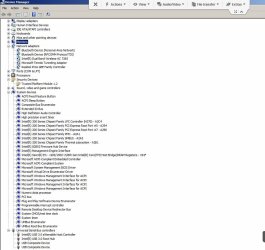
 we ruled out the KB/mouse its the same wireless model on all other PC's plus its a touch screen its got the touch KB if they wanted to use it.
 .
.
