
How to disbale the annoying Welcome to Window Screen

mediaman09

New member
Member
VIP
Local time
8:30 PM
Messages
260
Location
Toronto
How to disable the annoying Welcome to Window Screen

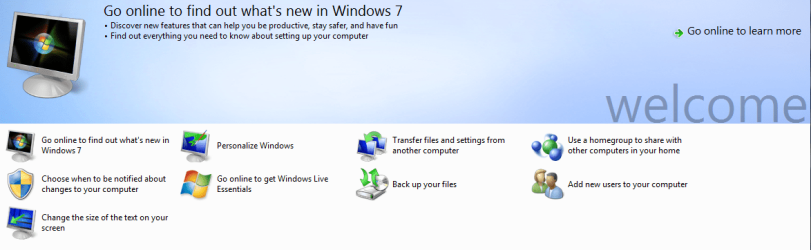
How does one disable the annoying welcome screen? I am not referring to the one associated with a user/password log-on ; I've seen a few post directing users to the tutorial on password removals., Rather, I am referring to the attached.

It comes up every time I restart.

In every other windows product known to man, there was a little check box in teh corner said "dont show me this again." I dont see such an option anymore.

Surely one does not need a registry fix to turn this off !!!

Why does Micorsoft make this so intentionally frustrating? I know, it's a gift.
 

Attachments
  • welcome.PNG
    welcome.PNG
    74 KB · Views: 22
Last edited:

My Computer My Computer

At a glance

DELL Win 7 Home Premium 64 BitIntel Core i7-930 (8MB L2, 2.8GHz) // ntel Co...16GB // 18GB DDR3 SDRAM 1333Mhhz 6 DIMMS (3x2...AMD HD7570 // AMD Radeon HD6750 // ATI Radeon...
Computer type
PC/Desktop
Computer Manufacturer/Model Number
DELL XPS 8500 // DELL XPS Studio 9100 // DELL Dim 9200
OS
DELL Win 7 Home Premium 64 Bit
CPU
Intel Core i7-930 (8MB L2, 2.8GHz) // ntel Core 2 Quad Q6600
Motherboard
?? // Dell A02 BIOS // ??
Memory
16GB // 18GB DDR3 SDRAM 1333Mhhz 6 DIMMS (3x2, 3x4) //4 GB
Graphics Card(s)
AMD HD7570 // AMD Radeon HD6750 // ATI Radeon HD5670 1 GB GD
Sound Card
?? // THX TruStudio PC //?
Monitor(s) Displays
Dual Dell 2405 WFP-HC24 //SAmsung 27" // Triple 19" LCD
Screen Resolution
1900 x 1200
Hard Drives
Main :WD Caviar Black 1 TB SATA WD1002FAEX
Backup :WD Caviar Black 1 TB SATA WD1002FAEX
PSU
?? // Ultra 900W // ??
It's the "getting started" page from the control panel,

go to run and type "msconfig" with or without quotes and select the "startup" tab.

Now look for a startup entry with info similar to (in the command field)
%windir%\system32\rundll32.exe %SystemRoot%\system32\OobeFldr.dll,ShowWelcomeCenter

If you find such a startup entry you can simply uncheck the box next to it and press ok.

This will solve the problem IF theres a startup entry for it!
 

My Computer My Computer

At a glance

Windows 7 Ultimate x64Intel Core2 Quad Q8300 2.5GhzKingston HyperX 4x1GB DDR2 1066MhzAsus/Nvidia 9500GT 1GB
Computer type
PC/Desktop
Computer Manufacturer/Model Number
Self Build
OS
Windows 7 Ultimate x64
CPU
Intel Core2 Quad Q8300 2.5Ghz
Motherboard
Asus P5QD Turbo
Memory
Kingston HyperX 4x1GB DDR2 1066Mhz
Graphics Card(s)
Asus/Nvidia 9500GT 1GB
Sound Card
On-Board HD
Monitor(s) Displays
22" Widescreen TFT
Screen Resolution
1920x1080
Hard Drives
2x 320Gb Seagate SATAII RAID 0
2x 80Gb Seagate SATAII RAID 0
1x 1tb hybrid (8gb ssd)
PSU
650w
Case
ATX
Cooling
140mm front, 120mm Rear, 80mm Chipset + stock CPU and GPU
Keyboard
Plastic one
Mouse
Plastic one
Internet Speed
4Mbps
Other Info
Laptop: HP Elitebook 2560p
i5 @2.7Ghz 4GB DDR3
Thanks Sub Styler.

LOL though .. it was not a regsitry fix but only required the user to run MSCONFIG, turn off the process, and reboot! Seriously?? That's the design?

Anyway, done , and deleted ( have not rebooted yet, but dont expect to see it anymore.

LOL2 is the name of the DLL file OOBE (for out of box experience !! )

Anyway many thanks for the quick tip!

Very minor iitem, I know.
 

My Computer My Computer

At a glance

DELL Win 7 Home Premium 64 BitIntel Core i7-930 (8MB L2, 2.8GHz) // ntel Co...16GB // 18GB DDR3 SDRAM 1333Mhhz 6 DIMMS (3x2...AMD HD7570 // AMD Radeon HD6750 // ATI Radeon...
Computer type
PC/Desktop
Computer Manufacturer/Model Number
DELL XPS 8500 // DELL XPS Studio 9100 // DELL Dim 9200
OS
DELL Win 7 Home Premium 64 Bit
CPU
Intel Core i7-930 (8MB L2, 2.8GHz) // ntel Core 2 Quad Q6600
Motherboard
?? // Dell A02 BIOS // ??
Memory
16GB // 18GB DDR3 SDRAM 1333Mhhz 6 DIMMS (3x2, 3x4) //4 GB
Graphics Card(s)
AMD HD7570 // AMD Radeon HD6750 // ATI Radeon HD5670 1 GB GD
Sound Card
?? // THX TruStudio PC //?
Monitor(s) Displays
Dual Dell 2405 WFP-HC24 //SAmsung 27" // Triple 19" LCD
Screen Resolution
1900 x 1200
Hard Drives
Main :WD Caviar Black 1 TB SATA WD1002FAEX
Backup :WD Caviar Black 1 TB SATA WD1002FAEX
PSU
?? // Ultra 900W // ??
This is confusing as the checkbox you mention is normally present to stop this appearing.

It normally appears on the second and subsequent re-boots of the operating system after initial install.

I have checked and if you manually run the welcome screen then the checkbox does not appear, so it would suggest that something has happened to make this issue arise with the screen being re-added to the startup.

probably not a malware issue but it may be worth while running a scan as malware will often cause weird side effects
 

My Computers My Computers

  • At a glance

    Windows 11 Pro x64 [Latest Release and Releas...Ryzen 9 5950X, 3.8 - 5.2 MHz64GB [2 x 32GB] DDR4 3200MHz4GB NVIDIA GEFORCE GTX 1650 Ti
    Computer type
    PC/Desktop
    Computer Manufacturer/Model Number
    ChillBlast - Custom to my design
    OS
    Windows 11 Pro x64 [Latest Release and Release Preview]
    CPU
    Ryzen 9 5950X, 3.8 - 5.2 MHz
    Motherboard
    Asus Prime X570-Pro
    Memory
    64GB [2 x 32GB] DDR4 3200MHz
    Graphics Card(s)
    4GB NVIDIA GEFORCE GTX 1650 Ti
    Sound Card
    On-board SPDIF to 5.1 System + HDMI [5.1 system]
    Monitor(s) Displays
    32" UHD 32 Bit HDR Monitor + 43" UHD 4K 32Bit HDR TV
    Screen Resolution
    2 x 3840 x 2160 @60Hz
    Hard Drives
    1TB M2 SSD OS, 500GB Fast Access SSD, 2 x 8TB Data + Various Externals from 1TB to 4TB, 10TB NAS
    PSU
    NZXT C750 80 PLUS Gold 750W Modular PSU
    Case
    Workstation Case [Matt Black]
    Cooling
    NZXT Kraken X63 280mm CPU Cooler +2x Quiet Case fans
    Keyboard
    Logitech Wireless MX Keys & K400 + others
    Mouse
    Logitech Wireless MX Master 3S
    Internet Speed
    920 MB Down 50 MB Up
    Antivirus
    BitDefender Total Security Pro
    Browser
    Chrome (always run latest Non-Beta)
    Other Info
    Also run ...
    Laptop - Quad 8GB - Windows 10 Pro x64
    Nexus 7 Android tablet x2
    Samsung 10.2" tablet
    Blackview TAB 8 4G Android Tablet c/w Keyboard
    Wacom Intuos Pro Medium Pen Pad
    Wacom Intuos Pro Small Pen Pad
    Wacom Expresskeys Remote
    Loopdeck+ Graphics Controller
    Shuttle Pro v2 Control
  • At a glance

    Windows 11 Pro x64 Latest RPIntel I7 10750H 5.0GHz32GB [2x16GB] DDR4 2933 MHznVidia GTX1650Ti 4 GB GDDR6
    Computer type
    Laptop
    System Manufacturer/Model Number
    Dell XPS 17 10750H
    OS
    Windows 11 Pro x64 Latest RP
    CPU
    Intel I7 10750H 5.0GHz
    Motherboard
    Dell XPS
    Memory
    32GB [2x16GB] DDR4 2933 MHz
    Graphics Card(s)
    nVidia GTX1650Ti 4 GB GDDR6
    Sound Card
    Stock [Realtek] 4 Speaker
    Monitor(s) Displays
    17" IPS UHD+ Infinity Edge Touchscreen
    Screen Resolution
    3840 x 2400
    Hard Drives
    2TB M2 NVMe, 4TB External + various 500GB & 1TB External NVMe (also have access to spinner HDD from
    PSU
    Stock
    Case
    Stock XPS Aluminium & Carbon Fibre
    Cooling
    Stock - Active Fan Control
    Keyboard
    Backlit + Various Logitech
    Mouse
    Stock Track Pad + Logitech MX Trackball
    Internet Speed
    72 MB Down 18MB Up
    Browser
    Chrome
    Other Info
    Also run ...
    Laptop - Quad 8GB - Windows 10 Pro x64
    Nexus 7 Android tablet x2
    10.2" tablet
    Sony Z3 Android Smartphone
    Wacom Intuos Pro Medium Pen Pad
    Wacom Intuos Pro Small Pen Pad
    Wacom Expresskeys Remote
    Loopdeck+ Graphics Controller
    Shuttle Pro v2 Control Pad
    10TB NAS
I'm guessing that the link has been accidentally dragged and dropped into the startup folder at some point? who knows, it's not an issue I have seen before. May also be caused by improper shutdown after firstboot?
 

My Computer My Computer

At a glance

Windows 7 Ultimate x64Intel Core2 Quad Q8300 2.5GhzKingston HyperX 4x1GB DDR2 1066MhzAsus/Nvidia 9500GT 1GB
Computer type
PC/Desktop
Computer Manufacturer/Model Number
Self Build
OS
Windows 7 Ultimate x64
CPU
Intel Core2 Quad Q8300 2.5Ghz
Motherboard
Asus P5QD Turbo
Memory
Kingston HyperX 4x1GB DDR2 1066Mhz
Graphics Card(s)
Asus/Nvidia 9500GT 1GB
Sound Card
On-Board HD
Monitor(s) Displays
22" Widescreen TFT
Screen Resolution
1920x1080
Hard Drives
2x 320Gb Seagate SATAII RAID 0
2x 80Gb Seagate SATAII RAID 0
1x 1tb hybrid (8gb ssd)
PSU
650w
Case
ATX
Cooling
140mm front, 120mm Rear, 80mm Chipset + stock CPU and GPU
Keyboard
Plastic one
Mouse
Plastic one
Internet Speed
4Mbps
Other Info
Laptop: HP Elitebook 2560p
i5 @2.7Ghz 4GB DDR3
Whee I go to Start/All Programs/Startup, its not listed there..

When I go to Start (right click) and select Open Windows Explore, earlier versions of Windows used to intuitively take me to the start menu. Not Window 7 - that would be too easy - I end up with the "anyones guess Librarires" ( really hate this but they are good sometimes) , so I have no idea where the start folder is anymore.

Where can I find the start folder from within Windows Explorer??
 

My Computer My Computer

At a glance

DELL Win 7 Home Premium 64 BitIntel Core i7-930 (8MB L2, 2.8GHz) // ntel Co...16GB // 18GB DDR3 SDRAM 1333Mhhz 6 DIMMS (3x2...AMD HD7570 // AMD Radeon HD6750 // ATI Radeon...
Computer type
PC/Desktop
Computer Manufacturer/Model Number
DELL XPS 8500 // DELL XPS Studio 9100 // DELL Dim 9200
OS
DELL Win 7 Home Premium 64 Bit
CPU
Intel Core i7-930 (8MB L2, 2.8GHz) // ntel Core 2 Quad Q6600
Motherboard
?? // Dell A02 BIOS // ??
Memory
16GB // 18GB DDR3 SDRAM 1333Mhhz 6 DIMMS (3x2, 3x4) //4 GB
Graphics Card(s)
AMD HD7570 // AMD Radeon HD6750 // ATI Radeon HD5670 1 GB GD
Sound Card
?? // THX TruStudio PC //?
Monitor(s) Displays
Dual Dell 2405 WFP-HC24 //SAmsung 27" // Triple 19" LCD
Screen Resolution
1900 x 1200
Hard Drives
Main :WD Caviar Black 1 TB SATA WD1002FAEX
Backup :WD Caviar Black 1 TB SATA WD1002FAEX
PSU
?? // Ultra 900W // ??
The startup folder is in the start menu but may be hidden.

Your start menu is composed from multiple locations:

C:\ProgramData\Microsoft\Windows\Start Menu
C:\Users\User Name\AppData\Roaming\Microsoft\Windows\Start Menu

This is usefull because I have been able to move 90% of the stuff into my account leaving only the things I want my son to have access to in the public start menu.
 

My Computer My Computer

At a glance

Windows 7 Ultimate x64Intel Core2 Quad Q8300 2.5GhzKingston HyperX 4x1GB DDR2 1066MhzAsus/Nvidia 9500GT 1GB
Computer type
PC/Desktop
Computer Manufacturer/Model Number
Self Build
OS
Windows 7 Ultimate x64
CPU
Intel Core2 Quad Q8300 2.5Ghz
Motherboard
Asus P5QD Turbo
Memory
Kingston HyperX 4x1GB DDR2 1066Mhz
Graphics Card(s)
Asus/Nvidia 9500GT 1GB
Sound Card
On-Board HD
Monitor(s) Displays
22" Widescreen TFT
Screen Resolution
1920x1080
Hard Drives
2x 320Gb Seagate SATAII RAID 0
2x 80Gb Seagate SATAII RAID 0
1x 1tb hybrid (8gb ssd)
PSU
650w
Case
ATX
Cooling
140mm front, 120mm Rear, 80mm Chipset + stock CPU and GPU
Keyboard
Plastic one
Mouse
Plastic one
Internet Speed
4Mbps
Other Info
Laptop: HP Elitebook 2560p
i5 @2.7Ghz 4GB DDR3
Thanks...

The Weclome screen is not there either.

I will reboot shortly to confrim its now gone.
 

My Computer My Computer

At a glance

DELL Win 7 Home Premium 64 BitIntel Core i7-930 (8MB L2, 2.8GHz) // ntel Co...16GB // 18GB DDR3 SDRAM 1333Mhhz 6 DIMMS (3x2...AMD HD7570 // AMD Radeon HD6750 // ATI Radeon...
Computer type
PC/Desktop
Computer Manufacturer/Model Number
DELL XPS 8500 // DELL XPS Studio 9100 // DELL Dim 9200
OS
DELL Win 7 Home Premium 64 Bit
CPU
Intel Core i7-930 (8MB L2, 2.8GHz) // ntel Core 2 Quad Q6600
Motherboard
?? // Dell A02 BIOS // ??
Memory
16GB // 18GB DDR3 SDRAM 1333Mhhz 6 DIMMS (3x2, 3x4) //4 GB
Graphics Card(s)
AMD HD7570 // AMD Radeon HD6750 // ATI Radeon HD5670 1 GB GD
Sound Card
?? // THX TruStudio PC //?
Monitor(s) Displays
Dual Dell 2405 WFP-HC24 //SAmsung 27" // Triple 19" LCD
Screen Resolution
1900 x 1200
Hard Drives
Main :WD Caviar Black 1 TB SATA WD1002FAEX
Backup :WD Caviar Black 1 TB SATA WD1002FAEX
PSU
?? // Ultra 900W // ??
Quick access to Programs > Startup folder:

- Start Menu > Right click All Programs > choose Open (current user's Start Menu Programs folder) or Open All Users (all users Start Menu Programs folder). Startup (individual or all users) is a subfolder of Programs.

Kari
 

My Computer My Computer

At a glance

Windows 10 Pro x64 EN-GB1.6 GHz Intel Core i7-720QM Processor6 GBATI Mobility Radeon HD 5850 Graphics
Computer type
Laptop
Computer Manufacturer/Model Number
HP ENVY 17-1150eg
OS
Windows 10 Pro x64 EN-GB
CPU
1.6 GHz Intel Core i7-720QM Processor
Memory
6 GB
Graphics Card(s)
ATI Mobility Radeon HD 5850 Graphics
Sound Card
Beats sound system with integrated subwoofer
Monitor(s) Displays
17" laptop display, 22" LED and 32" Full HD TV through HDMI
Screen Resolution
1600*900 (1), 1920*1080 (2&3)
Hard Drives
Internal: 2 x 500 GB SATA Hard Disk Drive 7200 rpm
External: 2TB for backups, 3TB USB3 network drive for media
Cooling
As Envy runs a bit warm, I have it on a Cooler Master pad
Keyboard
Logitech diNovo Media Desktop Laser (bluetooth)
Mouse
Logitech Performance Mouse MX
Internet Speed
50/10 Mbps VDSL
Antivirus
Windows Defender 4.3.9431.0
Browser
Maxthon 3.5.2., IE11
Back
Top