How to do this

PriSim

New member
Member
Local time
10:56 PM
Messages
29
Location
Pakistan
Hi,

I want to use these kind of visual styles but always get problem or corruption in my Win 7 main files! :confused:
but the look very nice and beautiful than other styles! :D

So any one how to use these kind of styles and themes safely under Win 7:(

One of nice visual style is this :)


dEEP 7 3.0 by ~seahorsepip on deviantART
 

My Computer

Computer type
PC/Desktop
Computer Manufacturer/Model Number
Gigabyte Technology Co., Ltd.
OS
Microsoft Windows 7 Ultimate
CPU
Intel Core 2 Quad CPU Q6600 @ 2.40GHz @ 2.40GHz
Motherboard
Gigabyte Technology Co., Ltd.
Memory
4GB
Graphics Card(s)
Intel(R) G965 Express
Sound Card
Realtek HD 8-Channel High Definition Audio
Monitor(s) Displays
Dell LED
Screen Resolution
1026x768
Hard Drives
300GB With External 800GB
PSU
Intel 800W
Case
mpc Client Pro
Cooling
stock cpu, 120mm rear, 140mm top
Keyboard
Compaq
Mouse
Accer
Internet Speed
ADSL 24Mb/sec
Antivirus
ESET NOD32
Browser
Firefox
Here's a tutorial for enabling custom themes,

http://www.sevenforums.com/tutorials/34579-enabling-custom-themes-windows-7-a.html

Once you run UXtheme, copy the contents of the visual style folder to C: Windows, Resources, Themes.
deep7.JPG

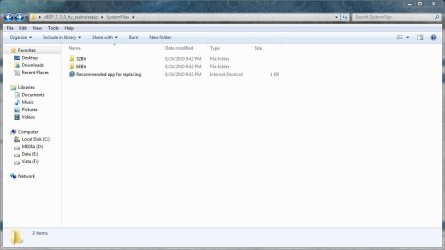
The system files folder, just use the recommended app to replace the explorer frame (32 or 64 bit, what ever you have) you have to turn off UAC and run as admin, as per instructions.
system files.JPG
 

My Computer

Computer type
PC/Desktop
Computer Manufacturer/Model Number
Self Built
OS
Win 10 Pro x64
CPU
Intel I5-2500K @3.3GHz
Motherboard
Asrock P67 Extreme4
Memory
16GB G.Skill Ripjaws X (4x4GB)
Graphics Card(s)
EVGA GeForce 750 Ti SC 2GB
Sound Card
ASUS Xonar DG 5.1 Channels 24-bit 96KHz PCI Interface Sound
Monitor(s) Displays
auria eq2367
Screen Resolution
1920 x 1080
Hard Drives
250GB Samsung 850 EVO SSD
1TB WD Blue
1TB Hitachi
PSU
SeaSonic X 650W 80 Plus Gold
Case
Corsair Obsidian 750D
Cooling
Corsair H60, Three 140mm case fans
Keyboard
Logitech Wireless Keyboard K520
Mouse
Logitech Wireless Mouse M310
Internet Speed
Wave Broadband ~ 100 dn 5 up
Antivirus
Windows Defender, Malwarebytes Premium
Browser
Edge, IE11, Chrome
Other Info
Laptop specs: HP g7-1365dx /
CPU: AMD A6-3420M APU with Radeon(tm) HD Graphics /
RAM: Crucial 8Gb (2x4Gb) /
SSD: Crucial M4-CT128M4SSD2 ATA Device/ FW 000F /
GFX: AMD Radeon HD 6520G /
OS: Windows 10 Pro x64
Here's a tutorial for enabling custom themes,

http://www.sevenforums.com/tutorials/34579-enabling-custom-themes-windows-7-a.html

Once you run UXtheme, copy the contents of the visual style folder to C: Windows, Resources, Themes.
View attachment 93093

The system files folder, just use the recommended app to replace the explorer frame (32 or 64 bit, what ever you have) you have to turn off UAC and run as admin, as per instructions.
View attachment 93092

First of All Thank you for ur great reply !

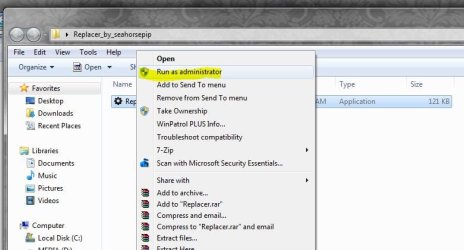
I download recommended app called Replacer but whenever i want to replace the file it gives me Access denied error even i am logged As Admin :( just help me here :| Please
 

My Computer

Computer type
PC/Desktop
Computer Manufacturer/Model Number
Gigabyte Technology Co., Ltd.
OS
Microsoft Windows 7 Ultimate
CPU
Intel Core 2 Quad CPU Q6600 @ 2.40GHz @ 2.40GHz
Motherboard
Gigabyte Technology Co., Ltd.
Memory
4GB
Graphics Card(s)
Intel(R) G965 Express
Sound Card
Realtek HD 8-Channel High Definition Audio
Monitor(s) Displays
Dell LED
Screen Resolution
1026x768
Hard Drives
300GB With External 800GB
PSU
Intel 800W
Case
mpc Client Pro
Cooling
stock cpu, 120mm rear, 140mm top
Keyboard
Compaq
Mouse
Accer
Internet Speed
ADSL 24Mb/sec
Antivirus
ESET NOD32
Browser
Firefox

My Computer

Computer type
PC/Desktop
Computer Manufacturer/Model Number
Self Built
OS
Win 10 Pro x64
CPU
Intel I5-2500K @3.3GHz
Motherboard
Asrock P67 Extreme4
Memory
16GB G.Skill Ripjaws X (4x4GB)
Graphics Card(s)
EVGA GeForce 750 Ti SC 2GB
Sound Card
ASUS Xonar DG 5.1 Channels 24-bit 96KHz PCI Interface Sound
Monitor(s) Displays
auria eq2367
Screen Resolution
1920 x 1080
Hard Drives
250GB Samsung 850 EVO SSD
1TB WD Blue
1TB Hitachi
PSU
SeaSonic X 650W 80 Plus Gold
Case
Corsair Obsidian 750D
Cooling
Corsair H60, Three 140mm case fans
Keyboard
Logitech Wireless Keyboard K520
Mouse
Logitech Wireless Mouse M310
Internet Speed
Wave Broadband ~ 100 dn 5 up
Antivirus
Windows Defender, Malwarebytes Premium
Browser
Edge, IE11, Chrome
Other Info
Laptop specs: HP g7-1365dx /
CPU: AMD A6-3420M APU with Radeon(tm) HD Graphics /
RAM: Crucial 8Gb (2x4Gb) /
SSD: Crucial M4-CT128M4SSD2 ATA Device/ FW 000F /
GFX: AMD Radeon HD 6520G /
OS: Windows 10 Pro x64
Back
Top