Solved How to do windows 7 repair on toshiba satellite computer

swimmeroc

New member
Local time
6:05 PM
Messages
11
I am trying to do a windows repair on my toshiba laptop Following this windows repair thread.

http://www.sevenforums.com/tutorials/3413-repair-install.html

I created the Bootable DVD from the iso image. Upon inserting the DVD I get a bad image error saying D:\Sources\SPWIZENG.DLL is either not designed to run on windows or it contains an error. Try installing the program again using the original installation media or contact your administratof or the software vendor for support.
after I click ok I get a message saying the file autorun.DLL could not be loaded or is corrupt. Setup cannot continue error code [0xC1]

I am doing the repair because my computer is running extremely slow. Only in safe mode and doing a clean boot for a limited amount of time make it run appropriately. What I did change before this started was that I update the Intel HD graphics driver after I tried to upgrade Internet Explorer to version 11. IE11 had failed to update as I did not have windows 7 sp1 installed and I realized that I needed to update that driver to update windows. This was on Jan 31st. I updates to sp1 and the IE11 the next day I had 107 additional updates. I did those one Feb 1St and left it running over night. The next morning my computer was unusabl. I've tried updating all the drivers that I could. I used cclearner, malwarebytes, and norton anti virus and everything was working well. I can't do a restore before sp1 update. I prefer not to do a full system restore because I don't want to lose everything as there are program I do not have a key anymore for. Predominantly the ms office 13 I got from school last year that isn't being given anymore. Any help would be greatly appreciated.
 

My Computer My Computer

At a glance

7 Home Premium x64Intel core is m350 @ 2.27Ghz4.0 GBIntel HD graphics
Computer type
Laptop
Computer Manufacturer/Model Number
toshiba A665-S6050
OS
7 Home Premium x64
CPU
Intel core is m350 @ 2.27Ghz
Memory
4.0 GB
Graphics Card(s)
Intel HD graphics
Antivirus
Norton security suite
Browser
chrome
Why would you not have SP1 installed almost five years after it was released? That is not even Windows 7! It sounds like you've been running an unpatched OS for years and probably are loaded up with malware, hardware that is unpatched and running badly as a result.

Is this s still the factory install which is the worst install of WIn7 one can have? If so I would take the time now to do a perfect Clean Reinstall Windows 7 which will result in the best possible install of Win7 one can have, which will stay that way as long as you stick with only the tools and methods given in that tutorial.

A Repair Install will be fighting against all the factory bloatware and corruption which has built up and would likely fail, and even if it "succeeded" it would need to pass back through so many corrupt settings it would defeat the purpose of in-place reinstalling since it would still have a ton of crap on its back. Better to go completely clean and unleash Win7 native perfect performance which you have never even experienced on that PC.

So your best option is to do the reinstall and you came to the right place since we've helped over a million consumers do a Clean Reinstall Windows 7 without a single complaint or return with problems.
 
Last edited:
Thanks gregrocker

I think you're right. I was able to backup all my personal data that I need. Now my issue is that the link provided does not let me download the iso file. I tried using the product key on the Software Recovery Center site and I get this message:

The language you've selected is not available for the product you are eligible for. Please select a different language.

I want it in English, I bought the retail version in English, so why won't it provide it for me in English. I have not tried it in a different language. If I am able to download it in another language, can I switch it to English after the install without any problems or is this just a bad idea. I also noticed that it mentions VPN for outside regions but I figured this doesn't apply to me since I'm in the U.S.

I should also add that I have an English Windows 7 Ultimate 32bit iso file, however, I want to install windows on a 64 bit computer. Can I convert this install to a 64bit using the eicfg removal tool or is this impossible? Thanks.

UPDATE: After some research, I downloaded the Portuguese version Win7 Ultimate x64 from software recovery center. I realized that the ultimate version lets you download language packs so I can switch to English later. I just have to use my other language skills to figure it out. :( Just have to work harder.
 
Last edited:

My Computer My Computer

At a glance

7 Home Premium x64Intel core is m350 @ 2.27Ghz4.0 GBIntel HD graphics
Computer type
Laptop
Computer Manufacturer/Model Number
toshiba A665-S6050
OS
7 Home Premium x64
CPU
Intel core is m350 @ 2.27Ghz
Memory
4.0 GB
Graphics Card(s)
Intel HD graphics
Antivirus
Norton security suite
Browser
chrome
I am a little confused as to what you want swimmeroc so is it Windows 7 Ultimate 64bit version in English you want because the ISO for it is in Greg's tutorial and you will just need the activation code. Now if that doesn't activate using the ISO because you have not got the retail version installed previously a then quick call to Microsoft will probably get it sorted for you.
They are very helpful in my experience when you have these problems. Having said that if you have used that retail version on the machine before the activation code will or should be recorded on the motherboard.
The machine CPU specs show it is a 64bit device so yes the 64bit ISO will install.

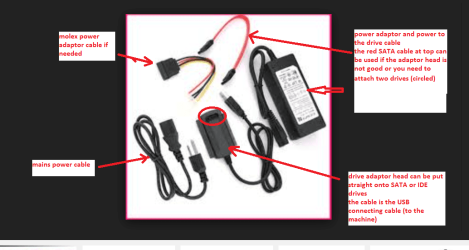
I am also thinking how did you prepare the drive for the reinstall? It seems to me even though I am a little confused with your request that you need to get the drive prepared first before you go ahead and install the 7. To do that of course you will need to use another machine and use an adaptor as in my pic.

If you post back what you want do it in point form mate it makes for it being easier to sort out.
 

Attachments

  • USB SATA GADGET.PNG
    USB SATA GADGET.PNG
    70.6 KB · Views: 0

My Computer My Computer

At a glance

Desk1 7 Home Prem / Desk2 10 Pro / Main lap A...Desk1 i5 3750K / Laptop i7 GTX 860M / Desk2 i...Desk1 8GB (1866) / Desk2 16GB (1333) / Laptop...Desk 1& 2NVidia GTX 650 & Laptops on board Intel
Computer type
PC/Desktop
Computer Manufacturer/Model Number
Own build (new) Desk1 / Asus ROG Win 7 / Desk2 1st build
OS
Desk1 7 Home Prem / Desk2 10 Pro / Main lap Asus ROG 10 Pro 2 laptop Toshiba 7 Pro Asus P2520 7 & 10
CPU
Desk1 i5 3750K / Laptop i7 GTX 860M / Desk2 i5 2500
Motherboard
Desk1 Asus P877-V / Desk2 Gigabyte H67 UD3H / Laptop ?
Memory
Desk1 8GB (1866) / Desk2 16GB (1333) / Laptop 8Gb DDR3
Graphics Card(s)
Desk 1& 2NVidia GTX 650 & Laptops on board Intel
Sound Card
Desk 1 & 2 -XONAR DG Realtek High Def audio Laptop
Monitor(s) Displays
Desk 1 Benq HD 2450 / Desk2 Philips 24" / Laptop 17.5"
Screen Resolution
1920x1080 D1 & D2 & Laptop 1
Hard Drives
Desk1 Samsung 120GB 830 SSD
Asus ROG 256GB 850 Pro SSD
Desk2 Samsung 840 256 SSD
Toshiba 120GB EVO
PSU
Desk 1 Corsair HX 1050/ Laptop ? / Desk 2 Corsair HX 650
Case
Desk 1 Cooler HAF XM ? Toshiba laptop / Desk2 Coolermaster
Cooling
Fans on all Desk1 -2 Desk2 - all Coolermasters 5 Laptop ?
Keyboard
Desk 1 MS Sidewinder X6 Desk 2 MS Sidewinder X 4
Mouse
Desk 1&2 - Gigabyte MS 900 gamer - laptop - Logitec wireless
Internet Speed
ADSL2+
Other Info
One other Desktop (tester) and spare Toshba laptop both with SSD's
Running Kaspersky 2016 ISS on all machines config'd identically
Logitec audio stereo systems on each machine (x3)
Canon MG5250MFC
Router/modem TP-Link running WPA2SK
Sorry for the confusion, I will start over.

I decided to do the clean reinstall of Windows 7.

The computer I want to reinstall windows is currently running an OEM Win7 Home Premium. I have a retail product key for a Windows 7 Ultmate that I used on a computer that I no longer use.

Clean install thread leads to the digitalriver website for the downloads but none of them finish downloading. I did a webchat with someone at microsoft and they are providing me a download for the iso file thats in English which I am currently downloading.

I have saved all my personal files onto an external harddrive. I have the installation disk and keys for all programs I want to keep. I downloaded the most recent network driver in case I needed after the install. I am not sure if I need to download all of the drivers.

Once I have the iso file, I was planning on using the eicfg removal tool to install the Home premium version or do you recommend sticking with the ultimate version?

I have read the clean install thread and believe I understand what I need to do.
 

My Computer My Computer

At a glance

7 Home Premium x64Intel core is m350 @ 2.27Ghz4.0 GBIntel HD graphics
Computer type
Laptop
Computer Manufacturer/Model Number
toshiba A665-S6050
OS
7 Home Premium x64
CPU
Intel core is m350 @ 2.27Ghz
Memory
4.0 GB
Graphics Card(s)
Intel HD graphics
Antivirus
Norton security suite
Browser
chrome
Ok mate have got to go offline for a while but will get back to you soon.
 

My Computer My Computer

At a glance

Desk1 7 Home Prem / Desk2 10 Pro / Main lap A...Desk1 i5 3750K / Laptop i7 GTX 860M / Desk2 i...Desk1 8GB (1866) / Desk2 16GB (1333) / Laptop...Desk 1& 2NVidia GTX 650 & Laptops on board Intel
Computer type
PC/Desktop
Computer Manufacturer/Model Number
Own build (new) Desk1 / Asus ROG Win 7 / Desk2 1st build
OS
Desk1 7 Home Prem / Desk2 10 Pro / Main lap Asus ROG 10 Pro 2 laptop Toshiba 7 Pro Asus P2520 7 & 10
CPU
Desk1 i5 3750K / Laptop i7 GTX 860M / Desk2 i5 2500
Motherboard
Desk1 Asus P877-V / Desk2 Gigabyte H67 UD3H / Laptop ?
Memory
Desk1 8GB (1866) / Desk2 16GB (1333) / Laptop 8Gb DDR3
Graphics Card(s)
Desk 1& 2NVidia GTX 650 & Laptops on board Intel
Sound Card
Desk 1 & 2 -XONAR DG Realtek High Def audio Laptop
Monitor(s) Displays
Desk 1 Benq HD 2450 / Desk2 Philips 24" / Laptop 17.5"
Screen Resolution
1920x1080 D1 & D2 & Laptop 1
Hard Drives
Desk1 Samsung 120GB 830 SSD
Asus ROG 256GB 850 Pro SSD
Desk2 Samsung 840 256 SSD
Toshiba 120GB EVO
PSU
Desk 1 Corsair HX 1050/ Laptop ? / Desk 2 Corsair HX 650
Case
Desk 1 Cooler HAF XM ? Toshiba laptop / Desk2 Coolermaster
Cooling
Fans on all Desk1 -2 Desk2 - all Coolermasters 5 Laptop ?
Keyboard
Desk 1 MS Sidewinder X6 Desk 2 MS Sidewinder X 4
Mouse
Desk 1&2 - Gigabyte MS 900 gamer - laptop - Logitec wireless
Internet Speed
ADSL2+
Other Info
One other Desktop (tester) and spare Toshba laptop both with SSD's
Running Kaspersky 2016 ISS on all machines config'd identically
Logitec audio stereo systems on each machine (x3)
Canon MG5250MFC
Router/modem TP-Link running WPA2SK
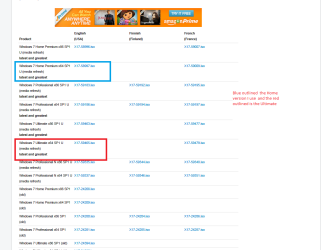
Ok now I am still not sure why you need the ei.cfg tool and also why it is proving to be such a problem downloading the ISO I downloaded a heap of times from here off that tutorial
Windows 7 Direct Download Links, Official Disk Images from Digital River see pic

Now it is up to you what version you need I am just an average user and the Home version is fine for what I need. I think a lot of people think they are going to get some whizz bang red hot OS with Ultimate and I guess if you are into a lot of programming and stuff like that then yes it is good but just have a Google at what the different versions offer and see what you want it to do.
Whatever you choose just use the activation code you have for that version.
I have 7 Pro on my new laptop not out of choice but because that is what the dealer offered it as the only 7 version option for the 8 that was installed on it and quite frankly I cannot see what difference is.

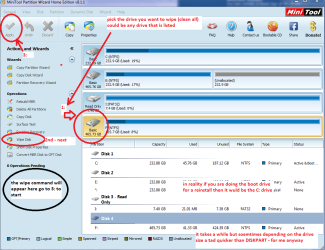
Now for the drive I always wipe a drive before I install if it has been used before just to be absolutely sure there is no data whatsoever on it and I do it by two methods
1 Clean all in DISKPART http://www.sevenforums.com/tutorials/52129-disk-clean-clean-all-diskpart-command.html
2 Wipe the drive using the Partition Wizard Free Partition Manager for Window PC | MiniTool Partition Wizard Free Edition
However you have to use a machine running Windows already to do that and use a USB to SATA adaptor to hook up the drive to a running machine see pic
 

Attachments

  • ISO.PNG
    ISO.PNG
    38.2 KB · Views: 0
  • MINI TOOL WIPE.PNG
    MINI TOOL WIPE.PNG
    52.4 KB · Views: 0

My Computer My Computer

At a glance

Desk1 7 Home Prem / Desk2 10 Pro / Main lap A...Desk1 i5 3750K / Laptop i7 GTX 860M / Desk2 i...Desk1 8GB (1866) / Desk2 16GB (1333) / Laptop...Desk 1& 2NVidia GTX 650 & Laptops on board Intel
Computer type
PC/Desktop
Computer Manufacturer/Model Number
Own build (new) Desk1 / Asus ROG Win 7 / Desk2 1st build
OS
Desk1 7 Home Prem / Desk2 10 Pro / Main lap Asus ROG 10 Pro 2 laptop Toshiba 7 Pro Asus P2520 7 & 10
CPU
Desk1 i5 3750K / Laptop i7 GTX 860M / Desk2 i5 2500
Motherboard
Desk1 Asus P877-V / Desk2 Gigabyte H67 UD3H / Laptop ?
Memory
Desk1 8GB (1866) / Desk2 16GB (1333) / Laptop 8Gb DDR3
Graphics Card(s)
Desk 1& 2NVidia GTX 650 & Laptops on board Intel
Sound Card
Desk 1 & 2 -XONAR DG Realtek High Def audio Laptop
Monitor(s) Displays
Desk 1 Benq HD 2450 / Desk2 Philips 24" / Laptop 17.5"
Screen Resolution
1920x1080 D1 & D2 & Laptop 1
Hard Drives
Desk1 Samsung 120GB 830 SSD
Asus ROG 256GB 850 Pro SSD
Desk2 Samsung 840 256 SSD
Toshiba 120GB EVO
PSU
Desk 1 Corsair HX 1050/ Laptop ? / Desk 2 Corsair HX 650
Case
Desk 1 Cooler HAF XM ? Toshiba laptop / Desk2 Coolermaster
Cooling
Fans on all Desk1 -2 Desk2 - all Coolermasters 5 Laptop ?
Keyboard
Desk 1 MS Sidewinder X6 Desk 2 MS Sidewinder X 4
Mouse
Desk 1&2 - Gigabyte MS 900 gamer - laptop - Logitec wireless
Internet Speed
ADSL2+
Other Info
One other Desktop (tester) and spare Toshba laptop both with SSD's
Running Kaspersky 2016 ISS on all machines config'd identically
Logitec audio stereo systems on each machine (x3)
Canon MG5250MFC
Router/modem TP-Link running WPA2SK
Back
Top