How to: Dual-boot Linux Debian and Win7RC

mukul

Banned
Local time
9:20 AM
Messages
52
Location
Delhi, India
Hello Guys,

I've Linux Debian installed at my workstation. We are not allowed to remove it. But I would like to make the system dual-boot. Debian Lenny is already installed, How can I safely install Win7RC along with the Debian without losing any of the files/system/partition etc.

Thanks & Regards
Mukul
 

My Computer My Computer

Computer Manufacturer/Model Number
Sony VAIO VGN-CS14G
OS
Vista Home Premium 32-bit/ Win7 RC/ Debian Lenny
CPU
Core 2 Duo 2.2GHz
Memory
2GB
Hard Drives
250GB SATA
Internet Speed
192Kbps/ 2Mbps
well get a live CD with a partition editer... .. maybe a knoppix live cd? or minipe live cd? even the freespire CD has gparted (actually works unlike other gparted aps)

You need to find something that will resize a partition...

first defrag your computer in debian,
boot into one of those CD's and go to resize your current partition, make it big enough for win7, and install win7,
than download easybcd or vistabootpro or something.
when your in win7 (because it will get rid of your debian boot option) you can run vistabootpro (my recomendation) and set up the boot. works well

or get a 2nd hard drive and do it that way....

or if you really know linux, restore gnome after the fact, and add win7 onto the boot list
 

My Computer My Computer

Computer Manufacturer/Model Number
Custom Built - TheTeZ
OS
Windows 7 -x6
CPU
Intel Core 2 Extreme QX9650 Processor- (Quad)
Motherboard
Asus P5N-D Motherboard
Memory
OCZ Platnum 8gb(2gbx4) PC 6400 DDR2 800MHz
Graphics Card(s)
EVGA 01G-P3-1145-TR GeForce GTS 250 Video Card
Sound Card
Realtek ALC883
Monitor(s) Displays
19" WideScreen Mag Innovision & Acer X203H Vertical Mount
Screen Resolution
1440x900 & 1600x900
Hard Drives
Western Digital WD7500AADS Caviar Green Hard Drive - 750GB
Western Digital WD500
Hitachi 1TB Serial ATA HD
PSU
Kingwin Mach 1 Modular Power Supply
Case
NZXT Tempest ATX Mid-Tower Case -- AKA Flow Master
Cooling
Thermaltake SpinQ CPU Cooler - Aerocool Touch 1000 LCD Panel
well get a live CD with a partition editer... .. maybe a knoppix live cd? or minipe live cd? even the freespire CD has gparted (actually works unlike other gparted aps)

You need to find something that will resize a partition...
I don't have a liveCD but i've installed gparted using synaptic.

first defrag your computer in debian,
boot into one of those CD's and go to resize your current partition, make it big enough for win7, and install win7,
than download easybcd or vistabootpro or something.
when your in win7 (because it will get rid of your debian boot option) you can run vistabootpro (my recomendation) and set up the boot. works well
Are you sure it's not going to lose my Debian OS. I mean using easybcd/vistabootpro I can get the Debian(initially installed) as well as Win7 without changing any config files??

or if you really know linux, restore gnome after the fact, and add win7 onto the boot list
What do you mean by this? Will vistabootpro/easybcd not restore the Debian automatically?
 

My Computer My Computer

Computer Manufacturer/Model Number
Sony VAIO VGN-CS14G
OS
Vista Home Premium 32-bit/ Win7 RC/ Debian Lenny
CPU
Core 2 Duo 2.2GHz
Memory
2GB
Hard Drives
250GB SATA
Internet Speed
192Kbps/ 2Mbps
dual boot

TeZ:
Just had to respond when I read this. I have been cautioned by an administrator on
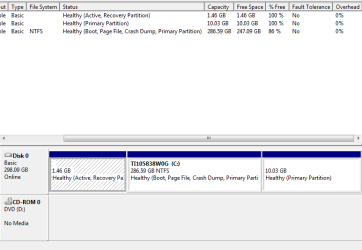
forum not to partition for Linux because of incompatibility of Grub to win 7 or maybe its this rather unique HD partitioning on this Toshiba. So is the opposite true with win 7 pre loaded can one install debian. I can resize the partition with gparted


well get a live CD with a partition editer... .. maybe a knoppix live cd? or minipe live cd? even the freespire CD has gparted (actually works unlike other gparted aps)

You need to find something that will resize a partition...

first defrag your computer in debian,
boot into one of those CD's and go to resize your current partition, make it big enough for win7, and install win7,
than download easybcd or vistabootpro or something.
when your in win7 (because it will get rid of your debian boot option) you can run vistabootpro (my recomendation) and set up the boot. works well

or get a 2nd hard drive and do it that way....

or if you really know linux, restore gnome after the fact, and add win7 onto the boot list
 

Attachments

  • 7 HD.PNG
    7 HD.PNG
    9.5 KB · Views: 184

My Computer My Computer

OS
7 home premium 64 bit
Have you considered a Virtual Machine instead of dual boot ?? I'm running Ubuntu (Debian based) with both XP and Windows 7 in VMs and it all works just fine. Just install VirtualBox and set up your VMs that way. If you need help, I'm sure you'll find it in a Debian forum since VMs have become rather common it seems.

Also, if you install in a dual boot, you'll have to tamper with a partition, which it sounds like you don't want to do if I read your original post correctly.
 

My Computer My Computer

Computer Manufacturer/Model Number
Dell Optiplex
OS
Windows 7 Professional 64 bit
Memory
4096
Back
Top