How to edit these font sizes in Window 7, it's been IMPOSSIBLE to do!

Matt621

New member
Local time
11:21 AM
Messages
9
Location
A house
Hello,

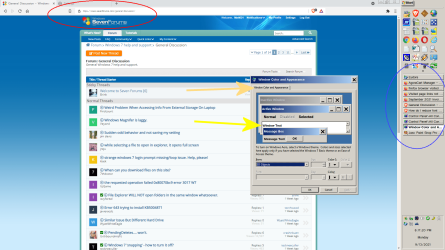
I'm an old guy with failing vision and mild color blindness and long time user of Windows 7 and use the computer for many, many applications. One thing that has really bugged me is that I can't set these font sizes. I CAN SET the faces, but the size issue has been a challenge. See the attached.

Also, look at the TINY font in the address bar of my browser. Does this on Chrome, Opera and Brave. Firefox does not do this.

To list the fonts that I'm trying to change the size to are:

the BUTTONS TEXT on the buttons in the task bar (Blue circle)
the size of the font in the address bar in Chrome based browsers (red circle)
the "window text" in any open application (yellow arrow)
the "windows system font" (orange arrow.)

If anyone could help, that would be great.

This is windows 7 with Classic Shell. FontSizesInWindows7.png
Also if anyone knows the FONT FACE and SIZE of the listings when you open file explorer. I have changed it, but I don't know how it did it so I can't change it back. It was something I changed when trying to do some of the above and it did not have the effect expected.

Thanks.
 

My Computers My Computers

  • At a glance

    windows 7 64bitAMD A1216gigbuilt in
    Computer type
    PC/Desktop
    Computer Manufacturer/Model Number
    custom
    OS
    windows 7 64bit
    CPU
    AMD A12
    Motherboard
    Gigabyte AB350MD3H
    Memory
    16gig
    Graphics Card(s)
    built in
    Sound Card
    built in
    Monitor(s) Displays
    Asus
    Screen Resolution
    2560x1440
    Hard Drives
    Samsung 980 Pro NVMe
    Various other Samsung SSD drives
  • Computer type
    PC/Desktop
    Antivirus
    Yes
Hi Matt,
couple of option
Control Panel ---
Ease of Access, well worth a read in your case
Display, short and sweet option
Display, just change it to 125 or higher
notes
screen size arrows come in handy here
all your desktop icons will be moved
 

My Computer My Computer

At a glance

W7 home premium 32bit/W7HP 64bit/w10 tp insid...E5300 dual core3gbNvidia Geforce 7100 Nforce 630i
Computer type
PC/Desktop
Computer Manufacturer/Model Number
medionl/Aspire 6930G/acer x55a
OS
W7 home premium 32bit/W7HP 64bit/w10 tp insider ring
CPU
E5300 dual core
Motherboard
medion MS7366
Memory
3gb
Graphics Card(s)
Nvidia Geforce 7100 Nforce 630i
Monitor(s) Displays
avixc
Internet Speed
n (isp resticted to 72)
Antivirus
mse/pands
Browser
palemoon
Other Info
Belkin Fd7050 n USB using Railink RT2870 drivers, more upto date
Hi Matt,
couple of option
Control Panel ---
Ease of Access, well worth a read in your case
Display, short and sweet option
Display, just change it to 125 or higher
notes
screen size arrows come in handy here
all your desktop icons will be moved
Yea, I tried that. It does not effect any of the fonts I have noted. And it also just blows everything up on the screen so nothing fits anymore. I have the screen set so I can see everything I need to and don't want to mess that up. I just need to adjust the fonts I identified in the image I posted.

- - - Updated - - -

Just so you can see I did not ignore you, I really did try that already. attached are some screen caps of the result:

FontSizesInWindows7-110.png
FontSizesInWindows7-110-2.png
FontSizesInWindows7-110-3.png

Yes it did make the buttons text larger but it made many other texts very much smaller.

And totally messed up all my desktop icons.
 

My Computers My Computers

  • At a glance

    windows 7 64bitAMD A1216gigbuilt in
    Computer type
    PC/Desktop
    Computer Manufacturer/Model Number
    custom
    OS
    windows 7 64bit
    CPU
    AMD A12
    Motherboard
    Gigabyte AB350MD3H
    Memory
    16gig
    Graphics Card(s)
    built in
    Sound Card
    built in
    Monitor(s) Displays
    Asus
    Screen Resolution
    2560x1440
    Hard Drives
    Samsung 980 Pro NVMe
    Various other Samsung SSD drives
  • Computer type
    PC/Desktop
    Antivirus
    Yes
Matt621

Perhaps download and install Winaero Tweaker. It's freeware.

Many options in this utility. Text font, colour and size for various aspects of Win 7 are some of them.
 

My Computer My Computer

At a glance

Windows 7 Pro x64Intel i5-8265U8gbIntel Iris Plus 655
Computer type
Laptop
Computer Manufacturer/Model Number
HP 250 G7
OS
Windows 7 Pro x64
CPU
Intel i5-8265U
Motherboard
Intel Coffee Lake
Memory
8gb
Graphics Card(s)
Intel Iris Plus 655
Sound Card
Realtek HDA
Monitor(s) Displays
Generic
Screen Resolution
1366 x 768
Hard Drives
Crucial P5 NVMe 1Tb internal
WD's 4Tb, 3Tb, 2 x 2Tb external
Mouse
Logi wireless
Internet Speed
45 Mbps
Antivirus
AVG
Browser
Firefox 88, Pale Moon 29, Brave 129
Other Info
Combination of i5-8265U with Crucial P5 achieves Crystal Bench scores > 5000

Iris Plus GPU (Whiskey Lake) driver from BioStar

HP 250 G7 is a budget machine
thank you, I will give that a try.

- - - Updated - - -

Okay It has helped, but it's like I'm competing with some settings. Making fonts larger makes other fonts smaller.

I have the brave/chrome/opera URL test larger but firefox got smaller.

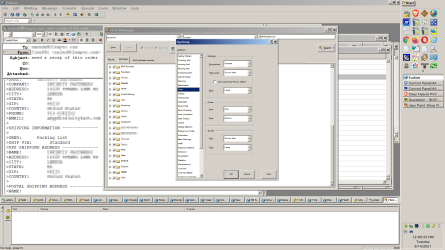
And my eudora text is normal, except for the pop up boxes for the Eudora settings. Those fonts are TINY. Probably 4 or 5 point.

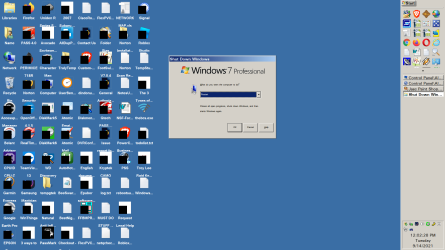
And the windows shut down fonts are tiny as well. Also probably the same face and size.

My task bar buttons are back to "too small" text which is where this all started. I had the system pretty good, but those buttons were just too small to read. thats a system font. I found were to change the face and it works but that is what caused the wheels to fall off every place else. .. still trying to get something readable in every app in every part of the program.
 

My Computers My Computers

  • At a glance

    windows 7 64bitAMD A1216gigbuilt in
    Computer type
    PC/Desktop
    Computer Manufacturer/Model Number
    custom
    OS
    windows 7 64bit
    CPU
    AMD A12
    Motherboard
    Gigabyte AB350MD3H
    Memory
    16gig
    Graphics Card(s)
    built in
    Sound Card
    built in
    Monitor(s) Displays
    Asus
    Screen Resolution
    2560x1440
    Hard Drives
    Samsung 980 Pro NVMe
    Various other Samsung SSD drives
  • Computer type
    PC/Desktop
    Antivirus
    Yes
Tweaker sets various system fonts, sizes and colours. It's used for system-type settings, and there are quite a few within Win 7 as you've found.

Programs generally have their own utilities. For example, Firefox has editable font attributes under Options > Language and Appearance. It's been so long since I used Eudora that I have no hope of remembering its' ins and outs.

You will need patience for this trial and error situation. Set all of the various system fonts with Tweaker first, then work through your programs. Trying to do both simultaneously probably invites confusion.

Suggest once you've finally settled it, perhaps make a backup image of your C: drive (eg. with Macrium 7 or Aomei - both freeware) for recovery against future mess.
 

My Computer My Computer

At a glance

Windows 7 Pro x64Intel i5-8265U8gbIntel Iris Plus 655
Computer type
Laptop
Computer Manufacturer/Model Number
HP 250 G7
OS
Windows 7 Pro x64
CPU
Intel i5-8265U
Motherboard
Intel Coffee Lake
Memory
8gb
Graphics Card(s)
Intel Iris Plus 655
Sound Card
Realtek HDA
Monitor(s) Displays
Generic
Screen Resolution
1366 x 768
Hard Drives
Crucial P5 NVMe 1Tb internal
WD's 4Tb, 3Tb, 2 x 2Tb external
Mouse
Logi wireless
Internet Speed
45 Mbps
Antivirus
AVG
Browser
Firefox 88, Pale Moon 29, Brave 129
Other Info
Combination of i5-8265U with Crucial P5 achieves Crystal Bench scores > 5000

Iris Plus GPU (Whiskey Lake) driver from BioStar

HP 250 G7 is a budget machine
I just looked at Firefox. There is Settings > language and appearance.

If there is a way to increase the size of the title bar fonts, it is not obvious to me.

This part stays the same

firefox-title-bar.png
 

My Computers My Computers

  • At a glance

    7 X64i5 84002x8gb 3200mhz
    Computer type
    PC/Desktop
    OS
    7 X64
    CPU
    i5 8400
    Motherboard
    gigabyte b365m ds3h
    Memory
    2x8gb 3200mhz
    Hard Drives
    various
    PSU
    pure power 11 400w cm
    Case
    Coolermaster
    Cooling
    cryorig m9i
  • At a glance

    7x64g54008gb ddr4 2400
    Computer type
    PC/Desktop
    OS
    7x64
    CPU
    g5400
    Motherboard
    ga b365m ds3h
    Memory
    8gb ddr4 2400
    PSU
    xfx pro 450w

My Computer My Computer

At a glance

Windows 7 Pro x64Intel i5-8265U8gbIntel Iris Plus 655
Computer type
Laptop
Computer Manufacturer/Model Number
HP 250 G7
OS
Windows 7 Pro x64
CPU
Intel i5-8265U
Motherboard
Intel Coffee Lake
Memory
8gb
Graphics Card(s)
Intel Iris Plus 655
Sound Card
Realtek HDA
Monitor(s) Displays
Generic
Screen Resolution
1366 x 768
Hard Drives
Crucial P5 NVMe 1Tb internal
WD's 4Tb, 3Tb, 2 x 2Tb external
Mouse
Logi wireless
Internet Speed
45 Mbps
Antivirus
AVG
Browser
Firefox 88, Pale Moon 29, Brave 129
Other Info
Combination of i5-8265U with Crucial P5 achieves Crystal Bench scores > 5000

Iris Plus GPU (Whiskey Lake) driver from BioStar

HP 250 G7 is a budget machine
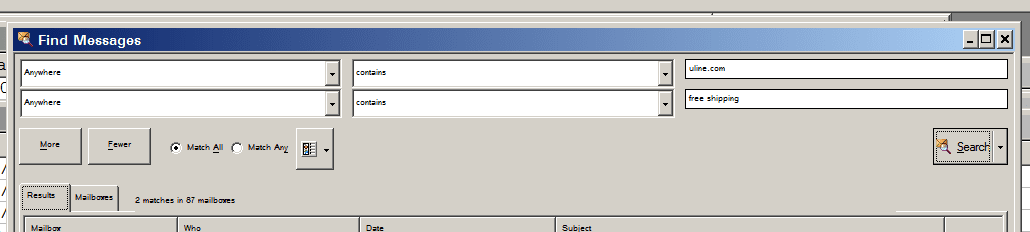
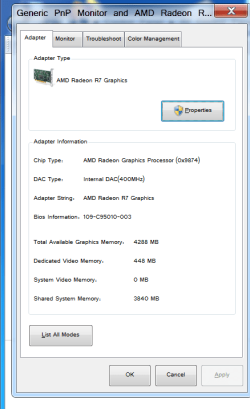
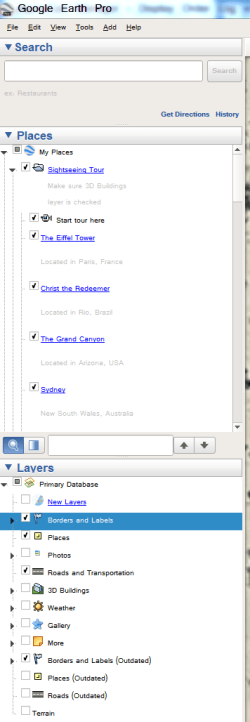
I'm uploading several more. I have sorta been able to get most of the fonts back to something readable, except for these. And if you look at them, you'll see it's almost all the basic system font for Windows. This is the font that shows under device mgt,

- - - Updated - - -

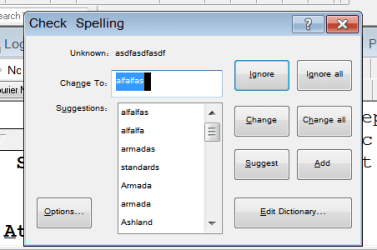
You will note all of these are "real time" size, ie, not sized down or up. That's exactly how they show on my screen. That's Google Earth, the spell chker from Eudora, various Window setting boxes, etc.

- - - Updated - - -

the spell checker is one that really shows the issue. I cropped too much of it, but you can see in the "background" (around the edges) the actual font on the page. It's a completely clear, readable "largish" font. But the spell checker dialogue box is tiny compared to the rest of the fonts on the page. Ironically the thing that started this all was the text on the buttons on the task bar. Somehow I have gotten them a bit bigger. But in doing so I made these system fonts very much smaller.

- - - Updated - - -

Using the winaero program I had no problems getting the address bar and others up to size. Those are in there. But the other fonts above... no luck. And what really bugs me is the font in Eudora for the spell check and find are just impossible to read they are so small. I have checked the ini file for Eudora and there are 3 font settings on there, but so far none have made any difference. And searching online has been futile since every article is referencing the same thing, none of them address these fonts. If anyone has any other ideas I'll ears. Thanks for the help.

- - - Updated - - -

Okay well after these several days trying to get it right I just gave up and went back to an old restore point. It solved the issue. The thing is, if it resolved the problem that means it was something in the registry that could have been found. I just wish I knew what it was.
 

Attachments

  • FontSizesInWindows7-110-6.png
    FontSizesInWindows7-110-6.png
    7 KB · Views: 10
  • FontSizesInWindows7-110-7.png
    FontSizesInWindows7-110-7.png
    8.9 KB · Views: 0
  • FontSizesInWindows7-110-5.png
    FontSizesInWindows7-110-5.png
    17.1 KB · Views: 10
  • FontSizesInWindows7-110-4.png
    FontSizesInWindows7-110-4.png
    20.8 KB · Views: 0

My Computers My Computers

  • At a glance

    windows 7 64bitAMD A1216gigbuilt in
    Computer type
    PC/Desktop
    Computer Manufacturer/Model Number
    custom
    OS
    windows 7 64bit
    CPU
    AMD A12
    Motherboard
    Gigabyte AB350MD3H
    Memory
    16gig
    Graphics Card(s)
    built in
    Sound Card
    built in
    Monitor(s) Displays
    Asus
    Screen Resolution
    2560x1440
    Hard Drives
    Samsung 980 Pro NVMe
    Various other Samsung SSD drives
  • Computer type
    PC/Desktop
    Antivirus
    Yes
Back
Top