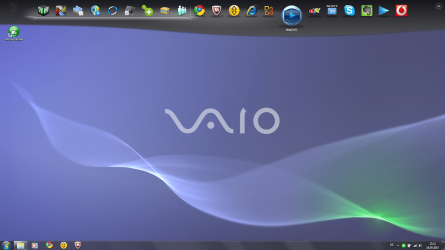
How to enable/disable/configure MAC style taskbar?

pstein

New member
Member
VIP
Local time
10:54 AM
Messages
244
I am sitting in front of a Win7 computer which has a MAC style taskbar at the top border of the screen (in addition to the "normal" taskbar as known from WinXP).

Is this an add-on of built-in in all Win7 systems?

How do I enable/disable it?

How do I configure it?

Peter
 

My Computer My Computer

Computer type
PC/Desktop
OS
win7pro 64bit

My Computer My Computer

Computer type
PC/Desktop
Computer Manufacturer/Model Number
LENOVO K450 @3.0GHZ
OS
64-bit Windows 8.1 Pro
CPU
Core(TM) i5 CPU 4330 Haswell @ 3.20GHz
Motherboard
LENOVO
Memory
12.00 GB
Graphics Card(s)
Intel(R) HD Graphics
Sound Card
Intel HD integtrated
Monitor(s) Displays
HP 25' ISP Monitor
Screen Resolution
1900/1020
Hard Drives
(1) ST1000DM003-1CH162 (2) Generic STORAGE DEVICE USB Device (3) Generic STORAGE DEVICE USB Device
Internet Speed
100mb down/10mb up
Back
Top