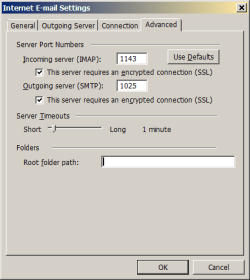
Yeah, I know Outlook 2003 is wicked old but... I just signed up for ProtonMail. To connect my Outlook client to their server I need to go through the Proton Mail Bridge which requires TSL for both incoming and outgoing connections. Following the instructions they provide, I was able to set up a new Outlook email account as required except for one thing: on the Advanced tab of the Internet E-mail Settings dialog, there is no option to select TSL for encryption. It offers only SSL. (see attachment)
In researching this problem I found various posts saying I needed to use particular port numbers for TSL, but Proton Mail Bridge specifies the port numbers that must be used. I also found posts saying I needed to install Windows Update KB3140245 to enable TSL on Win7. I've installed it. I also found a post on this site with a REG file that adds some Registry keys under HKLM\...\SCHANNELS\Protocols. I've installed that too. But I still see no TSL option in Outlook.
I've read that Outlook 2003 should be able to support TSL. Does anybody know how to get it working?
In researching this problem I found various posts saying I needed to use particular port numbers for TSL, but Proton Mail Bridge specifies the port numbers that must be used. I also found posts saying I needed to install Windows Update KB3140245 to enable TSL on Win7. I've installed it. I also found a post on this site with a REG file that adds some Registry keys under HKLM\...\SCHANNELS\Protocols. I've installed that too. But I still see no TSL option in Outlook.
I've read that Outlook 2003 should be able to support TSL. Does anybody know how to get it working?
Attachments
My Computer
At a glance
Windows 7 Home Premium 64 bitIntel i5 quad core8 GBNvidia GeForce GTS 250
- Computer type
- PC/Desktop
- Computer Manufacturer/Model Number
- custom
- OS
- Windows 7 Home Premium 64 bit
- CPU
- Intel i5 quad core
- Motherboard
- Gigabyte P55A-UD3
- Memory
- 8 GB
- Graphics Card(s)
- Nvidia GeForce GTS 250
- Sound Card
- SoundBlaster Audigy 2 ZS
- Screen Resolution
- 1920x1200
- Antivirus
- Kaspersky