How to enable wifi automatically at startup ?

swayzak

New member
Local time
5:13 PM
Messages
27
Hi

I'm new to 7 (all my desktops are XP Home).

With XP, the OS just connects automatically to my home wireless network.

However with this netbook, I have to do it manually everytime I reboot - it's a real pain.

Not sure if this OS, hardware or both.

Can anyone advise ?

I've looked at services.msc WiFi service and it's set to automatic already ....

thanks

PS Also, is there a way to get 7 to boot straight to desktop, without having to click on user icon or enter password ?

The reason these 2 are important to me is that this netbook is basically a music server, so when I come in from work etc., I'd like to just power up the netbook then walk off and play stuff via my network (Squeezebox) players
 

My Computer My Computer

Computer Manufacturer/Model Number
Medion E1222 Netbook
OS
Windows 7 Starter
Hi Swayzak,

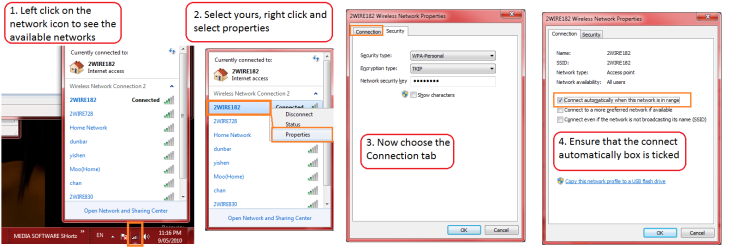
Here's a quick guide for you.

Good luck

Tim
 

Attachments

  • autoconnect.png
    autoconnect.png
    48.7 KB · Views: 8,539

My Computer My Computer

Computer Manufacturer/Model Number
Custom Hack job
OS
Windows 7 Ultimate 64 bit
CPU
Intel(R) Core(TM)2 Quad CPU Q8200 @ 2.33GHz
Motherboard
GigaByte EP45-UD3
Memory
8 GB Kingston
Graphics Card(s)
Nvidia GeForce 9600GT
Sound Card
Soundblaster Audigy
Monitor(s) Displays
AOC x2 22"
Hard Drives
2 x Samsung 500GB (RAID)
2 x Samsung 2TB
1 x WD Green 2TB
1 x Seagate 1TB
1 x Samsung 500GB
PSU
Thermaltake QFan 750W
Case
CM Scout Gaming
Cooling
Coolermaster V10
Keyboard
Microsoft Wireless Keyboard 1000
Mouse
Microsoft Wireless Optical 2000
Internet Speed
320
Other Info
Winfast PVR2000CP
LG DVD-RAM DVD/RW/DL Super Multi
Linksys WMP300Nx2 Wireless Adapter
Thanks

That box was already checked - but I also checked the one about SSID & now it connects at startup.

In addition I've enabled hibernation on powerdown, so now it just boots straight to desktop, without log in.
 

My Computer My Computer

Computer Manufacturer/Model Number
Medion E1222 Netbook
OS
Windows 7 Starter
Thanks

That box was already checked - but I also checked the one about SSID & now it connects at startup.

If that is the case then the problem may be that you didn't have your SSID set to broadcast in your routers set up page.

Either way it will work and it may be a bit more secure to not have the SSID being broadcast but if you have a friend or another machine that needs to connect wirelessly it might be easier to enable SSID in your routers set up page.
 

My Computer My Computer

Computer type
PC/Desktop
Computer Manufacturer/Model Number
Home built
OS
Windows 7 Ult, Windows 8.1 Pro,
CPU
Q9650-4.275GHz, E8600 4.5GHz, E6750-3.8GHz
Motherboard
Evga 780i FTW
Memory
G.Skill PC2 9600 1200Mhz 5 5 5 15 2T
Graphics Card(s)
GTX480
Sound Card
Asus Xonar D2
Monitor(s) Displays
HannsG
Screen Resolution
1680X1050
Hard Drives
GSkill Phoenix Pro 120GB SSD
PSU
ThermalTake Toughpower 1000Watt modular
Case
ThermalTake XaserV
Cooling
Xigmatek S1283
Keyboard
Logitech G15
Mouse
Logitech G9
Internet Speed
T1
Thanks

That box was already checked - but I also checked the one about SSID & now it connects at startup.

In addition I've enabled hibernation on powerdown, so now it just boots straight to desktop, without log in.

Awesome! and thanks for posting back the solution.

Note to chev65's advice: -Agreed, it's much better to hide the broadcasting.
 

My Computer My Computer

Computer Manufacturer/Model Number
Custom Hack job
OS
Windows 7 Ultimate 64 bit
CPU
Intel(R) Core(TM)2 Quad CPU Q8200 @ 2.33GHz
Motherboard
GigaByte EP45-UD3
Memory
8 GB Kingston
Graphics Card(s)
Nvidia GeForce 9600GT
Sound Card
Soundblaster Audigy
Monitor(s) Displays
AOC x2 22"
Hard Drives
2 x Samsung 500GB (RAID)
2 x Samsung 2TB
1 x WD Green 2TB
1 x Seagate 1TB
1 x Samsung 500GB
PSU
Thermaltake QFan 750W
Case
CM Scout Gaming
Cooling
Coolermaster V10
Keyboard
Microsoft Wireless Keyboard 1000
Mouse
Microsoft Wireless Optical 2000
Internet Speed
320
Other Info
Winfast PVR2000CP
LG DVD-RAM DVD/RW/DL Super Multi
Linksys WMP300Nx2 Wireless Adapter
Please ask a moderator to add this response to your post located @
http://forum.notebookreview.com/acer/68683-enable-aspire-wireless-boot.html
Read and you will see why...
SOLUTION! (at least for me on my win7 laptop)
I just had this problem when I reinstalled the OS from the OEM disc (not the factory install disc) I figured the OEM disc had a driver conflict. And I even tried updating the latest Wireless driver. But I incorrectly pointed the finger at the wireless lan driver.
The HOT KEY strip (the one with the buttons that turn white when you touch them just above the keyboard) on my laptop also controls the Wi-Fi Radio on/off button. This was the problem. You need the original driver for that strip, even if your volume on the strip is working.
Background. Think of your wireless lan as two seperate devices... the radio is compared to the cord of an ethernet connection. The wireless lan card is the ethernet card. When you think about it as one device it is easy to see why so many people assume the problem is with the wireless lan card. But the important part is that a laptop usually divides the two up to save power. Controlling the radio from a button on the keyboard (or a function key) (mine is FN +F2) is another reason to think of the two as seperate items.
Before reaching this conclusion I tried using "allow the computer to turn this device off to save power" I also had tried High performance power option modes and other wireless radio from the control pannel in both plug-in and battery modes. I tried the turn wireless netork on and off as well. There were plenty of reasons to think this was going to fix the problem.
I alos tried going with the above script but found that "WisWBSet.exe" was missing from windows 7. I also tried a Java script but could not find the key code for the FN button, nor the combination of the FN button (hold) and the F2 key combo.

So update your HOTkey strip driver... see if that doesnt fix your problem.
 

My Computer My Computer

OS
Win 7
Back
Top