JavaScript is disabled. For a better experience, please enable JavaScript in your browser before proceeding.
You are using an out of date browser. It may not display this or other websites correctly.
You should upgrade or use an
alternative browser .
How to enlarge picture preview box?
Hello!
I would like to know, if it's possible to customize the picture preview box.
Here is what I mean - I want to enlarge only the picture box, not the whole bottom toolbar. Perhaps there is another folder view that allows you to do that?
I have a lot of folders full of pictures, and it is really difficult to navigate, if I cannot see the preview of those pictures.
What I want to acomplish: Have the listview on, but also have a larger picture preview box, maintaining the rest of the toolbar the same size.
OS Windows 7 ultimate 64-bit CPU AMD Athlon 7750 Dual-Core Processor Motherboard A780FullHD Memory 4 GB RAM Graphics Card(s) nvidia 9800GT Monitor(s) Displays LG 19" Hard Drives 100 + 500 gb
An Angry Old Man
Guru
VIP
SF Team
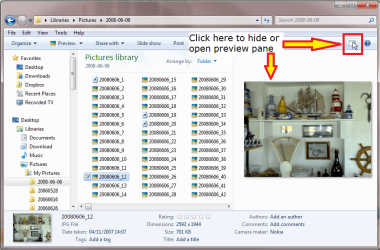
Hello Atomix, welcome to the Seven Forums. You could use the preview pane:
Kari
Computer type Laptop Computer Manufacturer/Model Number HP ENVY 17-1150eg OS Windows 10 Pro x64 EN-GB CPU 1.6 GHz Intel Core i7-720QM Processor Memory 6 GB Graphics Card(s) ATI Mobility Radeon HD 5850 Graphics Sound Card Beats sound system with integrated subwoofer Monitor(s) Displays 17" laptop display, 22" LED and 32" Full HD TV through HDMI Screen Resolution 1600*900 (1), 1920*1080 (2&3) Hard Drives Internal: 2 x 500 GB SATA Hard Disk Drive 7200 rpm Cooling As Envy runs a bit warm, I have it on a Cooler Master pad Keyboard Logitech diNovo Media Desktop Laser (bluetooth) Mouse Logitech Performance Mouse MX Internet Speed 50/10 Mbps VDSL Antivirus Windows Defender 4.3.9431.0 Browser Maxthon 3.5.2., IE11
Willing Helper
Guru
Gold Member
VIP
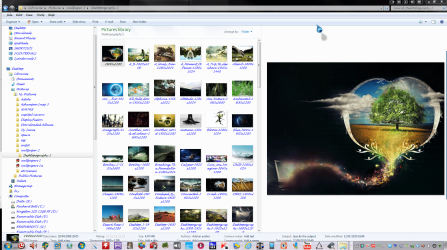
hi do you mean you want to view your pics in explorer like mine in the pic?
xxxx.PNG
413.7 KB
· Views: 16
Computer Manufacturer/Model Number packard bell IXTREME M5722 OS Operating System : Windows 7 Home Premium Edition 6.01.7600 SP1 (x64) CPU Processor : Intel Core 2 Quad Q8300 @ 2500 MHz Motherboard Mainboard : Packard Bell (Acer EG43M ) Memory Physical Memory :8GB Corsair4x 2GB 800MHz C5 DDR2 Graphics Card(s) Video Card : XFX 6700 AMD Monitor(s) Displays Maestro 234DL - BenQ V2220 - BenQ VW2420H Screen Resolution Current Display :1920x1080p pixels at 60 Hz in HD LED Hard Drives Hard Disks : WDC (1000 GB) PSU XFX ProSeries 550W PSU Case PACKARD BELL IXTREME Cooling System Blower Current: 150mA Air Flow16CFM ;Akasa 90mm rear Keyboard Gigabyte Aivia K8100 Mouse TRUST-Wireless Laser Mouse - Carbon edition MI-7770C Internet Speed TP-LINK > TL-WN951N / AV500 Gigabit Powerline Adapters Browser chrome dev Other Info EXTRA COOLING>(FAN CONTROLLER) PC Bay Cooler 3 x 40mm fans; Akasa AK-HD-BL Blue hard drive cooler 2 x 40 mm fan 4500 rpm 29.7 dBA
Willing Helper
Guru
Gold Member
VIP
Hello Atomix, welcome to the Seven Forums. You could use the preview pane:
View attachment 122543
Kari
well done kari you beat me to it sound advice
Computer Manufacturer/Model Number packard bell IXTREME M5722 OS Operating System : Windows 7 Home Premium Edition 6.01.7600 SP1 (x64) CPU Processor : Intel Core 2 Quad Q8300 @ 2500 MHz Motherboard Mainboard : Packard Bell (Acer EG43M ) Memory Physical Memory :8GB Corsair4x 2GB 800MHz C5 DDR2 Graphics Card(s) Video Card : XFX 6700 AMD Monitor(s) Displays Maestro 234DL - BenQ V2220 - BenQ VW2420H Screen Resolution Current Display :1920x1080p pixels at 60 Hz in HD LED Hard Drives Hard Disks : WDC (1000 GB) PSU XFX ProSeries 550W PSU Case PACKARD BELL IXTREME Cooling System Blower Current: 150mA Air Flow16CFM ;Akasa 90mm rear Keyboard Gigabyte Aivia K8100 Mouse TRUST-Wireless Laser Mouse - Carbon edition MI-7770C Internet Speed TP-LINK > TL-WN951N / AV500 Gigabit Powerline Adapters Browser chrome dev Other Info EXTRA COOLING>(FAN CONTROLLER) PC Bay Cooler 3 x 40mm fans; Akasa AK-HD-BL Blue hard drive cooler 2 x 40 mm fan 4500 rpm 29.7 dBA
New member
Thread Starter
Yep, thats exactly what I wanted, somehow hadn't noticed that there was such a button.
OS Windows 7 ultimate 64-bit CPU AMD Athlon 7750 Dual-Core Processor Motherboard A780FullHD Memory 4 GB RAM Graphics Card(s) nvidia 9800GT Monitor(s) Displays LG 19" Hard Drives 100 + 500 gb
Willing Helper
Guru
Gold Member
VIP
yes its a handy option the viewing pane in the explorer window have fun
Computer Manufacturer/Model Number packard bell IXTREME M5722 OS Operating System : Windows 7 Home Premium Edition 6.01.7600 SP1 (x64) CPU Processor : Intel Core 2 Quad Q8300 @ 2500 MHz Motherboard Mainboard : Packard Bell (Acer EG43M ) Memory Physical Memory :8GB Corsair4x 2GB 800MHz C5 DDR2 Graphics Card(s) Video Card : XFX 6700 AMD Monitor(s) Displays Maestro 234DL - BenQ V2220 - BenQ VW2420H Screen Resolution Current Display :1920x1080p pixels at 60 Hz in HD LED Hard Drives Hard Disks : WDC (1000 GB) PSU XFX ProSeries 550W PSU Case PACKARD BELL IXTREME Cooling System Blower Current: 150mA Air Flow16CFM ;Akasa 90mm rear Keyboard Gigabyte Aivia K8100 Mouse TRUST-Wireless Laser Mouse - Carbon edition MI-7770C Internet Speed TP-LINK > TL-WN951N / AV500 Gigabit Powerline Adapters Browser chrome dev Other Info EXTRA COOLING>(FAN CONTROLLER) PC Bay Cooler 3 x 40mm fans; Akasa AK-HD-BL Blue hard drive cooler 2 x 40 mm fan 4500 rpm 29.7 dBA
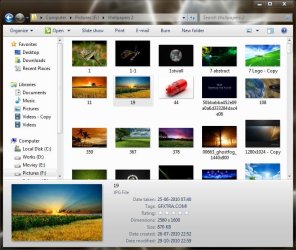
Or something like this ?
Just place the mouse pointer on the top edge of the vertical resize pointer . Now Hold the left mouse button and drag on the top .
Computer type PC/Desktop Computer Manufacturer/Model Number Self Assembled OS Microsoft Windows 10 Pro Insider Preview 64-bit CPU Intel(R) Core(TM) i3-4130 CPU @ 3.40GHz Motherboard Gigabyte Technology Co., Ltd. B85M-D3H Memory Corsair Vengence 4GB x2 (8.00GB Dual-Channel DDR3 @ 798MHz) Graphics Card(s) 2047MB GeForce GTS 450 (ZOTAC International) Sound Card Onboard (Realtek High Definition Audio) Monitor(s) Displays LG Flatron E2040T Screen Resolution 1600x900 Hard Drives Western Digital 1 TB PSU Corsair VS550 Case Cooler Master K380 Cooling Cooler Master Seidon 120V Plus Keyboard Logitech MK260r Mouse Logitech MK260r Internet Speed PMPL Broadband Antivirus Windows Defender + MBAM Browser Firefox Other Info Dell Studio 15" Laptop