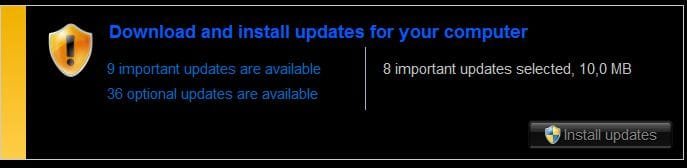
How to filter Updates?

madkiwi

New member
Local time
9:56 AM
Messages
36
I installed Office 2007 on my computer, but I specifically excluded that pos Outlook. So 1) why does Windows update keep telling me that there is an important update for Outlook that needs to be installed RIGHT NOW and 2) is there some way to tell update to exclude certain things from downloading in the future?
 

My Computer

Computer Manufacturer/Model Number
Acer TimelineX 4830TG
OS
Windows 7 Home Premium
CPU
Intel i5 2450M
Memory
8 GB
Graphics Card(s)
Nvidia G540M
Hard Drives
SanDisk Extreme 120 GB
Hi, Go into Windows Update and hide the update if you don't want to install it.

Also read the frequently asked questions on the left of the page.
 

My Computer

Computer Manufacturer/Model Number
Self Build 64bit
OS
Vista Ult64, Win7600
CPU
Intel Core 2 Quad Q6600 @ 2400 MHz 64bit OS
Motherboard
Asus P5E3 Deluxe WiFi @p 64 bit OS
Memory
4096 MB DDR3-SDRAM
Graphics Card(s)
ATI Radeon HD 3870 Series x2 Crossfired
Sound Card
Realtek on board
Monitor(s) Displays
Samsung SyncMaster - 23 inches
Screen Resolution
1680x1050 pixels at 60 Hz in True Colors
Hard Drives
Hitachi (250 GB)/Samsung 750 GB. /Barracuda 160 GB.
My Book 1 TB external..
PSU
Cooler Master 1000w
Case
Cooler Master Cosmos 1000.
Cooling
Fans and fresh air,
Keyboard
Wireless
Mouse
Wireless
Internet Speed
Never fast enough
Other Info
I use a Magnum.
Thanks, I saw the "hide update" option, did not know if it would "stick".
 

My Computer

Computer Manufacturer/Model Number
Acer TimelineX 4830TG
OS
Windows 7 Home Premium
CPU
Intel i5 2450M
Memory
8 GB
Graphics Card(s)
Nvidia G540M
Hard Drives
SanDisk Extreme 120 GB
Hi, Go into Windows Update and hide the update if you don't want to install it.

Also read the frequently asked questions on the left of the page.


How do you hide updates? I have a choice to unhide them but there is no choice to hide them...:(
 

My Computer

Computer Manufacturer/Model Number
Gateway GT5674
OS
Windows 7 Pro
CPU
AMD Phenom(tm) 9500 Quad-Core Processor, 2200 Mhz, 4 Core(s)
Motherboard
N/A
Memory
3 GB
Graphics Card(s)
NVIDIA GEFORCE
Sound Card
Creative X-Fi Audio Processor (WDM)
Monitor(s) Displays
ACER
Screen Resolution
1680 x 1050
Hard Drives
Drive C:
Description Local Fixed Disk
Compressed No
File System NTFS
Size 465.66 GB (500,000,878,592 bytes)
Free Space 392.74 GB (421,696,356,352 bytes)
Volume Name
Volume Serial Number 18B0BB86

Drive D:
Description CD-ROM Disc

Drive
PSU
N/A
Case
N/A
Cooling
N/A
Keyboard
standard ps2 keyboard Microsoft
Mouse
USB Logitech input device
Right click on it, hide. After that, if you had let say 10 important updates shown, now you'll have 9
 

My Computer

Computer Manufacturer/Model Number
Micro-Star International/MS-7529
OS
Windows 7 Ultimate x32
CPU
DualCore Intel Pentium E2200, 2218 MHz (11 x 202)
Motherboard
MSI G31M3 V2 (MS-7529) (2 PCI, 1 PCI-E x16,2 DDR2 DIMM)
Memory
2 GB DDR2-800 DDR2 SDRAM
Graphics Card(s)
nVIDIA GeForce 9500GT 1GB
Sound Card
Realtek ALC888/1200 @ Intel 82801GB ICH7
Monitor(s) Displays
Samsung SyncMaster 2253BW (Digital) 22'' LCD
Screen Resolution
1680x1050
Hard Drives
SAMSUNG HD322IJ ATA Device (298 GB , IDE)
something like this
Capture1.JPG Capture2.JPG

Hope this helps
cheers
 

My Computer

Computer Manufacturer/Model Number
Micro-Star International/MS-7529
OS
Windows 7 Ultimate x32
CPU
DualCore Intel Pentium E2200, 2218 MHz (11 x 202)
Motherboard
MSI G31M3 V2 (MS-7529) (2 PCI, 1 PCI-E x16,2 DDR2 DIMM)
Memory
2 GB DDR2-800 DDR2 SDRAM
Graphics Card(s)
nVIDIA GeForce 9500GT 1GB
Sound Card
Realtek ALC888/1200 @ Intel 82801GB ICH7
Monitor(s) Displays
Samsung SyncMaster 2253BW (Digital) 22'' LCD
Screen Resolution
1680x1050
Hard Drives
SAMSUNG HD322IJ ATA Device (298 GB , IDE)
Back
Top