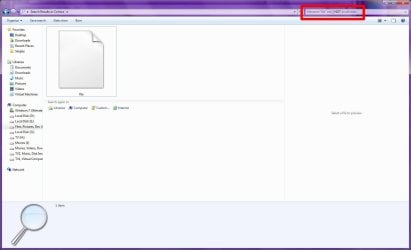
How to find a file with the exact name?

Ok here is the solution:

Open Command Prompt (Seems to work elevated or not, my sample is elevated)

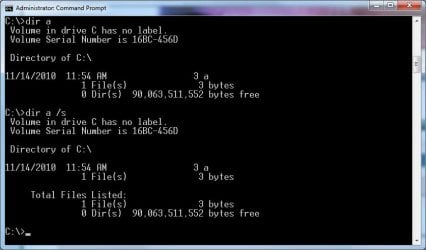
See the screen shot: (First a DIR A for just the file on the root, then a DIR A /S to search the entire drive)
 

Attachments

  • SearchAOnly.jpg
    SearchAOnly.jpg
    37.8 KB · Views: 15

My Computer My Computer

At a glance

Windows 7 Enterprise (x64); Windows Server 20...16GB
Computer type
PC/Desktop
Computer Manufacturer/Model Number
Dell OP7010
OS
Windows 7 Enterprise (x64); Windows Server 2008 R2 (x64)
Memory
16GB
Monitor(s) Displays
4 Dell 24" LCD
Screen Resolution
1280x1024
Keyboard
Dell
Mouse
Dell Optical
Internet Speed
40meg
(First a DIR A for just the file on the root, then a DIR A /S to search the entire drive)
Yeah, I used to regularly use the /s/b/p switch combo and pipe the output to a text file, because we have these custom programs that would throw near-identical logs all over the damn file hierarchy. The search feature has improved though and I've weaned myself from resorting to the command prompt. Mostly.

It looks to me just like a simple deficiency in Windows 7 implementation... :)
No Microsoft moderator here to defend Win 7?
What is there to defend against? Piss-poor file naming practice? The long filename system was created for a reason. The fact the system even allows you to create single character filenames should be a bonus. Should we complain password generators don't allow passwords 3 characters or shorter?

We used to have directories full of 2-character name files. "7a", "3f", "D!". Things improved tremendously when we managed to kludge a script which grovels through these files and rename them according to the department and date (because nobody has the source to the original program which was probably written in hieroglyphs, and we'd really not touch something running on production-line machines).

mborner put into words what I like about the search. There may be unrelated results but when yours appears on top, who cares about the rest?
 

My Computer My Computer

At a glance

Win7 Pro x64Koa i5-2550K8 GBSapphire ATI 6870 1GB GDDR5
Computer Manufacturer/Model Number
Self-built rig
OS
Win7 Pro x64
CPU
Koa i5-2550K
Memory
8 GB
Graphics Card(s)
Sapphire ATI 6870 1GB GDDR5
Sound Card
RealTek HD Audio / ATI HDMI Audio
Monitor(s) Displays
Samsung HDTV Monitor T23A350
Screen Resolution
1920 x 1080
Hard Drives
- SSD (C:)
- HDD (D:)
- BD-ROM (E:)
Keyboard
Logitech G110
Internet Speed
Unifi home (5mbps)
I've been thinking about this one for a bit, and have found what should hopefully be a solution.

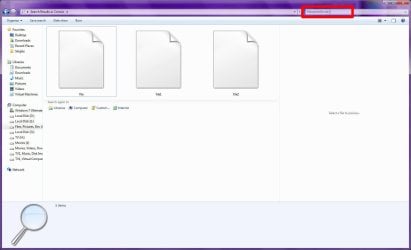
Normally, when you search for a file, you would use:

Image1.jpg
filename:file

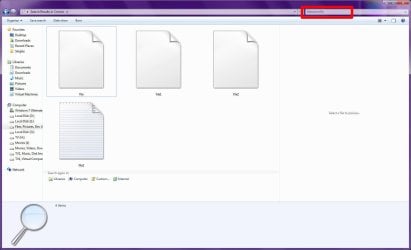
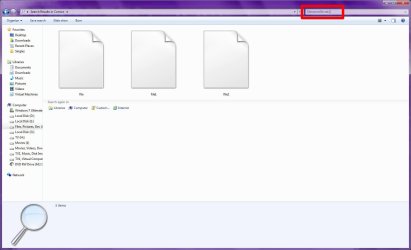
to return results whose filename contains the word "file". To match files that are named "file", you would use:

Image2.jpg
filename:"file"

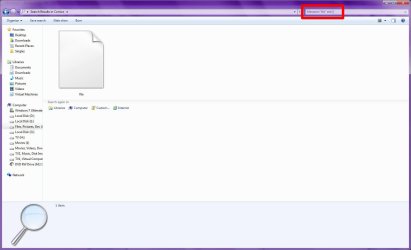
If you want to limit the results to a particular file type, then you will add the "ext:" query:

Image3.jpg
filename:file ext:txt

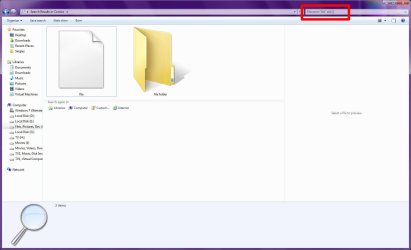
But how to search for filenames that have no extension? Just use the Windows Search "empty string" indicator of two square brackets:

Image4.jpg
filename:file ext:[]

Note that the "[]" empty string indicator works for other properties also, such as "tag", "title", etc...
 

My Computer My Computer

At a glance

Windows 7 Professional 32-bit SP1AMD A4/A63.00GB EDOVMware SVGA 3D
Computer type
PC/Desktop
Computer Manufacturer/Model Number
Virtual Machine
OS
Windows 7 Professional 32-bit SP1
CPU
AMD A4/A6
Motherboard
Intel Corporation 440BX Desktop Reference Platform
Memory
3.00GB EDO
Graphics Card(s)
VMware SVGA 3D
Sound Card
High Definition Audio Device
Monitor(s) Displays
Generic Non-PnP Monitor on VMware SVGA 3D
Screen Resolution
1440x900
Hard Drives
1 x 60GB VMware Virtual SATA Hard Drive ATA Device
Antivirus
Kaspersky Total Security
I can not understand I didn't think of that! You nailed it.

Bowing in front of The Real Guru. Rep given :)

Kari


EDIT, a few minutes later: Tested it and there's still something missing. It really finds all files where filename includes "file" and no extension. But what if you really want to find only file "file", not "file1" and "file2" and "ThisFile"? As already agreed in this thread, it's not so important because using this solution of yours the file "file" is at the top of search results, but out of interest: how to get only the file "file"?

(Could I ask this in a more confusing way? ;) )
 

My Computer My Computer

At a glance

Windows 10 Pro x64 EN-GB1.6 GHz Intel Core i7-720QM Processor6 GBATI Mobility Radeon HD 5850 Graphics
Computer type
Laptop
Computer Manufacturer/Model Number
HP ENVY 17-1150eg
OS
Windows 10 Pro x64 EN-GB
CPU
1.6 GHz Intel Core i7-720QM Processor
Memory
6 GB
Graphics Card(s)
ATI Mobility Radeon HD 5850 Graphics
Sound Card
Beats sound system with integrated subwoofer
Monitor(s) Displays
17" laptop display, 22" LED and 32" Full HD TV through HDMI
Screen Resolution
1600*900 (1), 1920*1080 (2&3)
Hard Drives
Internal: 2 x 500 GB SATA Hard Disk Drive 7200 rpm
External: 2TB for backups, 3TB USB3 network drive for media
Cooling
As Envy runs a bit warm, I have it on a Cooler Master pad
Keyboard
Logitech diNovo Media Desktop Laser (bluetooth)
Mouse
Logitech Performance Mouse MX
Internet Speed
50/10 Mbps VDSL
Antivirus
Windows Defender 4.3.9431.0
Browser
Maxthon 3.5.2., IE11
I can not understand I didn't think of that! You nailed it.

Bowing in front of The Real Guru. Rep given :)

Kari


EDIT, a few minutes later: Tested it and there's still something missing. It really finds all files where filename includes "file" and no extension. But what if you really want to find only file "file", not "file1" and "file2" and "ThisFile"? As already agreed in this thread, it's not so important because using this solution of yours the file "file" is at the top of search results, but out of interest: how to get only the file "file"?

(Could I ask this in a more confusing way? ;) )

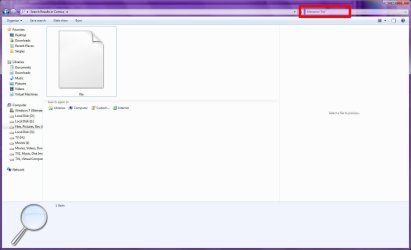
Using my example of searching for files named "file", with no extension:

Image5.jpg
filename:file ext:[]
Returns "file", "file1" and "file2"

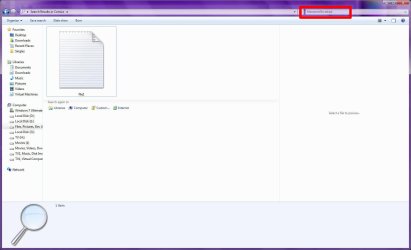
Image6.jpg
filename:"file" ext:[]
Enclosing the word "file" in quotes filters the results to give only "file"

Thanks for the rep.:D
 

My Computer My Computer

At a glance

Windows 7 Professional 32-bit SP1AMD A4/A63.00GB EDOVMware SVGA 3D
Computer type
PC/Desktop
Computer Manufacturer/Model Number
Virtual Machine
OS
Windows 7 Professional 32-bit SP1
CPU
AMD A4/A6
Motherboard
Intel Corporation 440BX Desktop Reference Platform
Memory
3.00GB EDO
Graphics Card(s)
VMware SVGA 3D
Sound Card
High Definition Audio Device
Monitor(s) Displays
Generic Non-PnP Monitor on VMware SVGA 3D
Screen Resolution
1440x900
Hard Drives
1 x 60GB VMware Virtual SATA Hard Drive ATA Device
Antivirus
Kaspersky Total Security
Second miss for me tonight. Forgot the quotes. Mods please remove half of my rep :o
 

My Computer My Computer

At a glance

Windows 10 Pro x64 EN-GB1.6 GHz Intel Core i7-720QM Processor6 GBATI Mobility Radeon HD 5850 Graphics
Computer type
Laptop
Computer Manufacturer/Model Number
HP ENVY 17-1150eg
OS
Windows 10 Pro x64 EN-GB
CPU
1.6 GHz Intel Core i7-720QM Processor
Memory
6 GB
Graphics Card(s)
ATI Mobility Radeon HD 5850 Graphics
Sound Card
Beats sound system with integrated subwoofer
Monitor(s) Displays
17" laptop display, 22" LED and 32" Full HD TV through HDMI
Screen Resolution
1600*900 (1), 1920*1080 (2&3)
Hard Drives
Internal: 2 x 500 GB SATA Hard Disk Drive 7200 rpm
External: 2TB for backups, 3TB USB3 network drive for media
Cooling
As Envy runs a bit warm, I have it on a Cooler Master pad
Keyboard
Logitech diNovo Media Desktop Laser (bluetooth)
Mouse
Logitech Performance Mouse MX
Internet Speed
50/10 Mbps VDSL
Antivirus
Windows Defender 4.3.9431.0
Browser
Maxthon 3.5.2., IE11
Sorry to be a party pooper, but 'filename:"file" ext:[]' doesn't exclude folders, here's what I get:

Where is the file 4.png

and why weren't the folders with the name 'a' the only ones to appear on this list?

NOW, as to all ponderers on why would I need to create an extensionless file, well... do perform a short search in your own WINDOWS folder for 'ext:[]'. How many extensionless files did you get? I have 707 (not counting folders). And, oh well, it's Microsoft's files, not mine... the question should go to MS :)

Besides, when a program fail to do what's expected out of it, blaming the user isn't the right attitude... we should make the program work.

Dzomlija, you were the closest. Thanks, if you can help filtering out the folder files you're a king.

 

My Computer My Computer

At a glance

Windows 7 Professional 64 bit
OS
Windows 7 Professional 64 bit
I can not understand I didn't think of that! You nailed it.

Bowing in front of The Real Guru. Rep given :)

Kari


EDIT, a few minutes later: Tested it and there's still something missing. It really finds all files where filename includes "file" and no extension. But what if you really want to find only file "file", not "file1" and "file2" and "ThisFile"? As already agreed in this thread, it's not so important because using this solution of yours the file "file" is at the top of search results, but out of interest: how to get only the file "file"?

(Could I ask this in a more confusing way? ;) )

Using my example of searching for files named "file", with no extension:

View attachment 114326
filename:file ext:[]
Returns "file", "file1" and "file2"

View attachment 114327
filename:"file" ext:[]
Enclosing the word "file" in quotes filters the results to give only "file"

Thanks for the rep.:D

I tried it here. It does not work. However the Command Prompt works everytime. :confused:
 

My Computer My Computer

At a glance

Windows 7 Enterprise (x64); Windows Server 20...16GB
Computer type
PC/Desktop
Computer Manufacturer/Model Number
Dell OP7010
OS
Windows 7 Enterprise (x64); Windows Server 2008 R2 (x64)
Memory
16GB
Monitor(s) Displays
4 Dell 24" LCD
Screen Resolution
1280x1024
Keyboard
Dell
Mouse
Dell Optical
Internet Speed
40meg
Sorry to be a party pooper, but 'filename:"file" ext:[]' doesn't exclude folders, here's what I get:

View attachment 114365

and why weren't the folders with the name 'a' the only ones to appear on this list?

NOW, as to all ponderers on why would I need to create an extensionless file, well... do perform a short search in your own WINDOWS folder for 'ext:[]'. How many extensionless files did you get? I have 707 (not counting folders). And, oh well, it's Microsoft's files, not mine... the question should go to MS :)

Besides, when a program fail to do what's expected out of it, blaming the user isn't the right attitude... we should make the program work.

Dzomlija, you were the closest. Thanks, if you can help filtering out the folder files you're a king.

Image7.jpg
filename:"file" ext:[]
Return results that include folders, which is what you do not want, so:

Image8.jpg
filename:"file" ext:[] NOT kind:folder
Excludes folders from the search.

I think also to make it a little easier on you, you might want to have a look at the Advanced Searches Tutorial of mine on the Vista forums. It covers much of what I have been discussing with you.

You can also look at the Microsoft reference for Windows Search Advanced Query Syntax and Tips and Tricks.

In hindsight, perhaps I should have referred you to said tutorial and reference from the start....:cry:
 

My Computer My Computer

At a glance

Windows 7 Professional 32-bit SP1AMD A4/A63.00GB EDOVMware SVGA 3D
Computer type
PC/Desktop
Computer Manufacturer/Model Number
Virtual Machine
OS
Windows 7 Professional 32-bit SP1
CPU
AMD A4/A6
Motherboard
Intel Corporation 440BX Desktop Reference Platform
Memory
3.00GB EDO
Graphics Card(s)
VMware SVGA 3D
Sound Card
High Definition Audio Device
Monitor(s) Displays
Generic Non-PnP Monitor on VMware SVGA 3D
Screen Resolution
1440x900
Hard Drives
1 x 60GB VMware Virtual SATA Hard Drive ATA Device
Antivirus
Kaspersky Total Security
Ok this does work:

filename:"a" ext:[] NOT kind:folder

I only get the file named: "a"

Awesome!
 

My Computer My Computer

At a glance

Windows 7 Enterprise (x64); Windows Server 20...16GB
Computer type
PC/Desktop
Computer Manufacturer/Model Number
Dell OP7010
OS
Windows 7 Enterprise (x64); Windows Server 2008 R2 (x64)
Memory
16GB
Monitor(s) Displays
4 Dell 24" LCD
Screen Resolution
1280x1024
Keyboard
Dell
Mouse
Dell Optical
Internet Speed
40meg
Test this; this seems to work and is very simple:

filename:=a
 

My Computer My Computer

At a glance

Windows 7 Enterprise (x64); Windows Server 20...16GB
Computer type
PC/Desktop
Computer Manufacturer/Model Number
Dell OP7010
OS
Windows 7 Enterprise (x64); Windows Server 2008 R2 (x64)
Memory
16GB
Monitor(s) Displays
4 Dell 24" LCD
Screen Resolution
1280x1024
Keyboard
Dell
Mouse
Dell Optical
Internet Speed
40meg
Awesome indeed.
Funny though, when restricting the search to ONLY folders (i.e. filename:"a" kind:folder), I get many folders that INCLUDE the letter a, not only the one folder I'm looking for.

Probably if I look long enough through your search tutorial I'll figure that one out too.

Gil.
 

My Computer My Computer

At a glance

Windows 7 Professional 64 bit
OS
Windows 7 Professional 64 bit
WindowsStar wow! where did you get that from??
 

My Computer My Computer

At a glance

Windows 7 Professional 64 bit
OS
Windows 7 Professional 64 bit
WindowsStar wow! where did you get that from??

Just trying to resolve the problem. Dzomlija used the NOT so I though that maybe you could put the EQL or = and it works. = for ONLY the a, nothing for everything containing a, and NOT to exclude the a. -WS
 

My Computer My Computer

At a glance

Windows 7 Enterprise (x64); Windows Server 20...16GB
Computer type
PC/Desktop
Computer Manufacturer/Model Number
Dell OP7010
OS
Windows 7 Enterprise (x64); Windows Server 2008 R2 (x64)
Memory
16GB
Monitor(s) Displays
4 Dell 24" LCD
Screen Resolution
1280x1024
Keyboard
Dell
Mouse
Dell Optical
Internet Speed
40meg
Test this; this seems to work and is very simple:

filename:=a

I was just wondering. What if you had a 1000 files named <something> =a <something> . <file extension>?

What would be the result? Will the computer search for "=a" or will it just search for "a" since it was =a not ==a?

Would this make the computer search for "=a"?
filename:==a
 

My Computer My Computer

At a glance

Windows 7 Pro
OS
Windows 7 Pro
Test this; this seems to work and is very simple:

filename:=a

I was just wondering. What if you had a 1000 files named <something> =a <something> . <file extension>?

What would be the result? Will the computer search for "=a" or will it just search for "a" since it was =a not ==a?

Would this make the computer search for "=a"?
filename:==a
I'm just wondering if I should give up computing and take up fishing! Just a thought:(
 

My Computer My Computer

At a glance

Microsoft Windows 7 Home Premium 64-bit 7601 ...Intel(R) Core(TM) i7-3770 CPU @ 3.40GHz8.00 GBIntel(R) HD Graphics 4000
Computer type
PC/Desktop
OS
Microsoft Windows 7 Home Premium 64-bit 7601 Multiprocessor Free Service Pack 1
CPU
Intel(R) Core(TM) i7-3770 CPU @ 3.40GHz
Motherboard
ASUSTeK COMPUTER INC. P8H77-M
Memory
8.00 GB
Graphics Card(s)
Intel(R) HD Graphics 4000
Sound Card
On Board
Monitor(s) Displays
Dell 24"
Screen Resolution
1920 x 1080
Hard Drives
(1) INTEL SSDSC2CT180A3 ATA Device (2) ST500DM002-1BD142 ATA Device (3) WDC WD3200AAKS-75L9A0 ATA Device (4) Generic- Compact Flash USB Device (5) Generic- MS/MS-Pro USB Device (6) Generic- SD/MMC USB Device (7) Generic- SM/xD-Picture USB
PSU
500w Corsair
Case
Cooler Master
Cooling
3 Fans
Keyboard
Logitech MK300
Mouse
Logitech WOM
Internet Speed
75Mb
Antivirus
Norton 360
Browser
Firefox, Opera, IE
Thank Kari but I would just like to know how its done, just curious really!
You can easily just remove the file extension from any existing file, just by renaming it. No tricks involved. Just be aware the file will be useless until you restore the extension.
 

My Computer My Computer

At a glance

Windows 7 Ultimate x64 SP1Intel Core i7-260012 GB Patriot Extreme DDR3-1333Nvidia GTX 470
OS
Windows 7 Ultimate x64 SP1
CPU
Intel Core i7-2600
Motherboard
Gigabyte GA-P67A-UD3P-B3
Memory
12 GB Patriot Extreme DDR3-1333
Graphics Card(s)
Nvidia GTX 470
Monitor(s) Displays
Dell UltraSharp 2209WA
Hard Drives
OCZ Agility3 240 GB, WD5001AALS, WD7501AALS
PSU
OCZ ModStream 700W
Case
CoolerMaster HAF 912 Advanced
Cooling
CoolerMaster Hyper 212 Plus
Test this; this seems to work and is very simple:

filename:=a

I was just wondering. What if you had a 1000 files named <something> =a <something> . <file extension>?

What would be the result? Will the computer search for "=a" or will it just search for "a" since it was =a not ==a?

Would this make the computer search for "=a"?
filename:==a

filename:="=a" works but filename:==a does not
 

My Computer My Computer

At a glance

Windows 7 Enterprise (x64); Windows Server 20...16GB
Computer type
PC/Desktop
Computer Manufacturer/Model Number
Dell OP7010
OS
Windows 7 Enterprise (x64); Windows Server 2008 R2 (x64)
Memory
16GB
Monitor(s) Displays
4 Dell 24" LCD
Screen Resolution
1280x1024
Keyboard
Dell
Mouse
Dell Optical
Internet Speed
40meg
Back
Top