How to fix 8 Beep Problem In Dell N5010

drifking8887

New member
Member
Local time
3:17 PM
Messages
66
Location
SRI Lanka
I have Inspiron N5010 for about 2 years
the screen has stopped working on the laptop, on boot it beeps loudly 8 times in a row.
Once the laptop is connected to an external monitor i am able to use the laptop as normal but it gave the
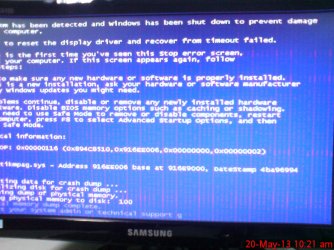
blue Screen 1st time and working normal after i restart the pc now Lcd display is working
Any ideas, or further diagnostics that i can do?

:confused::confused::confused:
 

My Computer My Computer

At a glance

windows 7Intel® Core™ i3-330M (3M Cache, 2.13 GHz)4Gb DDR3ATI Mobility Radeon HD 5470
Computer Manufacturer/Model Number
DELL
OS
windows 7
CPU
Intel® Core™ i3-330M (3M Cache, 2.13 GHz)
Motherboard
dell inc .03C6YH
Memory
4Gb DDR3
Graphics Card(s)
ATI Mobility Radeon HD 5470
Sound Card
onboard
Monitor(s) Displays
pnp moniter
Hard Drives
samsun 300gb
Internet Speed
512kpbs
drifking8887

That sounds like an LCD replacement .

Lets see what the BIOS VERSION is


Open up command prompt by clicking on :orb: type CMD inside Search programs and files . Press [ENTER]

In command prompt enter the following

systeminfo | find "BIOS Version:"


   Note

The | pipe symbol can be found using SHIFT + \ (just above the [ENTER] key)
 

My Computer My Computer

At a glance

Windows 7 Ultimate 32-Bit & Windows 7 Ultimat...Intel Core i7 CPU 950 @ 3.07GHzOCZ 6GB (3 x 2GB) 240-Pin DDR3 SDRAM DDR3 160...ATI Radeon HD 5700 Series
Computer Manufacturer/Model Number
Custom Built
OS
Windows 7 Ultimate 32-Bit & Windows 7 Ultimate 64-Bit
CPU
Intel Core i7 CPU 950 @ 3.07GHz
Motherboard
ASUS P6T DELUXE V2
Memory
OCZ 6GB (3 x 2GB) 240-Pin DDR3 SDRAM DDR3 1600 OCZ3X1600R2
Graphics Card(s)
ATI Radeon HD 5700 Series
Sound Card
OnBoard
Hard Drives
WD6400AACS-00M3B0 (640GB SATA )
PSU
CORSAIR 850w
Case
NZXT LEXA
Cooling
Intel Stock Heatsink Fan
Keyboard
Microsoft Wireless Laser Keyboard 7000
Mouse
Microsoft Wireless Laser Mouse 7000
Thanks for replaying :)
i did not update Bios
this is my version :
Snap_2013.05.08_13h11m44s_001.png

can it be the bios problem ?
 

My Computer My Computer

At a glance

windows 7Intel® Core™ i3-330M (3M Cache, 2.13 GHz)4Gb DDR3ATI Mobility Radeon HD 5470
Computer Manufacturer/Model Number
DELL
OS
windows 7
CPU
Intel® Core™ i3-330M (3M Cache, 2.13 GHz)
Motherboard
dell inc .03C6YH
Memory
4Gb DDR3
Graphics Card(s)
ATI Mobility Radeon HD 5470
Sound Card
onboard
Monitor(s) Displays
pnp moniter
Hard Drives
samsun 300gb
Internet Speed
512kpbs
Here is an updated Bios .


Name|Version|Download
Dell Inspiron N5010 System BIOS|A015|
Download


Installation Instructions


The file N5010A15.EXE is using the Hard Drive format and is designed to be directly executed from Windows environments.


Click Download now.
The File Download window appears.


Click the Save button.
The Save As window appears.

Select Desktop using the drop-down menu to the right of Save in.

Click the Save button.
A progress meter moves as the download is completed.

If necessary, click X in the upper right-hand corner of the Download Progress Window to close it upon completion.


   Note
Shut down all other applications prior to running the BIOS update utility. The update utility reboots your system in order to get the new BIOS loaded.


Double click the Icon on your desktop labeled N5010A15.EXE.

The Dell Bios Flash window appears


Click the Continue button.

The message Pressing OK will close all applications, shut down Windows, Flash the BIOS, then reboot. appears.

Click the OK button.

The system will restart and the Bios Flash will be completed.
 

My Computer My Computer

At a glance

Windows 7 Ultimate 32-Bit & Windows 7 Ultimat...Intel Core i7 CPU 950 @ 3.07GHzOCZ 6GB (3 x 2GB) 240-Pin DDR3 SDRAM DDR3 160...ATI Radeon HD 5700 Series
Computer Manufacturer/Model Number
Custom Built
OS
Windows 7 Ultimate 32-Bit & Windows 7 Ultimate 64-Bit
CPU
Intel Core i7 CPU 950 @ 3.07GHz
Motherboard
ASUS P6T DELUXE V2
Memory
OCZ 6GB (3 x 2GB) 240-Pin DDR3 SDRAM DDR3 1600 OCZ3X1600R2
Graphics Card(s)
ATI Radeon HD 5700 Series
Sound Card
OnBoard
Hard Drives
WD6400AACS-00M3B0 (640GB SATA )
PSU
CORSAIR 850w
Case
NZXT LEXA
Cooling
Intel Stock Heatsink Fan
Keyboard
Microsoft Wireless Laser Keyboard 7000
Mouse
Microsoft Wireless Laser Mouse 7000
Thanks i updated the bios to A015
untill now problem not occurred again
thanks again ...
 

My Computer My Computer

At a glance

windows 7Intel® Core™ i3-330M (3M Cache, 2.13 GHz)4Gb DDR3ATI Mobility Radeon HD 5470
Computer Manufacturer/Model Number
DELL
OS
windows 7
CPU
Intel® Core™ i3-330M (3M Cache, 2.13 GHz)
Motherboard
dell inc .03C6YH
Memory
4Gb DDR3
Graphics Card(s)
ATI Mobility Radeon HD 5470
Sound Card
onboard
Monitor(s) Displays
pnp moniter
Hard Drives
samsun 300gb
Internet Speed
512kpbs
Keep this thread open for a few more days . If the problem has been fixed . Mark this thread solved.

You're welcome .
 

My Computer My Computer

At a glance

Windows 7 Ultimate 32-Bit & Windows 7 Ultimat...Intel Core i7 CPU 950 @ 3.07GHzOCZ 6GB (3 x 2GB) 240-Pin DDR3 SDRAM DDR3 160...ATI Radeon HD 5700 Series
Computer Manufacturer/Model Number
Custom Built
OS
Windows 7 Ultimate 32-Bit & Windows 7 Ultimate 64-Bit
CPU
Intel Core i7 CPU 950 @ 3.07GHz
Motherboard
ASUS P6T DELUXE V2
Memory
OCZ 6GB (3 x 2GB) 240-Pin DDR3 SDRAM DDR3 1600 OCZ3X1600R2
Graphics Card(s)
ATI Radeon HD 5700 Series
Sound Card
OnBoard
Hard Drives
WD6400AACS-00M3B0 (640GB SATA )
PSU
CORSAIR 850w
Case
NZXT LEXA
Cooling
Intel Stock Heatsink Fan
Keyboard
Microsoft Wireless Laser Keyboard 7000
Mouse
Microsoft Wireless Laser Mouse 7000
i have updated the Bios to A15 after few days the problem appear again
this time safe mode work fine with external monitor but normal windows give a blue screen error and re start the pc
DSC00202.JPG
 

My Computer My Computer

At a glance

windows 7Intel® Core™ i3-330M (3M Cache, 2.13 GHz)4Gb DDR3ATI Mobility Radeon HD 5470
Computer Manufacturer/Model Number
DELL
OS
windows 7
CPU
Intel® Core™ i3-330M (3M Cache, 2.13 GHz)
Motherboard
dell inc .03C6YH
Memory
4Gb DDR3
Graphics Card(s)
ATI Mobility Radeon HD 5470
Sound Card
onboard
Monitor(s) Displays
pnp moniter
Hard Drives
samsun 300gb
Internet Speed
512kpbs
drifking8887

Update your graphic card driver .
 

My Computer My Computer

At a glance

Windows 7 Ultimate 32-Bit & Windows 7 Ultimat...Intel Core i7 CPU 950 @ 3.07GHzOCZ 6GB (3 x 2GB) 240-Pin DDR3 SDRAM DDR3 160...ATI Radeon HD 5700 Series
Computer Manufacturer/Model Number
Custom Built
OS
Windows 7 Ultimate 32-Bit & Windows 7 Ultimate 64-Bit
CPU
Intel Core i7 CPU 950 @ 3.07GHz
Motherboard
ASUS P6T DELUXE V2
Memory
OCZ 6GB (3 x 2GB) 240-Pin DDR3 SDRAM DDR3 1600 OCZ3X1600R2
Graphics Card(s)
ATI Radeon HD 5700 Series
Sound Card
OnBoard
Hard Drives
WD6400AACS-00M3B0 (640GB SATA )
PSU
CORSAIR 850w
Case
NZXT LEXA
Cooling
Intel Stock Heatsink Fan
Keyboard
Microsoft Wireless Laser Keyboard 7000
Mouse
Microsoft Wireless Laser Mouse 7000
Thanks
I will Update the new update of ATI radeon hd 5470 drivers A01
is this VGA rebel issue?
 

My Computer My Computer

At a glance

windows 7Intel® Core™ i3-330M (3M Cache, 2.13 GHz)4Gb DDR3ATI Mobility Radeon HD 5470
Computer Manufacturer/Model Number
DELL
OS
windows 7
CPU
Intel® Core™ i3-330M (3M Cache, 2.13 GHz)
Motherboard
dell inc .03C6YH
Memory
4Gb DDR3
Graphics Card(s)
ATI Mobility Radeon HD 5470
Sound Card
onboard
Monitor(s) Displays
pnp moniter
Hard Drives
samsun 300gb
Internet Speed
512kpbs
first 13 beeps and then 8 beeps

I have almost the same problem. When I turn on my laptop, i get 13 beeps but then the display is black. After 13 beeps, there is a cycle of 8 beeps and no change in the display. I tried connecting to an external monitor but there is no response on it as well. What can be the problem? Can you help me on this?
 

My Computer My Computer

At a glance

Windows 8 64 bit
Computer type
Laptop
Computer Manufacturer/Model Number
Dell
OS
Windows 8 64 bit
Guys...I have the same problem ....I get the blue screen on normal start with an external LCD and it works fine in safe mode with external LCD...


Did anyone find a solution???
 

My Computer My Computer

At a glance

Windows 7 ultimate x64
Computer type
PC/Desktop
OS
Windows 7 ultimate x64
Dell beep codes only go up to 8. And, 8 is the LCD.
 

My Computer My Computer

At a glance

Windows 10 64 bitIntel i7 6700K16GB Corsair DominatorIntel CPU Graphics
Computer type
PC/Desktop
Computer Manufacturer/Model Number
My Own Build
OS
Windows 10 64 bit
CPU
Intel i7 6700K
Motherboard
ASUS ROG Maximus VIII Hero
Memory
16GB Corsair Dominator
Graphics Card(s)
Intel CPU Graphics
Sound Card
RealTek
Monitor(s) Displays
27" Dell S2719dgf
Screen Resolution
2560X1440
Hard Drives
1 TB Samsung 850 EVO SSD for Win 10 Pro
500GB Samsung 850 EVO SSD for Win 10 Insider
2 TB drive for backup
PSU
EVGA Supernova 750G2
Case
BeQuiet Silent Base 600
Cooling
Deepcool Captain 120EX
Keyboard
Microsoft Wireless 2000
Mouse
Microsoft wireless
Internet Speed
100 MB/sec (Cable)
Antivirus
Microsoft Defender and Malwarebytes
Browser
Edge/Firefox
Other Info
Cakewalk (Sonar) by BandLab and Studio One 4.1 Pro recording studio software. MOTU 896Mk3 Hybrid recording interface, Frontier Tranzport wireless control unit, Behringer X-Touch Control Surface.
Five USB connected optical drives for CD Audio production using Nero BurningROM
Back
Top