How to fix bad theme appearance :(

fnyswan

New member
Local time
1:29 AM
Messages
1
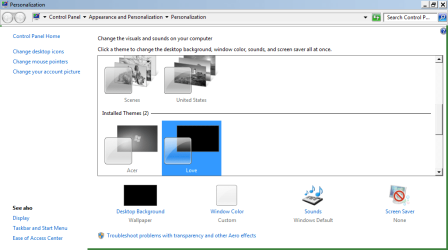
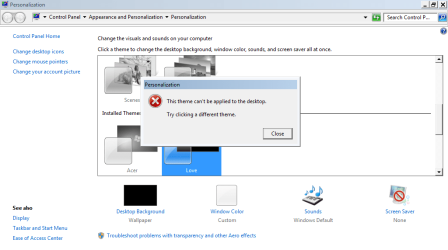
Yesterday I decided to install themes on my netbook. I looked for the ways in google and I found UXStyle Core. I installed it and it didn't help much , I deleted it but I didn't uninstall so I downloaded themes from official windows. I have installed the theme and it worked but just now I turned on my computer and the appearance of my windows looked like old windows, not the seven one. I tried to open personalize and use another them but it seemed like freezing. And I checked my programs, I found UXStyle Core but it can't be uninstalled. It said "Your theme subsystem (e.g uxtheme.dll, themeui.dll) has been tampered with. Uxstyle requires these files be restored before you can continue. Check the forums if you need help." What should I do? :(
 

Attachments

  • capture-20131125-210120.png
    capture-20131125-210120.png
    27 KB · Views: 5
  • capture-20131125-210229.png
    capture-20131125-210229.png
    27.3 KB · Views: 3

My Computer

Computer type
PC/Desktop
Computer Manufacturer/Model Number
Acer
OS
Banten
CPU
Intel Atom N570
Memory
2GB
Antivirus
Smadav, AVG
Browser
Google Chrome
Hi, Welcome to SF.

I am not sure of the program you mentioned. You can try to install it again.

Till then, try this
 

My Computer

Computer type
PC/Desktop
Computer Manufacturer/Model Number
Custom Bulid/Self made
OS
Windows 11 x64
CPU
i5 2500K @ 3.3 GHz
Motherboard
ASUS P8 Z77 V pro
Memory
16 GB DDR 3 @ 1600Mhz
Graphics Card(s)
MSI 1050TI 4GB OC version
Sound Card
On Board (Realtek HD audio)
Monitor(s) Displays
Samsung 22" LCD
Screen Resolution
1920*1080
Hard Drives
Seagate 1 TB, WD 1TB, Seagate 2 TB ( I use a lot of space)
PSU
coolermaster 750 W
Case
Coolermaster HAF912
Cooling
Coolermaster hyper 212 EVO
Keyboard
Samsung
Mouse
Dell Wireless
Internet Speed
Wireless 50 Mbps
Antivirus
AVG 2016 Internet Security
Browser
Google Chrome
  • Like
Reactions: Arc
Welcome to the Seven Forums

How did you install UXStyle Core?

Did you do it like in this tutorial?

http://www.sevenforums.com/tutorials/34579-enabling-custom-themes-windows-7-a.html

From the tutorial
Q: I tried running the installer but it keeps telling me that my subsystem has been tampered with...help!
A: This occurs when you have attempted to apply a patch to system files such as uxtheme.dll. To remedy this (in 95% of all scenarios) you must open a command prompt (run as Administrator) and execute the following command: sfc /scannow. After it finishes you should be able to run the installer for the program with no issue. See Run as Adminstrator and SFC /SCANNON Command - System File Checker in Related Links at the top for more info
Do Option 2 of this tutorial http://www.sevenforums.com/tutorials/1538-sfc-scannow-command-system-file-checker.html it will not harm any data or programs you have installed it will try to find and repair any corrupt system files that you have. You may need to do this up to 3 times with a reboot after each scan.

Jerry
 

My Computer

Computer type
Laptop
Computer Manufacturer/Model Number
Sager NP9170
OS
Win 7 Pro x64 / Win 10 Pro
CPU
Intel(R) Core(TM) i7-3630QM CPU @ 2.40GHz
Motherboard
CLEVO P170EM
Memory
12 GB
Graphics Card(s)
(1) Intel(R) HD Graphics 4000 (2) NVIDIA GeForce GTX 675M
Sound Card
(1) Realtek High Definition Audio (2) Intel(R) Display Aud
Monitor(s) Displays
17.3
Screen Resolution
1920x1080
Hard Drives
(1) Samsung 860 EVO 500GB(OS) (1) Samsung 860 EVO 500GB(Data)
Keyboard
Backlite
Antivirus
MSE, Malwarebytes Pro
Browser
Firefox
Other Info
DESKTOP: Custom-built.
OS: Win 10 Pro x64.
CASE: Rosewill R5.
CPU: Intel I5 4670K CPU @ 3.40GHz.
CPU COOLER: Cool Master Hyper 212 EVO.
MOTHERBOARD: Asus Z87-A.
MEMORY: Kingston HyperX 2x4 GB.
GPU: Nvidia Geforce 650 TI.
PSU: Corsair TX750.
DRIVES: (1) Samsung 840 120 GB SSD (2) Western Digital blue 500 GB 7200 RPM.
Back
Top