How to fix Customize Ribbon and Quick Access Toolbar?

soho1

New member
Power User
Local time
8:45 PM
Messages
458
Location
Earth, Mostly Chicago and London
Outlook 2010 32-bit running on Win 7 Pro 64-bit - something is broken.

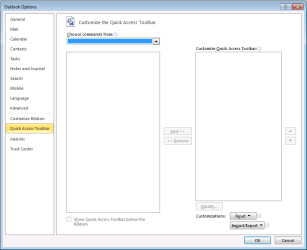
I cannot customize the ribbon and same for quick access toolbar.

All COM add-ons are turned off. Tried in /safe mode too.
 

Attachments
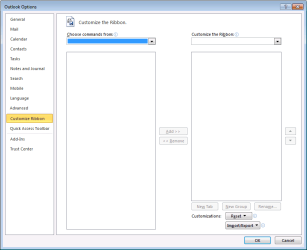
  • customize_ribbon_is_blank.png
    customize_ribbon_is_blank.png
    10.2 KB · Views: 0
  • quick_access_toolbar_no_choices.png
    quick_access_toolbar_no_choices.png
    11.3 KB · Views: 0

My Computer My Computer

Computer type
Laptop
Computer Manufacturer/Model Number
Dell Insprion 7559 next to a Toshiba Portege
OS
Win 7 Pro 64-bit
CPU
Intel Core i5
Motherboard
Intel
Memory
16 GB Dell, 6 GB Toshiba
Graphics Card(s)
Intel crap on both but Dell also has nVidia GeForce GTX960M
Sound Card
RealTek
Monitor(s) Displays
internal and external ACER KA270H 27"
Screen Resolution
1920x1080
Hard Drives
SSD 256 GB plus numerous WD Red or Purple on USB3 docks. Used to buy a lot of Seagate but tossed them the second time I got unrecoverable disc corruption in the midst of use.
Keyboard
Garage Mouse SW and some cheap Amazon China made USB device
Mouse
Garage Mouse and some cheap Amazon China made USB device
Internet Speed
50 Mbps (allegedly, depends on server)
Antivirus
Defender, Malwarebytes Premium and Kaspersky
Browser
IE 11, and Chrome something
what version of office are you running, as in things like Professional Plus, starter etc
 

My Computer My Computer

Computer type
Laptop
Computer Manufacturer/Model Number
Dell
OS
Windows 7 Enterprise x64
CPU
Intel i5 Dual Core
Screen Resolution
1366x768
Keyboard
built in Keyboard
Antivirus
System Centre Endpoint Protection
Browser
Google Chrome, Firefox and Internet Explorer
I am having the same problem. In Microsoft Outlook 2010 I cannot customize the Quick Access Toolbar. The menu for the buttons that I could add to the toolbar are all greyed out! Please help!! Thank you, Greg
 

My Computer My Computer

Computer type
Laptop
Computer Manufacturer/Model Number
Dell
OS
Windows 7 Professional x64
Outlook 2010 Quick Access Toolbar - all greyed out

Running:
MS Office Professional Plus 2010 (32 bit)
Windows 7 Pro (64 bit)
Ditto: cannot customize the QAT - it is all greyed out. It's functionality has stopped working :cry:
Just completed the regular 'Tuesday Windows updates' last night (Tuesday Dec 8, 2015) and since then, the QAT has stopped working.
Tried to repair Office Pro 2010 via Control Panel and reboot - no luck
Any suggestions, please?
 

My Computer My Computer

Computer type
Laptop
Computer Manufacturer/Model Number
Lenovo T420
OS
win 7 Pro 64 bit
You could try doing an Office Repair. Open Control Panel, select Programs & Features, scroll down to Microsoft Office 2010, Right Click on it & select Change & that will open a couple of Repair options to try.
 

My Computer My Computer

Computer type
PC/Desktop
Computer Manufacturer/Model Number
Self built using existing case
OS
Windows 7 Home Premium 64 bit sp1
CPU
Intel i5 3570 3.4Ghz Ivy Bridge SKT 1155 quad core
Motherboard
Gigabyte Z77-HD3 SKT 1155 2xSata 3, 4x USB 3.0
Memory
G-Skill Rip Jaws 16Gb (8x2) DDR3 -1600 PC3 12800 CL 10 red
Graphics Card(s)
Gigabyte NVIDIA GT610 1Gb DDR3 810/1200 PCI-E 2.0 Silent
Sound Card
NVIDIA High Definition & Realtech High Definition Audio
Monitor(s) Displays
2 x Philips 226V4L 16:9 aspect ratio
Screen Resolution
1920 x 1080 HD
Hard Drives
Samsung 840 Pro 256gb SSD, SATA 3.
Hitachi Touro Portable 1tb, USB 3.0 HDD used for image b/ups.
PSU
Corsair VS450
Case
Codeng
Cooling
PSU fan & CPU fan
Keyboard
Logitech
Mouse
Logitech Wireless trackball M570
Internet Speed
Wireless 3G. 3mg down & 550kb up.
Antivirus
Bitdefender Internet Security 2020
Browser
Opera (Current Version) & Firefox
Other Info
MS Office 2013 Pro. Davis weather station software. MGE Nova 600 avr UPS.
I just found the fix. Uninstall last night's Windows Update to Office that ends in the numbers 4409. Uninstall via the Control Panel. Google "how to uninstall a microsoft update" if you need additional information on how to do this. Reboot afterwards. I was able to get everything back but the buttons on my inbox "Quick Access Toolbar". Please let me know if this works for you. GD
 

My Computer My Computer

Computer type
Laptop
Computer Manufacturer/Model Number
Dell
OS
Windows 7 Professional x64
Remille - YOU ROCK, Sir !! :) Uninstalled that pesky KB3114409 update and voila, all my customizations I enabled via the QAT returned!
  • How on earth did you know that specific update - from among 22 (I think), was the faulty one?
  • Do you think MS is even aware that they deployed a faulty update?
Thanks again!
 

My Computer My Computer

Computer type
Laptop
Computer Manufacturer/Model Number
Lenovo T420
OS
win 7 Pro 64 bit
That was the fix for me as well. Thanks Remille.
 

My Computer My Computer

Computer type
PC/Desktop
OS
Windows 7 Pro 32 and 64
Back
Top