How to fix damaged keyboard?

julianzolo

New member
Local time
11:03 AM
Messages
4
some liquid spilled on it, and even though it is dry now, it is still worthless, probably a short circuit, is it fixable or do I have to sent it to professionals?
 

My Computer

Computer type
Laptop
Computer Manufacturer/Model Number
Asus
OS
windows 7 home premium 64
If it's a laptop, you'll probably have to replace the keyboard. It's difficult. You might want to have it done by a professional.
 

My Computer

Computer type
PC/Desktop
Computer Manufacturer/Model Number
Mellon Labs (custom build)
OS
Win 7 Pro x64/Win 10 Pro x64 dual boot
CPU
AMD FX 8350 Vishera @ 4200
Motherboard
ASUS M5A97 R2.0
Memory
16 GB Mushkin Blackline DDR3-2400 @ 1866 (9-10-10-10-31)
Graphics Card(s)
XFX Radeon R9 280 Double D Black Edition
Sound Card
Realtek HD Audio on MB. Sounds great.
Monitor(s) Displays
Acer 24", Acer 22"
Screen Resolution
3840 x 1080
Hard Drives
1 x Mushkin Chronos 120 GB SSD (Win 10)
1 x Samsung 850 EVO 250 GB SSD (Win 7)
1 x WD 1TB SATA Blue
1 x WD 1TB SATA Green
PSU
Corsair TX-750
Case
CoolerMaster HAF 912+
Cooling
Coolermaster Seidon 240M Liquid AIO. 6 case fans
Keyboard
Logitech G710+
Mouse
Logitech G500s
Internet Speed
Much better since I got fiber, but still way overpriced.
Antivirus
MSE, Malware Bytes for scanning
Browser
Firefox
Other Info
Corsair VOID USB headphones.

A Mellon Labs X-1 - LCD Smartie driven system status display.

Brought to you by the letter E
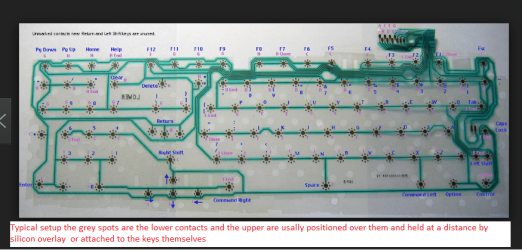
As Mellon Head has said mate but some can be pulled apart and the contacts cleaned. It is a matter of prising off the key pads and underneath there are rubberised electrical contacts that in your case have become contaminated by say sugar if the liquid was coffee or what.

Now depending on how much grief you want to go to - do as Mellon Head has said and just replace it and you can disassemble it for an exercise afterwards if you want to and you will see what I mean.

Edit: The pic is actually in reveerse you need to see that as the other way round;)
 

Attachments

  • CONTACTS.PNG
    CONTACTS.PNG
    157.2 KB · Views: 5

My Computer

Computer type
PC/Desktop
Computer Manufacturer/Model Number
Own build (new) Desk1 / Asus ROG Win 7 / Desk2 1st build
OS
Desk1 7 Home Prem / Desk2 10 Pro / Main lap Asus ROG 10 Pro 2 laptop Toshiba 7 Pro Asus P2520 7 & 10
CPU
Desk1 i5 3750K / Laptop i7 GTX 860M / Desk2 i5 2500
Motherboard
Desk1 Asus P877-V / Desk2 Gigabyte H67 UD3H / Laptop ?
Memory
Desk1 8GB (1866) / Desk2 16GB (1333) / Laptop 8Gb DDR3
Graphics Card(s)
Desk 1& 2NVidia GTX 650 & Laptops on board Intel
Sound Card
Desk 1 & 2 -XONAR DG Realtek High Def audio Laptop
Monitor(s) Displays
Desk 1 Benq HD 2450 / Desk2 Philips 24" / Laptop 17.5"
Screen Resolution
1920x1080 D1 & D2 & Laptop 1
Hard Drives
Desk1 Samsung 120GB 830 SSD
Asus ROG 256GB 850 Pro SSD
Desk2 Samsung 840 256 SSD
Toshiba 120GB EVO
PSU
Desk 1 Corsair HX 1050/ Laptop ? / Desk 2 Corsair HX 650
Case
Desk 1 Cooler HAF XM ? Toshiba laptop / Desk2 Coolermaster
Cooling
Fans on all Desk1 -2 Desk2 - all Coolermasters 5 Laptop ?
Keyboard
Desk 1 MS Sidewinder X6 Desk 2 MS Sidewinder X 4
Mouse
Desk 1&2 - Gigabyte MS 900 gamer - laptop - Logitec wireless
Internet Speed
ADSL2+
Other Info
One other Desktop (tester) and spare Toshba laptop both with SSD's
Running Kaspersky 2016 ISS on all machines config'd identically
Logitec audio stereo systems on each machine (x3)
Canon MG5250MFC
Router/modem TP-Link running WPA2SK
You need to tell us about this keyboard. If a notebook keyboard, and you have not disassembled notebooks before, I would take the notebook to a professional. They take apart notebooks all the time, have the necessary tools, know how to strategically place their tongue right, and how to put it back together again.

If a PC, you can just replace the keyboard or try to clean it and if not successful, replace it anyway. Some keyboards can be soaked in a sink of warm soapy water, rinsed VERY thoroughly, then dried with compressed air (or prop up the keyboard on its edge in front of a desk fan on high for MANY hours - turning the keyboard frequently). Other keyboards will be totally ruined if you dunk them water. Electrical contact cleaner can some times be used without disassembling the keyboard.

The worry is, if a notebook, that some of the liquid made it past the keyboard and into the interior of notebook's case. This is particularly bad with a notebook because even if unplugged, the battery is still supplying voltages to several points inside, and permanent damage may result. :(

If a notebook and you are 200% certain it is totally dry inside, you could test the notebook itself by connecting an external USB keyboard to the notebook and see if it works okay.
 

My Computer

Computer Manufacturer/Model Number
BrightWorks Systems B4
OS
Windows 7 Profession 64-bit
CPU
Intel Core i7-860 Quad
Motherboard
Gigabyte P55-UD4P
Memory
Mushkin 4x2Gb PC12800
Graphics Card(s)
Gigabyte GTX260 896Mb
Sound Card
Integrated 7.1 HD Dolby
Monitor(s) Displays
2 Samsung 2220wm-HAS 22"
Screen Resolution
1680 x 1050 | 1680 x 1050
Hard Drives
WD HE 1Tb
PSU
Corsair TX-750W
Case
Ultra M998
Cooling
OEM
Keyboard
MS Wireless Comfort 5000
Mouse
MS Wireless 5000
Internet Speed
Cable and pretty darn fast
If a notebook keyboard,

Yep mate in his specs it is a laptop (post#1 specs) and in my experience especially with the older ones the keyboard "sits" in an aluminium tray for want of a better description. Now taking that apart is not that hard unless it is a sealed unit.
It does depend as I think mentioned how much was spilled what was spilled ie plain water or soem sugary or even and acidic solution most Coke drinks are slightly acidic.

Having said that keyboards for laptops on EBay are usually quite cheap and to save the expense of a shop only takes a few minutes to replace given one has a disassembly guide for that brand of laptop.

Which by the way Julian is it?? Let us know and we can track something down for you.
 

My Computer

Computer type
PC/Desktop
Computer Manufacturer/Model Number
Own build (new) Desk1 / Asus ROG Win 7 / Desk2 1st build
OS
Desk1 7 Home Prem / Desk2 10 Pro / Main lap Asus ROG 10 Pro 2 laptop Toshiba 7 Pro Asus P2520 7 & 10
CPU
Desk1 i5 3750K / Laptop i7 GTX 860M / Desk2 i5 2500
Motherboard
Desk1 Asus P877-V / Desk2 Gigabyte H67 UD3H / Laptop ?
Memory
Desk1 8GB (1866) / Desk2 16GB (1333) / Laptop 8Gb DDR3
Graphics Card(s)
Desk 1& 2NVidia GTX 650 & Laptops on board Intel
Sound Card
Desk 1 & 2 -XONAR DG Realtek High Def audio Laptop
Monitor(s) Displays
Desk 1 Benq HD 2450 / Desk2 Philips 24" / Laptop 17.5"
Screen Resolution
1920x1080 D1 & D2 & Laptop 1
Hard Drives
Desk1 Samsung 120GB 830 SSD
Asus ROG 256GB 850 Pro SSD
Desk2 Samsung 840 256 SSD
Toshiba 120GB EVO
PSU
Desk 1 Corsair HX 1050/ Laptop ? / Desk 2 Corsair HX 650
Case
Desk 1 Cooler HAF XM ? Toshiba laptop / Desk2 Coolermaster
Cooling
Fans on all Desk1 -2 Desk2 - all Coolermasters 5 Laptop ?
Keyboard
Desk 1 MS Sidewinder X6 Desk 2 MS Sidewinder X 4
Mouse
Desk 1&2 - Gigabyte MS 900 gamer - laptop - Logitec wireless
Internet Speed
ADSL2+
Other Info
One other Desktop (tester) and spare Toshba laptop both with SSD's
Running Kaspersky 2016 ISS on all machines config'd identically
Logitec audio stereo systems on each machine (x3)
Canon MG5250MFC
Router/modem TP-Link running WPA2SK
ICIT2LOL said:
Yep mate in his specs it is a laptop (post#1 specs)
True, but I don't assume the computer listed in a poster's specs is the same computer with the problem. I have 5 computers in this house, all different. And many come here seeking help for a friends or relatives computer. So those System Specs lists are really worthless and potentially misleading, unless the OP specifies in his opening post that is the computer in question. Assuming can get one in trouble, and worse, lead to bad advice being given.

And since the OP has yet to return to verify what we are dealing with, we still cannot assume one way or the other.
 

My Computer

Computer Manufacturer/Model Number
BrightWorks Systems B4
OS
Windows 7 Profession 64-bit
CPU
Intel Core i7-860 Quad
Motherboard
Gigabyte P55-UD4P
Memory
Mushkin 4x2Gb PC12800
Graphics Card(s)
Gigabyte GTX260 896Mb
Sound Card
Integrated 7.1 HD Dolby
Monitor(s) Displays
2 Samsung 2220wm-HAS 22"
Screen Resolution
1680 x 1050 | 1680 x 1050
Hard Drives
WD HE 1Tb
PSU
Corsair TX-750W
Case
Ultra M998
Cooling
OEM
Keyboard
MS Wireless Comfort 5000
Mouse
MS Wireless 5000
Internet Speed
Cable and pretty darn fast
Yep mate I was just going on what was in the OP's specs (an Asus laptop) as usually if the machine is down they are usually sending from a desktop or someone else's laptop. As so often is the case we are left with little to no system specs or such a brief description of the problem machine and I for one am alwasy asking for specs to be sent in. I sometimes wish I was a mind reader.
 

My Computer

Computer type
PC/Desktop
Computer Manufacturer/Model Number
Own build (new) Desk1 / Asus ROG Win 7 / Desk2 1st build
OS
Desk1 7 Home Prem / Desk2 10 Pro / Main lap Asus ROG 10 Pro 2 laptop Toshiba 7 Pro Asus P2520 7 & 10
CPU
Desk1 i5 3750K / Laptop i7 GTX 860M / Desk2 i5 2500
Motherboard
Desk1 Asus P877-V / Desk2 Gigabyte H67 UD3H / Laptop ?
Memory
Desk1 8GB (1866) / Desk2 16GB (1333) / Laptop 8Gb DDR3
Graphics Card(s)
Desk 1& 2NVidia GTX 650 & Laptops on board Intel
Sound Card
Desk 1 & 2 -XONAR DG Realtek High Def audio Laptop
Monitor(s) Displays
Desk 1 Benq HD 2450 / Desk2 Philips 24" / Laptop 17.5"
Screen Resolution
1920x1080 D1 & D2 & Laptop 1
Hard Drives
Desk1 Samsung 120GB 830 SSD
Asus ROG 256GB 850 Pro SSD
Desk2 Samsung 840 256 SSD
Toshiba 120GB EVO
PSU
Desk 1 Corsair HX 1050/ Laptop ? / Desk 2 Corsair HX 650
Case
Desk 1 Cooler HAF XM ? Toshiba laptop / Desk2 Coolermaster
Cooling
Fans on all Desk1 -2 Desk2 - all Coolermasters 5 Laptop ?
Keyboard
Desk 1 MS Sidewinder X6 Desk 2 MS Sidewinder X 4
Mouse
Desk 1&2 - Gigabyte MS 900 gamer - laptop - Logitec wireless
Internet Speed
ADSL2+
Other Info
One other Desktop (tester) and spare Toshba laptop both with SSD's
Running Kaspersky 2016 ISS on all machines config'd identically
Logitec audio stereo systems on each machine (x3)
Canon MG5250MFC
Router/modem TP-Link running WPA2SK
I sometimes wish I was a mind reader.
lol Actually it would be better if all posters were mind readers and know what information we need before posting. ;) That would certainly be to the OPs' advantage too because it would avoid delays caused by unnecessary exchanges of posts just to gather information about the hardware and problem before a solution can be determined and offered.

Sadly, we are still waiting for the OP to return. Fortunately, after 20+ years in the military, I am a expert at "Hurry up and wait!" ;)
 

My Computer

Computer Manufacturer/Model Number
BrightWorks Systems B4
OS
Windows 7 Profession 64-bit
CPU
Intel Core i7-860 Quad
Motherboard
Gigabyte P55-UD4P
Memory
Mushkin 4x2Gb PC12800
Graphics Card(s)
Gigabyte GTX260 896Mb
Sound Card
Integrated 7.1 HD Dolby
Monitor(s) Displays
2 Samsung 2220wm-HAS 22"
Screen Resolution
1680 x 1050 | 1680 x 1050
Hard Drives
WD HE 1Tb
PSU
Corsair TX-750W
Case
Ultra M998
Cooling
OEM
Keyboard
MS Wireless Comfort 5000
Mouse
MS Wireless 5000
Internet Speed
Cable and pretty darn fast
some liquid spilled on it, and even though it is dry now, it is still worthless, probably a short circuit, is it fixable or do I have to sent it to professionals?

Depending on what type of liquid was spilt on laptop keyboard. It could have gotten down to the motherboard and it would need to be taken apart to clean off the board as it could cause corrosion. And short the board out.
 

My Computer

Computer type
PC/Desktop
Computer Manufacturer/Model Number
dell xps 9000
OS
win 10
some liquid spilled on it, and even though it is dry now, it is still worthless, probably a short circuit, is it fixable or do I have to sent it to professionals?

Depending on what type of liquid was spilt on laptop keyboard. It could have gotten down to the motherboard and it would need to be taken apart to clean off the board as it could cause corrosion. And short the board out.

Yep you are right Oscer especially a sugary liquid or coffee which can be quite acidic and may have even chewed through some of the copper tracks already.
 

My Computer

Computer type
PC/Desktop
Computer Manufacturer/Model Number
Own build (new) Desk1 / Asus ROG Win 7 / Desk2 1st build
OS
Desk1 7 Home Prem / Desk2 10 Pro / Main lap Asus ROG 10 Pro 2 laptop Toshiba 7 Pro Asus P2520 7 & 10
CPU
Desk1 i5 3750K / Laptop i7 GTX 860M / Desk2 i5 2500
Motherboard
Desk1 Asus P877-V / Desk2 Gigabyte H67 UD3H / Laptop ?
Memory
Desk1 8GB (1866) / Desk2 16GB (1333) / Laptop 8Gb DDR3
Graphics Card(s)
Desk 1& 2NVidia GTX 650 & Laptops on board Intel
Sound Card
Desk 1 & 2 -XONAR DG Realtek High Def audio Laptop
Monitor(s) Displays
Desk 1 Benq HD 2450 / Desk2 Philips 24" / Laptop 17.5"
Screen Resolution
1920x1080 D1 & D2 & Laptop 1
Hard Drives
Desk1 Samsung 120GB 830 SSD
Asus ROG 256GB 850 Pro SSD
Desk2 Samsung 840 256 SSD
Toshiba 120GB EVO
PSU
Desk 1 Corsair HX 1050/ Laptop ? / Desk 2 Corsair HX 650
Case
Desk 1 Cooler HAF XM ? Toshiba laptop / Desk2 Coolermaster
Cooling
Fans on all Desk1 -2 Desk2 - all Coolermasters 5 Laptop ?
Keyboard
Desk 1 MS Sidewinder X6 Desk 2 MS Sidewinder X 4
Mouse
Desk 1&2 - Gigabyte MS 900 gamer - laptop - Logitec wireless
Internet Speed
ADSL2+
Other Info
One other Desktop (tester) and spare Toshba laptop both with SSD's
Running Kaspersky 2016 ISS on all machines config'd identically
Logitec audio stereo systems on each machine (x3)
Canon MG5250MFC
Router/modem TP-Link running WPA2SK
especially a sugary liquid or coffee which can be quite acidic and may have even chewed through some of the copper tracks already.
Sorry, but not buying that. Look up some of the many Mythbusters shows about sugary acidic drinks like Coca Cola involving organic (beef steaks) and inorganic (nails and pennies) materials. In every case, the myth was busted or took so long that it was judged implausible.

It would have to be some seriously corrosive stuff to eat through the epoxy resin protective barriers used on PCBs. These epoxy resins are used just to provide protection from corrosion and damage from spills, and the elements, and even the air we breathe. So this liquid would have to first eat through the epoxy resins before it could even get to the copper traces and that is just not likely.

More likely it would start to corrode the exposed contacts of the components attached to the motherboard (that aren't coated in epoxy resin too). But before that, if acidic enough to eat epoxy resins and metals, the various plastics and other membranes in the keyboard and on the way to the mainboard would get eaten first. And by that time, the water in the liquid would have evaporated and dried, stopping or greatly slowing down any chemical reactions going on - even if this is a notebook with the battery still providing electrical current as a catalyst.

But most importantly, it takes many years for Coca Cola, for example, to eat through a penny and even then, the Coke would have to be regularly replaced with fresh Coke. That is, gallons and gallons of Coke, not a glass full. It might make the penny shine, but eat through it? No.

Consider this. What are Coca Cola, Isopropyl Alcohol, Acetone, Tetrahydro-furane, Toluene, and other "solvents" stored in? Plastic and metal containers.

What is one of the best corrosives out there? Oxygen.

So the question is, what could the OP (who has yet to return) spill on his keyboard to eat through plastics, epoxy resins and metals? Not anything he would drink, that's for sure.

So excluding the obvious risk of electrical shorts, what is the problem with spilt liquids on electronics if not really corrosion? Gunk!

It is the sticky, gooey, perhaps greasy "gunk" that is left behind that "gums" up switches, electrical contacts, and other mechanical components, as well as creating a coating that collects dust and forms an insulating blanket over heat sensitive devices.

 

My Computer

Computer Manufacturer/Model Number
BrightWorks Systems B4
OS
Windows 7 Profession 64-bit
CPU
Intel Core i7-860 Quad
Motherboard
Gigabyte P55-UD4P
Memory
Mushkin 4x2Gb PC12800
Graphics Card(s)
Gigabyte GTX260 896Mb
Sound Card
Integrated 7.1 HD Dolby
Monitor(s) Displays
2 Samsung 2220wm-HAS 22"
Screen Resolution
1680 x 1050 | 1680 x 1050
Hard Drives
WD HE 1Tb
PSU
Corsair TX-750W
Case
Ultra M998
Cooling
OEM
Keyboard
MS Wireless Comfort 5000
Mouse
MS Wireless 5000
Internet Speed
Cable and pretty darn fast
Sorry, but not buying that. Look up some of the many Mythbusters shows about sugary acidic drinks like Coca Cola involving organic (beef steaks) and inorganic (nails and pennies) materials. In every case, the myth was busted or took so long that it was judged implausible.

Yes well you might be correct but I have seen quite a few that have had the tracks corroded and you mentioned Coke and it contains phosphoric acid and unless the protective film over the soldered tracks are absolutely 100% impervious then it will find it's way in. One condition that comes to mind are dry joints what about those being exposed?
It will certainly have a go at the aluminium trays that are under some KB's. I know for a fact that the kitchen at where I work use that acid to descale washers and drains and we used to use it in cleaning the rust out of car rads way back. I use it to also clean rust drip marks in baths and basins and the rate at which it does it would make your nose bleed.

Oh and I forgot to mention what about those tiny cable pin connections inside the machine/ they do not have any protection as such

But we are not here to argue the toss and had better get OT as I am sure the OP does not want two senior members finding faults with each others posts I am sure you would agree:p.

But if you are adamant that you have the answers then be my guest.
 

My Computer

Computer type
PC/Desktop
Computer Manufacturer/Model Number
Own build (new) Desk1 / Asus ROG Win 7 / Desk2 1st build
OS
Desk1 7 Home Prem / Desk2 10 Pro / Main lap Asus ROG 10 Pro 2 laptop Toshiba 7 Pro Asus P2520 7 & 10
CPU
Desk1 i5 3750K / Laptop i7 GTX 860M / Desk2 i5 2500
Motherboard
Desk1 Asus P877-V / Desk2 Gigabyte H67 UD3H / Laptop ?
Memory
Desk1 8GB (1866) / Desk2 16GB (1333) / Laptop 8Gb DDR3
Graphics Card(s)
Desk 1& 2NVidia GTX 650 & Laptops on board Intel
Sound Card
Desk 1 & 2 -XONAR DG Realtek High Def audio Laptop
Monitor(s) Displays
Desk 1 Benq HD 2450 / Desk2 Philips 24" / Laptop 17.5"
Screen Resolution
1920x1080 D1 & D2 & Laptop 1
Hard Drives
Desk1 Samsung 120GB 830 SSD
Asus ROG 256GB 850 Pro SSD
Desk2 Samsung 840 256 SSD
Toshiba 120GB EVO
PSU
Desk 1 Corsair HX 1050/ Laptop ? / Desk 2 Corsair HX 650
Case
Desk 1 Cooler HAF XM ? Toshiba laptop / Desk2 Coolermaster
Cooling
Fans on all Desk1 -2 Desk2 - all Coolermasters 5 Laptop ?
Keyboard
Desk 1 MS Sidewinder X6 Desk 2 MS Sidewinder X 4
Mouse
Desk 1&2 - Gigabyte MS 900 gamer - laptop - Logitec wireless
Internet Speed
ADSL2+
Other Info
One other Desktop (tester) and spare Toshba laptop both with SSD's
Running Kaspersky 2016 ISS on all machines config'd identically
Logitec audio stereo systems on each machine (x3)
Canon MG5250MFC
Router/modem TP-Link running WPA2SK
:( Phosphoric acid as found in cola products is highly diluted - especially compared to that found in industrial strength solvents used in commercial kitchens. We have to be a little realistic here. And to that, industrial strength phosphoric acid is used to descale those surfaces, as opposed to other solvents, because it is safe on aluminum. In fact, industrial strength phosphoric acid is commonly used on aluminum to clean it. BUT, it is not so strong that it "etches" the surface. For that reason, phosphoric acid is not good enough to prepare aluminum for painting, for example, so the paint will properly stick.

And as seen here,
Hydrochloric and phosphoric acid don't oxidize metals well and won't dissolve copper.

Finally, corrosion on the traces does NOT mean the corrosion chewed through the traces. That would take a very long time, if ever, to achieve. The problem with corrosion in electronics is that it can bridge over (short) circuits, and it can interfere with the continuity (add resistance) in connections. If left unchecked, can cause problems with the substrates in the PCBs. Lastly, it can irritate skin and eyes.

ICIT2LOL said:
But if you are adamant that you have the answers then be my guest.
It is not about me. It about doing our homework. I look it up so the OP is given pertinent information. I would not worry about the phosphoric acid in Coke (if that is even what was spilled here). The much bigger worry is all about the water in the Coke getting into the electronics and the sugary "gunk" or residue left behind once the liquid dries.
 

My Computer

Computer Manufacturer/Model Number
BrightWorks Systems B4
OS
Windows 7 Profession 64-bit
CPU
Intel Core i7-860 Quad
Motherboard
Gigabyte P55-UD4P
Memory
Mushkin 4x2Gb PC12800
Graphics Card(s)
Gigabyte GTX260 896Mb
Sound Card
Integrated 7.1 HD Dolby
Monitor(s) Displays
2 Samsung 2220wm-HAS 22"
Screen Resolution
1680 x 1050 | 1680 x 1050
Hard Drives
WD HE 1Tb
PSU
Corsair TX-750W
Case
Ultra M998
Cooling
OEM
Keyboard
MS Wireless Comfort 5000
Mouse
MS Wireless 5000
Internet Speed
Cable and pretty darn fast
It is not about me. It about doing our homework. I look it up so the OP is given pertinent information. I would not worry about the phosphoric acid in Coke (if that is even what was spilled here). The much bigger worry is all about the water in the Coke getting into the electronics and the sugary "gunk" or residue left behind once the liquid dries.

ZLok water phiosphric acid whatever as you say any liquid is no good but I will leave it is as is.
 

My Computer

Computer type
PC/Desktop
Computer Manufacturer/Model Number
Own build (new) Desk1 / Asus ROG Win 7 / Desk2 1st build
OS
Desk1 7 Home Prem / Desk2 10 Pro / Main lap Asus ROG 10 Pro 2 laptop Toshiba 7 Pro Asus P2520 7 & 10
CPU
Desk1 i5 3750K / Laptop i7 GTX 860M / Desk2 i5 2500
Motherboard
Desk1 Asus P877-V / Desk2 Gigabyte H67 UD3H / Laptop ?
Memory
Desk1 8GB (1866) / Desk2 16GB (1333) / Laptop 8Gb DDR3
Graphics Card(s)
Desk 1& 2NVidia GTX 650 & Laptops on board Intel
Sound Card
Desk 1 & 2 -XONAR DG Realtek High Def audio Laptop
Monitor(s) Displays
Desk 1 Benq HD 2450 / Desk2 Philips 24" / Laptop 17.5"
Screen Resolution
1920x1080 D1 & D2 & Laptop 1
Hard Drives
Desk1 Samsung 120GB 830 SSD
Asus ROG 256GB 850 Pro SSD
Desk2 Samsung 840 256 SSD
Toshiba 120GB EVO
PSU
Desk 1 Corsair HX 1050/ Laptop ? / Desk 2 Corsair HX 650
Case
Desk 1 Cooler HAF XM ? Toshiba laptop / Desk2 Coolermaster
Cooling
Fans on all Desk1 -2 Desk2 - all Coolermasters 5 Laptop ?
Keyboard
Desk 1 MS Sidewinder X6 Desk 2 MS Sidewinder X 4
Mouse
Desk 1&2 - Gigabyte MS 900 gamer - laptop - Logitec wireless
Internet Speed
ADSL2+
Other Info
One other Desktop (tester) and spare Toshba laptop both with SSD's
Running Kaspersky 2016 ISS on all machines config'd identically
Logitec audio stereo systems on each machine (x3)
Canon MG5250MFC
Router/modem TP-Link running WPA2SK
Back
Top