
LanguidLegend
New member
- Local time
- 1:30 PM
- Messages
- 7
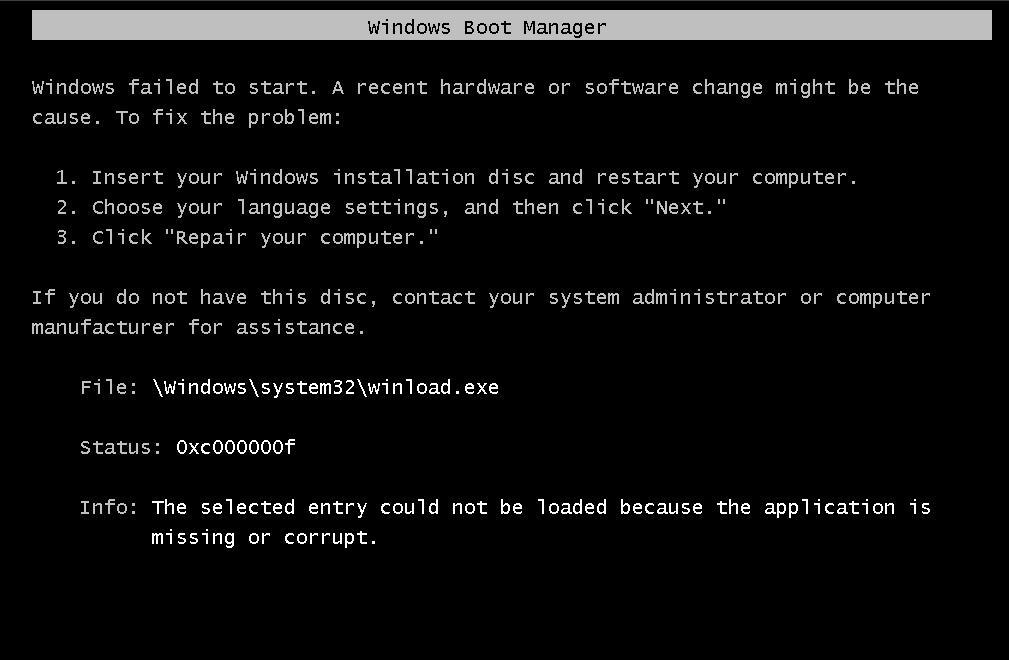
I am trying to install W7 Ultimate 64-bit on my new custom built system. So basically the installation works all the way up until after the first reboot when it tries to log into Windows for the first time - I keep getting a Windows Boot Manager error (at least lately I have been) stating that winload.exe is missing or corrupt, as shown below (except error code is 0x0000000e). However repairing Windows startup doesn't seem to work.
So I have tried multiple times to re-install (even using different discs and using the bootrec command), but all I end up getting is a longer list of W7 duplicates to choose from on bootup, all of which give the same exact error.
DISKPART:

BCDEDIT:
Now here's a little more info on my system:
I was (previous to my screenshots) running both of the listed 60GB hard drives on as a RAID 0 setup (yes, I changed the BIOS settings and loaded the appropriate driver during W7 installation to allow the 120GB RAID drive to be detected). The 1TB listed is my backup/storage drive.
My ultimate goal here is to remove those faulty Windows installations as bootup options and successfully install Windows 7 onto my 120GB RAID drive.
So I have tried multiple times to re-install (even using different discs and using the bootrec command), but all I end up getting is a longer list of W7 duplicates to choose from on bootup, all of which give the same exact error.
DISKPART:
BCDEDIT:
Code:
X:\Sources>bcdedit

Windows Boot Manager
--------------------
identifier              {bootmgr}
device                  partition=C:
description             Windows Boot Manager
locale                  en-US
inherit                 {globalsettings}
default                 {default}
resumeobject            {04c1d2f6-6523-11e1-b4da-ea97e217693b}
displayorder            {default}
                        {04c1d2f5-6523-11e1-b4da-ea97e217693b}
                        {04c1d2f1-6523-11e1-b4da-ea97e217693b}
                        {04c1d2ed-6523-11e1-b4da-ea97e217693b}
                        {04c1d2e9-6523-11e1-b4da-ea97e217693b}
                        {04c1d2e7-6523-11e1-b4da-ea97e217693b}
toolsdisplayorder       {memdiag}
timeout                 3

Windows Boot Loader
-------------------
identifier              {default}
device                  unknown
path                    \Windows\system32\winload.exe
description             Windows 7
locale                  en-US
inherit                 {bootloadersettings}
osdevice                unknown
systemroot              \Windows
resumeobject            {04c1d2f6-6523-11e1-b4da-ea97e217693b}
nx                      OptIn
detecthal               Yes

Windows Boot Loader
-------------------
identifier              {04c1d2f5-6523-11e1-b4da-ea97e217693b}
device                  unknown
path                    \Windows\system32\winload.exe
description             Windows 7
locale                  en-US
inherit                 {bootloadersettings}
osdevice                unknown
systemroot              \Windows
resumeobject            {04c1d2f4-6523-11e1-b4da-ea97e217693b}
nx                      OptIn
detecthal               Yes

Windows Boot Loader
-------------------
identifier              {04c1d2f1-6523-11e1-b4da-ea97e217693b}
device                  unknown
path                    \Windows\system32\winload.exe
description             Windows 7
locale                  en-US
inherit                 {bootloadersettings}
recoverysequence        {04c1d2f2-6523-11e1-b4da-ea97e217693b}
recoveryenabled         Yes
osdevice                unknown
systemroot              \Windows
resumeobject            {04c1d2f0-6523-11e1-b4da-ea97e217693b}
nx                      OptIn

Windows Boot Loader
-------------------
identifier              {04c1d2ed-6523-11e1-b4da-ea97e217693b}
device                  unknown
path                    \Windows\system32\winload.exe
description             Windows 7
locale                  en-US
inherit                 {bootloadersettings}
recoverysequence        {04c1d2ee-6523-11e1-b4da-ea97e217693b}
recoveryenabled         Yes
osdevice                unknown
systemroot              \Windows
resumeobject            {04c1d2ec-6523-11e1-b4da-ea97e217693b}
nx                      OptIn

Windows Boot Loader
-------------------
identifier              {04c1d2e9-6523-11e1-b4da-ea97e217693b}
device                  unknown
path                    \Windows\system32\winload.exe
description             Windows 7
locale                  en-US
inherit                 {bootloadersettings}
recoverysequence        {04c1d2ea-6523-11e1-b4da-ea97e217693b}
recoveryenabled         Yes
osdevice                unknown
systemroot              \Windows
resumeobject            {04c1d2e8-6523-11e1-b4da-ea97e217693b}
nx                      OptIn

Windows Boot Loader
-------------------
identifier              {04c1d2e7-6523-11e1-b4da-ea97e217693b}
device                  unknown
path                    \Windows\system32\winload.exe
description             Windows 7
locale                  en-US
inherit                 {bootloadersettings}
osdevice                unknown
systemroot              \Windows
resumeobject            {04c1d2e6-6523-11e1-b4da-ea97e217693b}
nx                      OptIn
detecthal               Yes
Now here's a little more info on my system:
I was (previous to my screenshots) running both of the listed 60GB hard drives on as a RAID 0 setup (yes, I changed the BIOS settings and loaded the appropriate driver during W7 installation to allow the 120GB RAID drive to be detected). The 1TB listed is my backup/storage drive.
My ultimate goal here is to remove those faulty Windows installations as bootup options and successfully install Windows 7 onto my 120GB RAID drive.
My Computer
- Computer Manufacturer/Model Number
- Compaq Presario
- OS
- Windows 7 Ultimate 32bit
