How to force taskbar to be 24px max in height?

tetractys

New member
Local time
5:49 PM
Messages
2
Hi,
Customization of taskbar for standard theme (right click on task bar, properties, check on "use small icons") permit to reduce the huge appearence but is not sufficent for me :(. I would know if there is a method to force icons @ 20px and taskbar @24px, like tweaking the registry or whatever.;)

This should permit to have a minimalistic appearance.
Anybody has a clue on this "problem"?
Thanks in advance!
Tetractys
 

My Computer My Computer

At a glance

windows 7
OS
windows 7
Yeah,, it's called auto hide
 

My Computer My Computer

At a glance

Win 7 Ultimate 32bitC2D E6600 2.4Ghz4G Kingston KHX5400D2EVGA GTX 570 HD SC (012-P3-1573-KR)
Computer Manufacturer/Model Number
Self Built
OS
Win 7 Ultimate 32bit
CPU
C2D E6600 2.4Ghz
Motherboard
Intel D965WH
Memory
4G Kingston KHX5400D2
Graphics Card(s)
EVGA GTX 570 HD SC (012-P3-1573-KR)
Sound Card
On-Board
Monitor(s) Displays
Samsung 226BW
Screen Resolution
1680 x 1050
Hard Drives
2 x 250 Seagate Barracuda
2 x 500 Seagate Barracuda (Raid1)
PSU
Corsair TX750W
Case
In-Win C589
Cooling
Stock Intel Cooling
Okay. Not sure if any of these options will work for you, but its something to try. Right click on your desktop and click on personalize. At the bottom under the themes, there are four options with icons beside them in the Personalization screen. Desktop Background, Window Color, Sounds, Screen Saver. Click on Window Color. It will give you a menu which, amongst other things, lets you change icon and font sizes.

Now, I want to be extemely clear. You can do lightly horrible things to your user interface with this menu. Won't mess anything up, but you move the wrong font size or icon width, and you'll be regretting it. On the other hand, to accomplish what you want, its probably your best bet.

Or you can try auto-hide, yeah. But where's the fun in that?
 

My Computer My Computer

At a glance

XP Service Pack 3, Windows 7 Home Premium
OS
XP Service Pack 3, Windows 7 Home Premium
thank you for your prompt response.
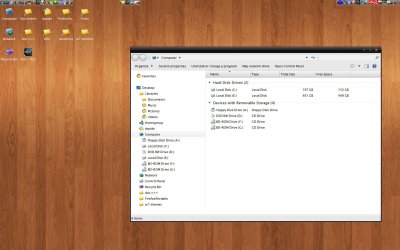
i found a workaround with Stardock ObjectDock tool that fit my minimalistic needs. I changed the font too with your suggestion. In attachment you will find the result :)

the dimension of the icons in the top bars is 16 pixels. Plenty of room for other things :)

Tetractys
 

Attachments

  • Tetractys desktop.jpg
    Tetractys desktop.jpg
    139.5 KB · Views: 618

My Computer My Computer

At a glance

windows 7
OS
windows 7
Back
Top