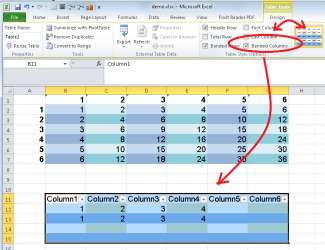
I want to format a table as a matrix with the rows striped and the columns striped also.
However, I cannot seem to make a table format that accomplishes that.
There are several canned table formats that stripe the rows, but none that stripe the columns.
Creating a custom table format that stripes rows works OK: excel > home > format as a table > new table style > , second row stripe > format (choose color) ...
However, but I cannot get the custom format to apply any column formatting. It shows in the "preview" correctly, but does NOT show up with the same preview pattern when the style is saved as a custom style. (The custom formats appear before the light, medium and dark table formats when created.)
Neither does it appear in the icon for the custom format, nor does it apply to the data in the spreadsheet.
Attached is a demo xlsx of what I am trying to do. Near the top, see the table that I manually colored without a format. Below, is a table I am trying to format using a custom style. Cannot get the style to apply column formatting.
Is this is a bug or am I doing something wrong? Running Office Pro 2010.
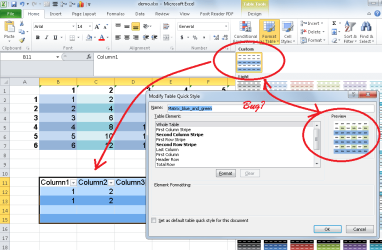
However, I cannot seem to make a table format that accomplishes that.
There are several canned table formats that stripe the rows, but none that stripe the columns.
Creating a custom table format that stripes rows works OK: excel > home > format as a table > new table style > , second row stripe > format (choose color) ...
However, but I cannot get the custom format to apply any column formatting. It shows in the "preview" correctly, but does NOT show up with the same preview pattern when the style is saved as a custom style. (The custom formats appear before the light, medium and dark table formats when created.)
Neither does it appear in the icon for the custom format, nor does it apply to the data in the spreadsheet.
Attached is a demo xlsx of what I am trying to do. Near the top, see the table that I manually colored without a format. Below, is a table I am trying to format using a custom style. Cannot get the style to apply column formatting.
Is this is a bug or am I doing something wrong? Running Office Pro 2010.
Attachments
My Computer
At a glance
Win 7 Pro 64-bitIntel Core i516 GB Dell, 6 GB ToshibaIntel crap on both but Dell also has nVidia G...
- Computer type
- Laptop
- Computer Manufacturer/Model Number
- Dell Insprion 7559 next to a Toshiba Portege
- OS
- Win 7 Pro 64-bit
- CPU
- Intel Core i5
- Motherboard
- Intel
- Memory
- 16 GB Dell, 6 GB Toshiba
- Graphics Card(s)
- Intel crap on both but Dell also has nVidia GeForce GTX960M
- Sound Card
- RealTek
- Monitor(s) Displays
- internal and external ACER KA270H 27"
- Screen Resolution
- 1920x1080
- Hard Drives
- SSD 256 GB plus numerous WD Red or Purple on USB3 docks. Used to buy a lot of Seagate but tossed them the second time I got unrecoverable disc corruption in the midst of use.
- Keyboard
- Garage Mouse SW and some cheap Amazon China made USB device
- Mouse
- Garage Mouse and some cheap Amazon China made USB device
- Internet Speed
- 50 Mbps (allegedly, depends on server)
- Antivirus
- Defender, Malwarebytes Premium and Kaspersky
- Browser
- IE 11, and Chrome something