Solved How to fully customize Windows 7 taskbar?

Pano1

New member
Local time
5:28 PM
Messages
3
Hi all,
I've been searching for hours and can't find a way to change the taskbar the way i want.
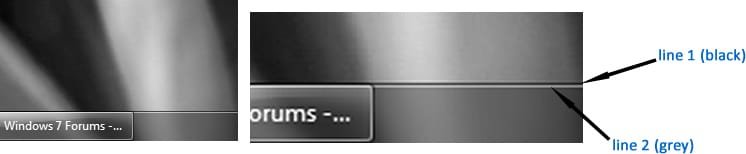
So , at the top of the taskbar are 2 lines in order to highlight the edge. Is there a way to change their color or delete them? I've attached a picture to show you what i mean.

I also tried to find a way to make some registry editing, but failed.

thanks
 

Attachments
  • im1.jpg
    im1.jpg
    26.5 KB · Views: 301

My Computer

OS
Windows 7 Homw Premium x64
Welcome to the Seven Forums
Here is as clear as you can get the taskbar.
Region.png
Region2.png


If you are using the default aero theme I can change that for you, using Windows Style Builder and post it here in a zip folder.
If you are using a custom theme you will need to ask the theme maker. It's not cool to change someone else work.
&
This will be a custom theme and you will need to do 1 of these 2 ways of Enabling custom themes for it to work.
http://www.sevenforums.com/tutorials/34579-enabling-custom-themes-windows-7-a.html
Or
http://www.sevenforums.com/tutorials/28377-theme-how-apply-custom-themes.html?filter
All I need is a name to call the theme.
Let me know.
Jerry
 

My Computer

Computer type
Laptop
Computer Manufacturer/Model Number
Sager NP9170
OS
Win 7 Pro x64 / Win 10 Pro
CPU
Intel(R) Core(TM) i7-3630QM CPU @ 2.40GHz
Motherboard
CLEVO P170EM
Memory
12 GB
Graphics Card(s)
(1) Intel(R) HD Graphics 4000 (2) NVIDIA GeForce GTX 675M
Sound Card
(1) Realtek High Definition Audio (2) Intel(R) Display Aud
Monitor(s) Displays
17.3
Screen Resolution
1920x1080
Hard Drives
(1) Samsung 860 EVO 500GB(OS) (1) Samsung 860 EVO 500GB(Data)
Keyboard
Backlite
Antivirus
MSE, Malwarebytes Pro
Browser
Firefox
Other Info
DESKTOP: Custom-built.
OS: Win 10 Pro x64.
CASE: Rosewill R5.
CPU: Intel I5 4670K CPU @ 3.40GHz.
CPU COOLER: Cool Master Hyper 212 EVO.
MOTHERBOARD: Asus Z87-A.
MEMORY: Kingston HyperX 2x4 GB.
GPU: Nvidia Geforce 650 TI.
PSU: Corsair TX750.
DRIVES: (1) Samsung 840 120 GB SSD (2) Western Digital blue 500 GB 7200 RPM.
I use the default theme (aero). Well let's say "taskbar theme" .

You really can do that..?

i already installed uxstyle.
thanks
 

My Computer

OS
Windows 7 Homw Premium x64
Here you go download the zip at the bottom of this post to your desktop double-click it and extracted to your desktop then put both 1 Taskbar_Theme folder and 1 Taskbar_Theme.theme file in C:\Windows\Resources\Themes
Taskbar_Theme.png

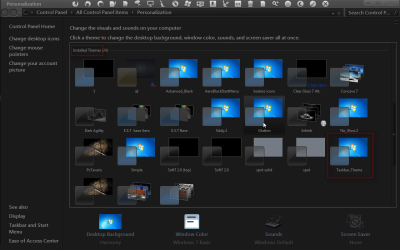
It will show up in Personalization as Taskbar_Theme
Personalization.png

Let me know if it's okay.
Jerry
 

Attachments

My Computer

Computer type
Laptop
Computer Manufacturer/Model Number
Sager NP9170
OS
Win 7 Pro x64 / Win 10 Pro
CPU
Intel(R) Core(TM) i7-3630QM CPU @ 2.40GHz
Motherboard
CLEVO P170EM
Memory
12 GB
Graphics Card(s)
(1) Intel(R) HD Graphics 4000 (2) NVIDIA GeForce GTX 675M
Sound Card
(1) Realtek High Definition Audio (2) Intel(R) Display Aud
Monitor(s) Displays
17.3
Screen Resolution
1920x1080
Hard Drives
(1) Samsung 860 EVO 500GB(OS) (1) Samsung 860 EVO 500GB(Data)
Keyboard
Backlite
Antivirus
MSE, Malwarebytes Pro
Browser
Firefox
Other Info
DESKTOP: Custom-built.
OS: Win 10 Pro x64.
CASE: Rosewill R5.
CPU: Intel I5 4670K CPU @ 3.40GHz.
CPU COOLER: Cool Master Hyper 212 EVO.
MOTHERBOARD: Asus Z87-A.
MEMORY: Kingston HyperX 2x4 GB.
GPU: Nvidia Geforce 650 TI.
PSU: Corsair TX750.
DRIVES: (1) Samsung 840 120 GB SSD (2) Western Digital blue 500 GB 7200 RPM.
  • Like
Reactions: JMH
Thank you very much, it worked and looks great :)
 

My Computer

OS
Windows 7 Homw Premium x64
You're welcome
 

My Computer

Computer type
Laptop
Computer Manufacturer/Model Number
Sager NP9170
OS
Win 7 Pro x64 / Win 10 Pro
CPU
Intel(R) Core(TM) i7-3630QM CPU @ 2.40GHz
Motherboard
CLEVO P170EM
Memory
12 GB
Graphics Card(s)
(1) Intel(R) HD Graphics 4000 (2) NVIDIA GeForce GTX 675M
Sound Card
(1) Realtek High Definition Audio (2) Intel(R) Display Aud
Monitor(s) Displays
17.3
Screen Resolution
1920x1080
Hard Drives
(1) Samsung 860 EVO 500GB(OS) (1) Samsung 860 EVO 500GB(Data)
Keyboard
Backlite
Antivirus
MSE, Malwarebytes Pro
Browser
Firefox
Other Info
DESKTOP: Custom-built.
OS: Win 10 Pro x64.
CASE: Rosewill R5.
CPU: Intel I5 4670K CPU @ 3.40GHz.
CPU COOLER: Cool Master Hyper 212 EVO.
MOTHERBOARD: Asus Z87-A.
MEMORY: Kingston HyperX 2x4 GB.
GPU: Nvidia Geforce 650 TI.
PSU: Corsair TX750.
DRIVES: (1) Samsung 840 120 GB SSD (2) Western Digital blue 500 GB 7200 RPM.
Bongo can I ask were you got that black theme at it looks great, and its the nicest one that Iv seen. Also how did you get icons on top of your personalization page.

Sorry for off-topic post.
 
Last edited:

My Computer

Computer Manufacturer/Model Number
Self built
OS
Windows 7 Ultimate x64 SP1
CPU
AMD Phenom II x4 960T
Motherboard
MSI 990FXA-GD80
Memory
8gigs 2x4gig
Graphics Card(s)
Gigabyte Geforce GTX 660
Sound Card
N/A
Monitor(s) Displays
23" Acer
Screen Resolution
1920x1080
Hard Drives
Seagate
500gig main
1tb secondary
300gig external
PSU
Corsair CX600
Case
Rosewill Smart One
Cooling
H60 plus 3 120mm fans
Keyboard
A cheap HP
Mouse
logitech G400
Internet Speed
35-Mbps down and 6-Mbps up
Other Info
Nothing is overclocked.
Bongo can I ask were you got that black theme at it looks great, and its the nicest one that Iv seen. Also how did you get icons on top of your personalization page.

Sorry for off-topic post.
Here's the link to the theme charleston2378's deviantART gallery it's more of a dark gray than black. And I have tweaked it to my liking.
The icons are not on the top of my Personalization window those are on a Dock I have at the top of my screen they are set to be on top all the time so when I took that screenshot it was a maximized window that's why you see him there.
Jerry
 

My Computer

Computer type
Laptop
Computer Manufacturer/Model Number
Sager NP9170
OS
Win 7 Pro x64 / Win 10 Pro
CPU
Intel(R) Core(TM) i7-3630QM CPU @ 2.40GHz
Motherboard
CLEVO P170EM
Memory
12 GB
Graphics Card(s)
(1) Intel(R) HD Graphics 4000 (2) NVIDIA GeForce GTX 675M
Sound Card
(1) Realtek High Definition Audio (2) Intel(R) Display Aud
Monitor(s) Displays
17.3
Screen Resolution
1920x1080
Hard Drives
(1) Samsung 860 EVO 500GB(OS) (1) Samsung 860 EVO 500GB(Data)
Keyboard
Backlite
Antivirus
MSE, Malwarebytes Pro
Browser
Firefox
Other Info
DESKTOP: Custom-built.
OS: Win 10 Pro x64.
CASE: Rosewill R5.
CPU: Intel I5 4670K CPU @ 3.40GHz.
CPU COOLER: Cool Master Hyper 212 EVO.
MOTHERBOARD: Asus Z87-A.
MEMORY: Kingston HyperX 2x4 GB.
GPU: Nvidia Geforce 650 TI.
PSU: Corsair TX750.
DRIVES: (1) Samsung 840 120 GB SSD (2) Western Digital blue 500 GB 7200 RPM.
Back
Top