
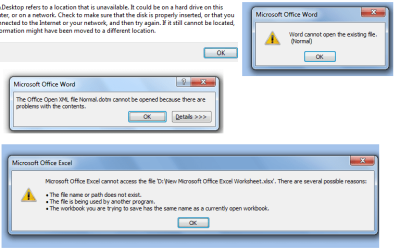
I've had a weird problem for the past few months. A while ago while trying to create backup of my users folder in the C drive, i (probably) cut-pasted it into my external HD instead of copy-pasting it. So the problem i have is that all my appdata has been transferred there, or i think so. Therefore, whenever i try to access my desktop without attaching my HD, i can't as my desktop is now on my HD, i.e. instead of C:\<user>\Desktop it's H:\<user>\Desktop (see screenshot). I also can't access my MS Office files without my HD as i get errors saying MS Office can't access the files (see same screenshot).
Moreover recently when i used the SF Diagnostic tool, i just couldn't find where it was storing the output file. I finally had to do a search and then i found it in a separately created users folder on my HD. (H:\Users\<user>).
While my HD uses my USB for power supply, it is majorly inconvenient for me to always drag my HD along. Also it seriously affects the battery backup of my laptop as it's been nearly four years now since i bought my laptop and haven't replaced the battery yet .
So can anyone tell me how to get back the appdata (or whatever it is) from my HD back onto my laptop HD?
PS: I'm not sure where to post this problem so i've kept this under General here. If this is not appropriate, let me know where to post it.
Moreover recently when i used the SF Diagnostic tool, i just couldn't find where it was storing the output file. I finally had to do a search and then i found it in a separately created users folder on my HD. (H:\Users\<user>).
While my HD uses my USB for power supply, it is majorly inconvenient for me to always drag my HD along. Also it seriously affects the battery backup of my laptop as it's been nearly four years now since i bought my laptop and haven't replaced the battery yet .
So can anyone tell me how to get back the appdata (or whatever it is) from my HD back onto my laptop HD?
PS: I'm not sure where to post this problem so i've kept this under General here. If this is not appropriate, let me know where to post it.
Attachments
My Computer
At a glance
Microsoft Windows 7 Professional 32 bitIntel Core 2 Duo
- Computer type
- Laptop
- Computer Manufacturer/Model Number
- Sony Vaio VGN-CS35GN
- OS
- Microsoft Windows 7 Professional 32 bit
- CPU
- Intel Core 2 Duo
- Antivirus
- Microsoft Security Essentials
- Browser
- Firefox


 so I know how you feel. Did you try to copy back the files to the C drive?


