Solved How to get back partition created from C Drive to unallocated space?

Suchithareja

New member
Local time
3:28 PM
Messages
7
Hi..
I recently bought a new laptop 500 GB hard drive, which had C:, Recovery (D: ), and HP Tools (E: ) drive. I thought of creating a sepreate drive to keep personal stuff like pics, songs, etc.

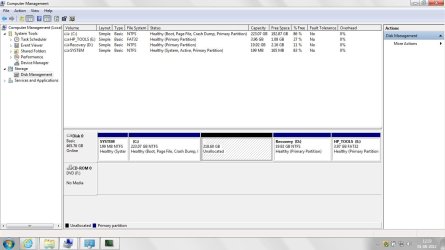
I went to disk management, and clicked on "Shrink Volume" on C: Drive. Now an unallocated parition has been created, which I cannot see in "My Computer" and moreover the size of C: drive is also showing as reduced size.

Please help me to create a new drive from that unallocated space or get back the original C: Drive.

Please help me with layman's terms as I am not so familiar with computer terms.

Thanks in advance.
 

My Computer My Computer

At a glance

Windows 7 Home Basic4 GB RAMAMD Radeon (TM) HD 6520 G (3060 MB)
Computer Manufacturer/Model Number
HP Pavilion g6 Notebook PC
OS
Windows 7 Home Basic
Memory
4 GB RAM
Graphics Card(s)
AMD Radeon (TM) HD 6520 G (3060 MB)
Please find attached the screen shot of the disk management.

Hi..
I recently bought a new laptop 500 GB hard drive, which had C:, Recovery (D: ), and HP Tools (E: ) drive. I thought of creating a sepreate drive to keep personal stuff like pics, songs, etc.

I went to disk management, and clicked on "Shrink Volume" on C: Drive. Now an unallocated parition has been created, which I cannot see in "My Computer" and moreover the size of C: drive is also showing as reduced size.

Please help me to create a new drive from that unallocated space or get back the original C: Drive.

Please help me with layman's terms as I am not so familiar with computer terms.

Thanks in advance.
 

Attachments

  • Disk Mgmt.jpg
    Disk Mgmt.jpg
    87 KB · Views: 80

My Computer My Computer

At a glance

Windows 7 Home Basic4 GB RAMAMD Radeon (TM) HD 6520 G (3060 MB)
Computer Manufacturer/Model Number
HP Pavilion g6 Notebook PC
OS
Windows 7 Home Basic
Memory
4 GB RAM
Graphics Card(s)
AMD Radeon (TM) HD 6520 G (3060 MB)

My Computer My Computer

At a glance

Win 10 Pro x64Intel I5-2500K @3.3GHz16GB G.Skill Ripjaws X (4x4GB)EVGA GeForce 750 Ti SC 2GB
Computer type
PC/Desktop
Computer Manufacturer/Model Number
Self Built
OS
Win 10 Pro x64
CPU
Intel I5-2500K @3.3GHz
Motherboard
Asrock P67 Extreme4
Memory
16GB G.Skill Ripjaws X (4x4GB)
Graphics Card(s)
EVGA GeForce 750 Ti SC 2GB
Sound Card
ASUS Xonar DG 5.1 Channels 24-bit 96KHz PCI Interface Sound
Monitor(s) Displays
auria eq2367
Screen Resolution
1920 x 1080
Hard Drives
250GB Samsung 850 EVO SSD
1TB WD Blue
1TB Hitachi
PSU
SeaSonic X 650W 80 Plus Gold
Case
Corsair Obsidian 750D
Cooling
Corsair H60, Three 140mm case fans
Keyboard
Logitech Wireless Keyboard K520
Mouse
Logitech Wireless Mouse M310
Internet Speed
Wave Broadband ~ 100 dn 5 up
Antivirus
Windows Defender, Malwarebytes Premium
Browser
Edge, IE11, Chrome
Other Info
Laptop specs: HP g7-1365dx /
CPU: AMD A6-3420M APU with Radeon(tm) HD Graphics /
RAM: Crucial 8Gb (2x4Gb) /
SSD: Crucial M4-CT128M4SSD2 ATA Device/ FW 000F /
GFX: AMD Radeon HD 6520G /
OS: Windows 10 Pro x64
Hi..Thank you so much for the prompt reply. It was very helpful.

But, as mentioned in the tutorial, I got a pop-up saying "The operation selected will convert the disk to dynamic... are you sure you want to continue?"...to which i clicked NO.

Now the unallocated space is where it was. Please help. Thanks.


Welcome to the forum,

Here is a tutorial with pictures that will show you how to finish creating your new partition,

http://www.sevenforums.com/tutorials/2674-partition-volume-create-new.html
 

My Computer My Computer

At a glance

Windows 7 Home Basic4 GB RAMAMD Radeon (TM) HD 6520 G (3060 MB)
Computer Manufacturer/Model Number
HP Pavilion g6 Notebook PC
OS
Windows 7 Home Basic
Memory
4 GB RAM
Graphics Card(s)
AMD Radeon (TM) HD 6520 G (3060 MB)
Hi Suchithareja, welcome to the Seven Forums.

You have already too many primary partitions, that's why Windows would convert you basic disks to dynamic if you create a new one. To click NO when asked if you would like to do this was a correct decision.

I would recommend you to burn recovery DVD set and then delete the recovery partition D:. To burn recovery disks just select Start Menu > All Programs > HP > HP Recovery Manager > HP Recovery Media and follow on-screen instructions.

When you have the recovery disk set, delete the recovery partition and then follow instructions on tutorial Derek told you, creating a new partition.

A PDF manual for your computer: http://h10032.www1.hp.com/ctg/Manual/c02770249.pdf

Kari
 

My Computer My Computer

At a glance

Windows 10 Pro x64 EN-GB1.6 GHz Intel Core i7-720QM Processor6 GBATI Mobility Radeon HD 5850 Graphics
Computer type
Laptop
Computer Manufacturer/Model Number
HP ENVY 17-1150eg
OS
Windows 10 Pro x64 EN-GB
CPU
1.6 GHz Intel Core i7-720QM Processor
Memory
6 GB
Graphics Card(s)
ATI Mobility Radeon HD 5850 Graphics
Sound Card
Beats sound system with integrated subwoofer
Monitor(s) Displays
17" laptop display, 22" LED and 32" Full HD TV through HDMI
Screen Resolution
1600*900 (1), 1920*1080 (2&3)
Hard Drives
Internal: 2 x 500 GB SATA Hard Disk Drive 7200 rpm
External: 2TB for backups, 3TB USB3 network drive for media
Cooling
As Envy runs a bit warm, I have it on a Cooler Master pad
Keyboard
Logitech diNovo Media Desktop Laser (bluetooth)
Mouse
Logitech Performance Mouse MX
Internet Speed
50/10 Mbps VDSL
Antivirus
Windows Defender 4.3.9431.0
Browser
Maxthon 3.5.2., IE11
Hi Kari,

Thank you so much for the information. I really want to thank you. It was really helpful.

But in the process....I just thought of extending the C: Drive (I did this after a lot of reading, unlike shrinking the volume)....and to my surprise the unallocated space was merged with the C: Drive back. I am so happy now :)

now my question is.....Can i use C: Drive to store all my personal stuff? as in will it not get heavy and slow my laptop?

Suchi
 

My Computer My Computer

At a glance

Windows 7 Home Basic4 GB RAMAMD Radeon (TM) HD 6520 G (3060 MB)
Computer Manufacturer/Model Number
HP Pavilion g6 Notebook PC
OS
Windows 7 Home Basic
Memory
4 GB RAM
Graphics Card(s)
AMD Radeon (TM) HD 6520 G (3060 MB)
The biggest problem with storing your data on the C drive is that it will make your system images much larger. You do make backup images I hope.
 

My Computer My Computer

At a glance

Microsoft Windows 7 Home Premium 64-bit Servi...Intel(R) Core(TM) i3 CPU M 330 @ 2.13GHz8 GB DDR3Intel(R) HD Graphics
Computer type
Laptop
Computer Manufacturer/Model Number
Hewlett-Packard/G62-107SA Notebook
OS
Microsoft Windows 7 Home Premium 64-bit Service Pack 1
CPU
Intel(R) Core(TM) i3 CPU M 330 @ 2.13GHz
Motherboard
Hewlett-Packard 1425
Memory
8 GB DDR3
Graphics Card(s)
Intel(R) HD Graphics
Sound Card
Realtek High Definition Audio
Monitor(s) Displays
Builtin
Screen Resolution
1366 x 768 x 32 bits (4294967296 colors) @ 60 Hz
Hard Drives
250 GB SATA Hard Disk Drive 7200 rpm
2TB Seagate GoFlex USB 2 Drive
1TB Iomega Prestige USB 2 Drive
1.5TB Iomega Prestige USB 2 Drive (Samsung)
2TB WD MyBook Live NAS.
Mouse
Logitech Anywhere MX
Internet Speed
152 Mbs download 10 Mbs upload
Antivirus
Norton 360
Browser
Chrome
yes, i do make a copy of the data i store in my laptop in my external hard disk.

I want to again check with you....can i permanently delete the recovery drive after creating a recovery disk? and there would not be any problem in running the laptop in future?

And later if i want to restore my laptop or any data, i can use the disk (that i created on a DVD) without it being there on my laptop?


Suchi

The biggest problem with storing your data on the C drive is that it will make your system images much larger. You do make backup images I hope.
 

My Computer My Computer

At a glance

Windows 7 Home Basic4 GB RAMAMD Radeon (TM) HD 6520 G (3060 MB)
Computer Manufacturer/Model Number
HP Pavilion g6 Notebook PC
OS
Windows 7 Home Basic
Memory
4 GB RAM
Graphics Card(s)
AMD Radeon (TM) HD 6520 G (3060 MB)
If you are certain that your recovery discs work, you can delete the recovery partition. But in any case I would suggest that you take an extra image of your C partition and your System partition (the little hidden 100MB partition) now so that you have an extra safety net. Use this free program: http://www.sevenforums.com/tutorials/73828-imaging-free-macrium.html?ltr=I

But in any case, you can only create an additional partition if you have no more than 3 primary partitions. There are ways to get to this state in your current configuration (keeping the recovery partition) - but that is a somewhat complicated procedure using an OEM live CD. If you are interested, post back and we'll explain.
 

My Computer My Computer

At a glance

Vista, Windows7, Mint Mate, Zorin, Windows 8from 1.6GHz Duo to i7
Computer Manufacturer/Model Number
HP, Dell, Gateway, Toshiba - 4 laptops and 2 desktops
OS
Vista, Windows7, Mint Mate, Zorin, Windows 8
CPU
from 1.6GHz Duo to i7
Monitor(s) Displays
2x HP w2207
Hard Drives
5x HDD, 7x SSD, 12x Externals
Keyboard
with trackball - no mices
Mouse
Trackball mice
Internet Speed
DSL 6000
Thank you for the valuable information.

I think i will go without deleting the recovering partition. My storage use of laptop is limited to storing pics, videos and music, which i'l do in C: Drive only. In any case, I will prepare a recovery disk, and also keep a back-up of my data regularly.

I am not so familiar with the computer terms, installtions and other such things. So, I dont think i'l be in a position to deal with the complicated procedure using an OEM live CD you are refering to :p Thanks for mentioning it though. :)

If you are certain that your recovery discs work, you can delete the recovery partition. But in any case I would suggest that you take an extra image of your C partition and your System partition (the little hidden 100MB partition) now so that you have an extra safety net. Use this free program: http://www.sevenforums.com/tutorials/73828-imaging-free-macrium.html?ltr=I

But in any case, you can only create an additional partition if you have no more than 3 primary partitions. There are ways to get to this state in your current configuration (keeping the recovery partition) - but that is a somewhat complicated procedure using an OEM live CD. If you are interested, post back and we'll explain.
 

My Computer My Computer

At a glance

Windows 7 Home Basic4 GB RAMAMD Radeon (TM) HD 6520 G (3060 MB)
Computer Manufacturer/Model Number
HP Pavilion g6 Notebook PC
OS
Windows 7 Home Basic
Memory
4 GB RAM
Graphics Card(s)
AMD Radeon (TM) HD 6520 G (3060 MB)
OK, sounds like my logo on the bottom of my posting.
 

My Computer My Computer

At a glance

Vista, Windows7, Mint Mate, Zorin, Windows 8from 1.6GHz Duo to i7
Computer Manufacturer/Model Number
HP, Dell, Gateway, Toshiba - 4 laptops and 2 desktops
OS
Vista, Windows7, Mint Mate, Zorin, Windows 8
CPU
from 1.6GHz Duo to i7
Monitor(s) Displays
2x HP w2207
Hard Drives
5x HDD, 7x SSD, 12x Externals
Keyboard
with trackball - no mices
Mouse
Trackball mice
Internet Speed
DSL 6000
ha ha...yes :)

I would like to thank everyone who helped me to get out of the mess i had created. Honestly, I had never expected this kinda response :) but I am happy that if ever i get into any trouble, I can always look here :)

Thanks again :)
 

My Computer My Computer

At a glance

Windows 7 Home Basic4 GB RAMAMD Radeon (TM) HD 6520 G (3060 MB)
Computer Manufacturer/Model Number
HP Pavilion g6 Notebook PC
OS
Windows 7 Home Basic
Memory
4 GB RAM
Graphics Card(s)
AMD Radeon (TM) HD 6520 G (3060 MB)
Back
Top