How to get data out of a defective HDD ?

@gregrocker

Yes you are right. I downloaded and installed the right version, and here the serial worked ok.
There's only 4G of RAM in the computer.
Then I can give my granddaughter 4 more G's as a gift :-)
 

My Computer My Computer

At a glance

Windows 7 UltimateE73004gNVIDIA GeForce 7300 LE
Computer type
PC/Desktop
Computer Manufacturer/Model Number
Homemade
OS
Windows 7 Ultimate
CPU
E7300
Motherboard
ASUS P5Q DeLuxe
Memory
4g
Graphics Card(s)
NVIDIA GeForce 7300 LE
Sound Card
N/A
Monitor(s) Displays
Acer
Screen Resolution
1600x1200
Hard Drives
Samsung HD503HI ATA Device
PSU
Seasonic
Case
ATX
Cooling
FAN
Keyboard
Logitech
Mouse
HP
Internet Speed
20/2
Antivirus
MSE
Browser
IE9, Chrome, Firefox
For any less than 4gb RAM I would install 32 bit for best performance.

As an eMachine notebook can have low specs, it might be best to go with 32 bit than upgrade RAM.

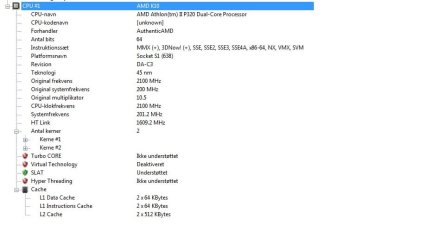
What are the processor specs? Or the eMachine model so we can check for you.

Even if you were able to upgrade RAM the processor might not be up to it.
 
I know it, because I have 2 w7 computers here.
One running 32bit, and another running 64bit
The first has 4G and the last has 8G.

The Notebook is an eMachines G640G
 

Attachments

  • cpu.jpg
    cpu.jpg
    33.9 KB · Views: 5

My Computer My Computer

At a glance

Windows 7 UltimateE73004gNVIDIA GeForce 7300 LE
Computer type
PC/Desktop
Computer Manufacturer/Model Number
Homemade
OS
Windows 7 Ultimate
CPU
E7300
Motherboard
ASUS P5Q DeLuxe
Memory
4g
Graphics Card(s)
NVIDIA GeForce 7300 LE
Sound Card
N/A
Monitor(s) Displays
Acer
Screen Resolution
1600x1200
Hard Drives
Samsung HD503HI ATA Device
PSU
Seasonic
Case
ATX
Cooling
FAN
Keyboard
Logitech
Mouse
HP
Internet Speed
20/2
Antivirus
MSE
Browser
IE9, Chrome, Firefox
I'd stick with 32 bit and the 4gb RAM on the eMachine if performance is good.

Be sure to run a Clean Boot without any freeloaders:

Don't let any programs write themselves into msconfig>Startup as they slow startup, become freeloaders on your RAM/CPU and can spy on you. As illustrated in Startup Programs - Change un-check everything except AV and gadgets in msconfig>Startup. Then after reboots do the same in msconfig>Services after checking "Hide All MS Services." Check back with both lists periodically to see if anything writes itself back in and turn it off in its Program Preferences or Uninstall it. If you have any questions about a listing, Google it to learn what it does.
 
I will carefully think about doing this.
Thanks again for your words :-)
 

My Computer My Computer

At a glance

Windows 7 UltimateE73004gNVIDIA GeForce 7300 LE
Computer type
PC/Desktop
Computer Manufacturer/Model Number
Homemade
OS
Windows 7 Ultimate
CPU
E7300
Motherboard
ASUS P5Q DeLuxe
Memory
4g
Graphics Card(s)
NVIDIA GeForce 7300 LE
Sound Card
N/A
Monitor(s) Displays
Acer
Screen Resolution
1600x1200
Hard Drives
Samsung HD503HI ATA Device
PSU
Seasonic
Case
ATX
Cooling
FAN
Keyboard
Logitech
Mouse
HP
Internet Speed
20/2
Antivirus
MSE
Browser
IE9, Chrome, Firefox
Back
Top