Solved How to get licence from old HD that is not working properly

good news im getting my recovery disk soon. there are a few questions that i have,
atm i have my 1tb HD divided in 2, one or the windows and other for storage. im wondering if when i use the recovery disk it wont delete the information on the partition that im using for storage atm. im really worried because i have like 300gb of data storage and dont want to loose it.
 

My Computer My Computer

At a glance

windows 7 home premium 64 bit
Computer Manufacturer/Model Number
dell
OS
windows 7 home premium 64 bit
Your Dell recovery disc will format the whole drive so you will lose any data you haven't backed up.

I strongly advise you buy an external hard drive and backup all your personal data before you use your Dell recovery disc.

In fact, you should be backing up your personal data in this manner even if you weren't recovering your system, because you will lose everything with your present setup if your internal hard drive fails.

External drives are not all that expensive and are good insurance against data loss.

http://www.sevenforums.com/tutorials/615-backup-user-system-files.html

For irreplacable data you may even want to consider using something like Microsoft Skydrive as well.

http://windows.microsoft.com/en-HK/skydrive/home
 

My Computer My Computer

At a glance

Windows 7 Ultimate SP1 64-BitIntel Core i7 870 @ 2.93GHz8Gb Dual-Channel DDR3 @ 664MHznVidia GeForce GTX 460 1024MB dedicated RAM
Computer Manufacturer/Model Number
HP Pavilion Elite 495UK
OS
Windows 7 Ultimate SP1 64-Bit
CPU
Intel Core i7 870 @ 2.93GHz
Motherboard
MSI 2A9C (CPU1)
Memory
8Gb Dual-Channel DDR3 @ 664MHz
Graphics Card(s)
nVidia GeForce GTX 460 1024MB dedicated RAM
Sound Card
Realtek HD Audio
Monitor(s) Displays
HP2310i
Screen Resolution
1920 x 1080
Hard Drives
1x1954GB Hitachi HDS22020ALA 330 (RAID), 1x1954GB Hitachi External for backup and storage
PSU
460W
Case
HP Elite
Cooling
Air cooled
Keyboard
Logitech K750 solar-powered keyboard
Mouse
Logitech Wireless M180 mouse
Internet Speed
2Mb
Other Info
Pure Avanti Flow Internet Radio with iPod Dock, 64Gb iPod, HP USB Speakers, Sony MDR-V500 Headphones, Sony Vaio F-Series Laptop
Hi guatemala,

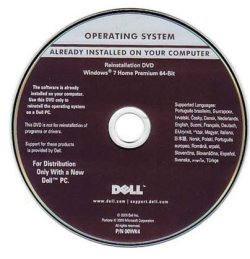
Glad to know that you are getting the Dell Media. Dell usually sends only the OEM Reinstall media as indicated in my post #19, and not the Recovery Disks.

If what you get is something like this in the screenshot

delloem.jpg

then it is the full OS with OEM activation data embedded in it with which you can do a clean install and it will self-activate. You can safely install the OS on any partition you like without affecting any other partition.( As a matter of abundant caution, I always backup my other partitions before doing a clean install.)

It is always better that you have a backup of all that you want to retain on an external drive apart from the internal drive. So go ahead and backup, before you do the clean install.

(Download all the necessary drivers for your DELL system from the DELL Support Site before starting the clean install.)
 
Last edited:

My Computer My Computer

At a glance

Windows 7 Home Premium 32 bit
OS
Windows 7 Home Premium 32 bit
thanks for all the help. i finally fix my computer wtih the OEM Reinstall media dell send me.
 

My Computer My Computer

At a glance

windows 7 home premium 64 bit
Computer Manufacturer/Model Number
dell
OS
windows 7 home premium 64 bit
Good to know that.:thumbsup:

Make an ISO of the DELL Reinstall disk or burn a copy ( I think you will need a DL DVD) and keep these safely.
 

My Computer My Computer

At a glance

Windows 7 Home Premium 32 bit
OS
Windows 7 Home Premium 32 bit
thanks for all the help. i finally fix my computer wtih the OEM Reinstall media dell send me.
Good to hear it - please post a new MGADiag report so we can check that all is now woeking as it should.
 

My Computer My Computer

At a glance

Win 7 x64 Home Premium (and x86 VirtualBox VM...i3 370M/i7 6500U8GB - finally :)/8GBit's an i3, dude!/dual Intel&nVidia
Computer type
Laptop
Computer Manufacturer/Model Number
Asus K52F or Lenovo B51-80
OS
Win 7 x64 Home Premium (and x86 VirtualBox VM)/Win10
CPU
i3 370M/i7 6500U
Motherboard
Asus/Lenovo
Memory
8GB - finally :)/8GB
Graphics Card(s)
it's an i3, dude!/dual Intel&nVidia
Sound Card
onboard
Monitor(s) Displays
15.6" built-in
Screen Resolution
1366x768/1920x1080
Hard Drives
750GB Seagate internal
Sundry external drives attached to other computers on the local network
1TB SSD on the Lenovo
PSU
n/a
Internet Speed
as much as I can get - usually on a dongle/phone, so <1MB/s
Antivirus
MSE/Defender
Browser
IE11/12/Edge/Chrome/FF(if I must)
Back
Top