- Local time
- 2:40 PM
- Messages
- 42
Hey!
I hope you can help me with my problem ...
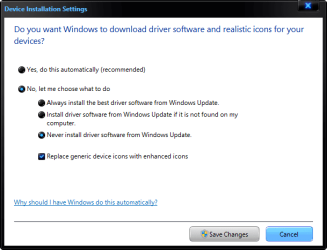
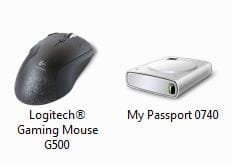
So all of you know the High-Res-Icons in the Devices and Printers. I would like to know how it works, because not for each item the metadata is downloaded. I can understand that not each cheap device is recognized but I think my external Western Digital My Passport or my Nikon D3000 should be recognized or not? Until now my Logitech G500 and my Canon MP540 are the only devices which got the Metadata.
So it would be nice if someone can explain how it works ... and how I can get the metadata for my Nikon D3000 or my external HDD?
I found this link but this wasnt very helpful for me ... and there were several other links but theses seemed to be for developer ...
greets.mowh
I hope you can help me with my problem ...
So all of you know the High-Res-Icons in the Devices and Printers. I would like to know how it works, because not for each item the metadata is downloaded. I can understand that not each cheap device is recognized but I think my external Western Digital My Passport or my Nikon D3000 should be recognized or not? Until now my Logitech G500 and my Canon MP540 are the only devices which got the Metadata.
So it would be nice if someone can explain how it works ... and how I can get the metadata for my Nikon D3000 or my external HDD?
I found this link but this wasnt very helpful for me ... and there were several other links but theses seemed to be for developer ...
greets.mowh
My Computer
- OS
- Windows 7 Prof. x64
- CPU
- AMD Athlon 64 X2 6000+
- Motherboard
- M2N SLI DELUXE
- Memory
- Kingston 4GB
- Graphics Card(s)
- ASUS Geforce 9800GTX+
- Sound Card
- On Board
- Monitor(s) Displays
- Samsung
- Screen Resolution
- 1680x1050