
How to get programs to appear in the Icon Notification Area?

trstew

New member
Local time
9:21 PM
Messages
3
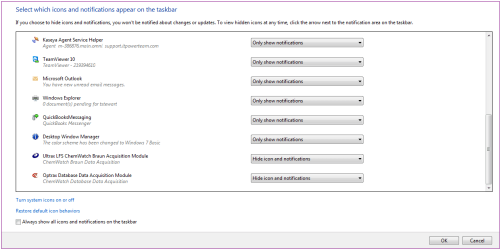
I somehow managed to get my TeamViewer and Capture Screenshot icons back into the Notification Area (see attached), but am thinking there's an easy way to do this? (I used to have several more in this area, but they disappeared this morning). Also, I don't know how the last 2 items appeared - these are .exe files that I double clicked, now they're in the notification area... how to delete?
Thanks for any advice - I wasn't able to find much info of use on this topic...
 

Attachments
  • QL.png
    QL.png
    22.5 KB · Views: 2

My Computer My Computer

At a glance

win 7 pro 64i3 415012 Gb Crucial DDR3None (HD 4400)
Computer type
PC/Desktop
Computer Manufacturer/Model Number
Local build
OS
win 7 pro 64
CPU
i3 4150
Motherboard
Asus
Memory
12 Gb Crucial DDR3
Graphics Card(s)
None (HD 4400)
Sound Card
Realtek
Hard Drives
WD 1 Tb
Cooling
Standard
Keyboard
MS wireless
Mouse
Logitech 5 button wireless
Internet Speed
Cable
Antivirus
MS Essentials
Browser
Chrome ver. 56
Here is a tutorial that might help you, plus of other tutorials with lots of information and methods.


"Notification Area Icons" Settings - Enable or Disable


Related Tutorials at the end of the Tutorial

How to Open the Taskbar in Windows 8.1
How to Move Taskbar Location in Windows 8 and 8.1
How to Hide or Show System Icons and Notifications in Windows 7 and Windows 8
How to Turn System Icons On or Off in Windows 7 and Windows 8
How to Create a "System Icons" Settings Shortcut in Windows 7 and Windows 8
How to Change the Action Center Message Settings in Windows 7
How to Turn On or Off Action Center Messages in Windows 8 and 8.1
How to Change How Long Notifications Stay Open in Windows 7
How to Enable or Disable Balloon Notifications in Vista, Windows 7, and Windows 8
How to Reset the Notification Area Icons Cache in Vista, Windows 7, and Windows 8
How to Enable or Disable Notification System Icons in Windows 7 and Windows 8
How to Create a "Notification Area Icons" Shortcut in Windows 7 and Windows 8
How to Customize the Notification Area Icons in Windows 7
How to Enable or Disable Changing "Notification Area Icons" Settings in Windows 7
How to Hide or Show Intel Rapid Storage Technology Notification Area Icon in Windows
Enable or Disable Automatic Promotion of Notification Area Icons to Taskbar in Windows 7 and 8

Jack.
 

My Computer My Computer

At a glance

Windows 10 Pro. 64/ version 1709 Windows 7 Pr...Intel i7-6800K @ 4.3Corsair Platinum 16 gig @2400EVGA GTX 1070 OC
Computer type
PC/Desktop
Computer Manufacturer/Model Number
Home made Desktop
OS
Windows 10 Pro. 64/ version 1709 Windows 7 Pro/64
CPU
Intel i7-6800K @ 4.3
Motherboard
ASUS X-99 Deluxe II
Memory
Corsair Platinum 16 gig @2400
Graphics Card(s)
EVGA GTX 1070 OC
Monitor(s) Displays
Asus 27" LED LCD/VE278Q
Screen Resolution
1920-1080 or 1280-720 HDMI
Hard Drives
INTEL SSD 730-240 Gb Sata 3.0/
PSU
EVGA Platium 1200W
Case
Phanteks Luxe Tempered Glass 8 fans/ one radiator
Cooling
XSPC/ Water Cooled CPU
Keyboard
Das 4 Professional
Mouse
Logitech M705/MX Anywhere 2-S
Internet Speed
100 mbits
Antivirus
Microsoft Security Essentials/ Malwarebytes Premium 3.0/ SAS
Browser
I.E. 11 default/Firefox/ ISP Time Warner Cable/Spectrum
Other Info
LG BluRay Burner/
Sound system-KLipsch-THX/
Icy Dock ssd Hot Swap bays.
Back
Top