
Solved How to get Task Manager back to its original screen

Riff88

New member
Member
Local time
2:14 PM
Messages
56
Location
Pretoria, South Africa
Hallo,

I am not sure what I pressed on my keyboard, but somehow my Task Manager ended up looking as you can see from the picture below, without its menus. How do I get it back to its original state?

Thank you for your help.
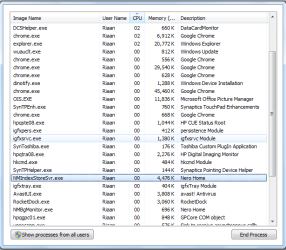
16-02-2016-09-57-02.png
 

My Computer My Computer

At a glance

Microsoft Windows 7 Professional 64-bit 7601 ...Intel(R) Celeron(R) CPU 540 @ 1.86GHz2.00gGB(1) Mobile Intel(R) 965 Express Chipset Family
Computer type
Laptop
Computer Manufacturer/Model Number
Toshiba
OS
Microsoft Windows 7 Professional 64-bit 7601 Multiprocessor Free Service Pack 1
CPU
Intel(R) Celeron(R) CPU 540 @ 1.86GHz
Motherboard
Intel Corporation SANTA ROSA CRB
Memory
2.00gGB
Graphics Card(s)
(1) Mobile Intel(R) 965 Express Chipset Family
Sound Card
High Definition Audio Device (Microsoft)
Monitor(s) Displays
Generic Monitor
Screen Resolution
1280 x 800 x 32 bits (4294967296 colors) @ 60 Hz
Hard Drives
(1) WDC WD3200BPVT-22JJ5T0 ATA Device (2) HUAWEI TF CARD Storage USB Device
Keyboard
Standard PS/2 Keyboard
Mouse
Synaptics PS/ Port Touchpad
Antivirus
Avast
Browser
Google Chrome
Press Ctrl+Page Down several times until you see the network traffic graphs.

Double click on one of the graphs.
 

My Computer My Computer

At a glance

W7 Pro SP1 64biti78GBIntel HD Graphics
Computer type
Laptop
Computer Manufacturer/Model Number
Employer provided Dell Latitude
OS
W7 Pro SP1 64bit
CPU
i7
Memory
8GB
Graphics Card(s)
Intel HD Graphics
Hard Drives
crappy SSD
Antivirus
Employer mandated Symantec Endpoint Protection
Browser
Pale Moon 64bit, IE11 64bit & Chrome 64bit
Just double click in any of the border areas. This is the little known small footprint mode. I don't know if it was ever officially documented.
 

My Computer My Computer

At a glance

Windows 7 Pro 64 bitXeon W35208 GBNvidia Geforce 210
Computer type
PC/Desktop
Computer Manufacturer/Model Number
HP
OS
Windows 7 Pro 64 bit
CPU
Xeon W3520
Memory
8 GB
Graphics Card(s)
Nvidia Geforce 210
Just double click in any of the border areas. This is the little known small footprint mode. I don't know if it was ever officially documented.

Thank you, that was so simple!
 

My Computer My Computer

At a glance

Microsoft Windows 7 Professional 64-bit 7601 ...Intel(R) Celeron(R) CPU 540 @ 1.86GHz2.00gGB(1) Mobile Intel(R) 965 Express Chipset Family
Computer type
Laptop
Computer Manufacturer/Model Number
Toshiba
OS
Microsoft Windows 7 Professional 64-bit 7601 Multiprocessor Free Service Pack 1
CPU
Intel(R) Celeron(R) CPU 540 @ 1.86GHz
Motherboard
Intel Corporation SANTA ROSA CRB
Memory
2.00gGB
Graphics Card(s)
(1) Mobile Intel(R) 965 Express Chipset Family
Sound Card
High Definition Audio Device (Microsoft)
Monitor(s) Displays
Generic Monitor
Screen Resolution
1280 x 800 x 32 bits (4294967296 colors) @ 60 Hz
Hard Drives
(1) WDC WD3200BPVT-22JJ5T0 ATA Device (2) HUAWEI TF CARD Storage USB Device
Keyboard
Standard PS/2 Keyboard
Mouse
Synaptics PS/ Port Touchpad
Antivirus
Avast
Browser
Google Chrome
Back
Top